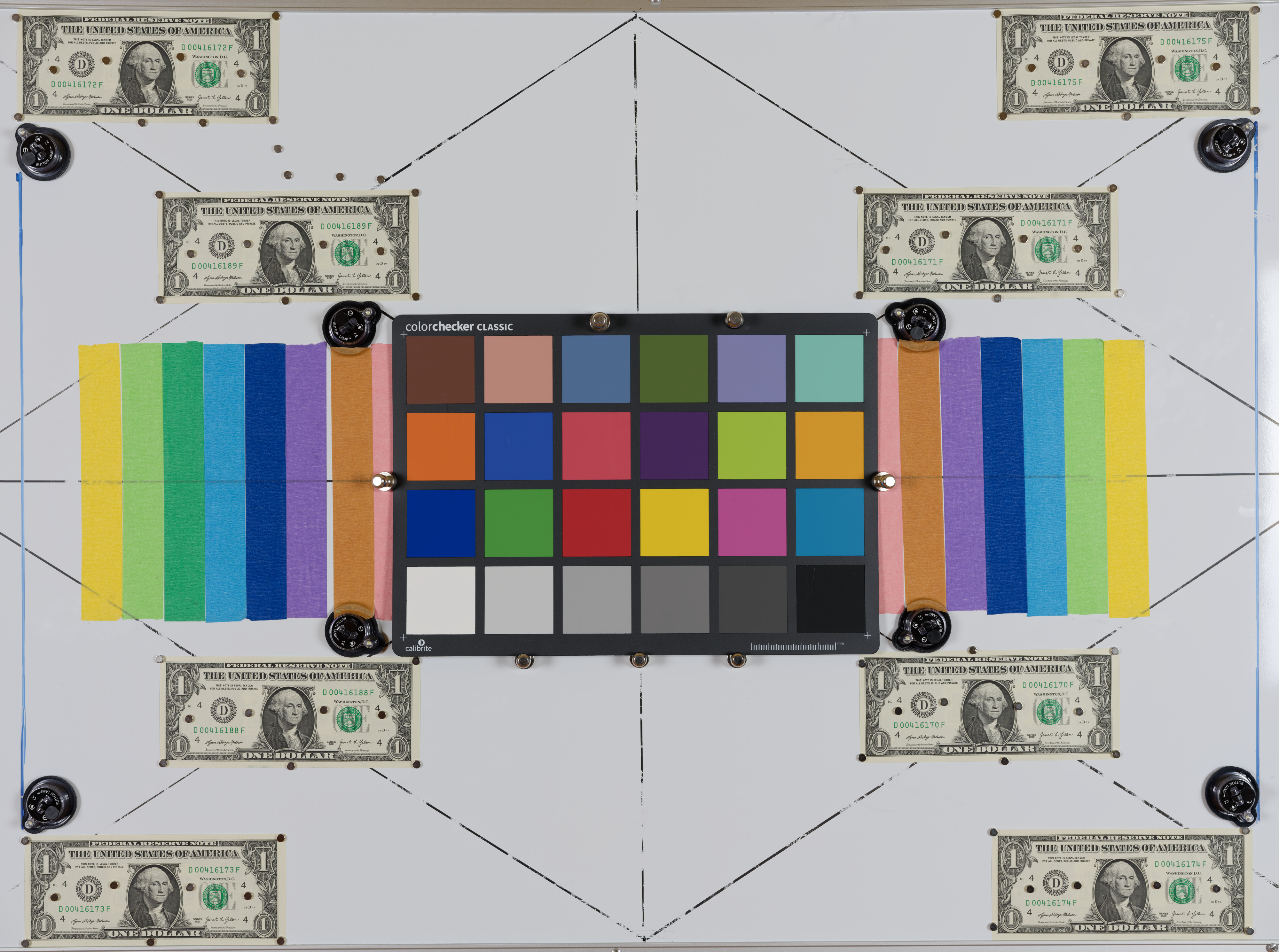
I shall appreciate it if someone can explain the discrepancies in WB that I see between DxO Photolab 9 and Capture One.
The observations:
-The scene is a custom chart on a magnetic whiteboard with a Colorchecker classic color palette, as shown below. All illumination is solely from two NEEWER 24x24 inches Softboxes with "Certified 5700K LED Lighting Bulbs." Just to mention - I expect that there is some contamination from the light reflected from the walls in the room that are not neutral grey.
-DxO Photolab 9 shows White Balance "as shot" with Temperature 5051 and Tint 47.
Photolab has a built-in tool that can produce a calibrated color profile from the colorchecker classic.
After the calibration, the custom White Balance shows Temperature 5048 and Tint 38.
-for the same raw file, Capture One shows White balance shot with Kelvin 4732 and Tint 12.1
-a DNG file exported from DxO Photolab 9 (without any corrections) and viewed in Capture One shows Kelvin 4907 and Tint 17.8, that is different from any of the numbers given above.
I have thought that the WB as shot is decided be camera and should be read from the raw file by the apps. This doesn't seem to be the case between DxO Photolab 9 and Capture One. Furthermore, the change in WB in the DNG file is another unexpected observation.
Any thoughts or explanations from the experts would be greately appreciated - thank you!
jeffbuzz wrote:
Where are you measuring the WB? 18% grey patch on the colorchecker?
I have not measured the WB. The numbers I reported come strait from Capture One and DxO Photolab 9. I expected that these numbers should correspond to the WB measured by the camera.
I did mention that DxO Photolab 9 has a built-in tool for creating a color profile from the colorchecker classic. This tool also can set the WB. All work that is involved in the creation of the color profile and deciding correct WB, when requested, happens entirely in PL9, without any intervention from the user.
Raw images don't have a measured WB. They only contain the WB setting assigned in the camera which can be arbitrary. Your example image was set to "auto". Fuji raw has some red and blue offsets in the EXIF. There might be more color data hidden in maker notes that are less obviously named.
DxO and C1 are likely applying their own interpretation as to what "auto" is rather than using any metadata color temperature value from the image itself. You'd have to contact them to find out what metadata they might be considering in their calculation.
Your example image has this EXIF:
WhiteBalance : Auto
WhiteBalanceFineTune : Red +0, Blue +0
WhiteBalance : Auto
BlueBalance : 2.096026
RedBalance : 1.917219
The color profile and response curves applied from all the different raw converters would need to be identical and they’re not generally going to be. Since raw droppers are measuring the currently adjusted image output color, each converter will render a different value from any given patch due to those base settings. Moreover, because of this even if you adjust each software to read the same value on say the 18% gray patch, due to differences in those, the other patches will likely vary somewhat.
I opened the file in PS and my color checker values show the white patch up in the 252-253 range ... i.e. overexposed. Black patch around 60 ... i.e. overexposed.
I tried to pull down the exposure uniformly in RGB channels at all three levels using color balance (highlights, mids, shadows). The shadows and mids responded to the adjustments, but the highlights wouldn't budge ... i.e. overexposed.
Before I'd the diff between what DXO vs. C1 is doing, I'd rerun the test with an exposure that puts the whites into whites territory. 250's is specular highlight territory. Actual whites should be more in the 220's to 235 territory (iirc). Similarly, black patch should be closer to 20-30 (again, iirc).
Double check with the Color Checker documentation to understand what those calibrated values are supposed to be, and re-shoot with an exposure that lands them there. THEN, try again to see how DXO and C1 play with AWB / Color / As Shot / etc.
I measured values in the white, two of the middle gray and the black swatches. The values were pretty close to neutral in each. (i.e. less than < +/- 2 RGB spread). I measure two different points in each of those swatches, And, I repositioned the info points and checked again. Salient point being that you're captured exposure was well balanced, just overexposed (per PS).
I suspect that the overexposure is what had DXO and C1 scrambling to figure out a way to adjust things, each taking a different approach. Also, I recall (remiss to remember) something about C1 not being to a calibrated standard, but to their own home brew of color science. Therein could be a difference also. But, again ... I'd re-shoot an exposure that lands whites in white and black in black (per the calibrated values of the Color Checker documentation), and then see how that plays with DXO vs. C1 if you're so inclined.
Noting that "white" is NOT 255 on the calibrated Color Checker (iirc).
"What you are seeing is normal and expected, and it comes from a combination of how white balance is stored in RAW files and how different RAW converters interpret it.
Below is the conceptual explanation, followed by a more technical breakdown.
---
Short answer (the key idea)
The camera does not store “white balance” as absolute Temperature (K) and Tint values.
It stores multipliers for the red, green, and blue channels (WB gains), plus some metadata.
Each RAW processor converts those multipliers into its own Temperature/Tint scale, based on its own camera profiles, color matrices, and illuminant models.
Therefore, the same image can show different Kelvin and Tint numbers while producing a visually identical neutral result.
The numbers differ, but the white point is effectively the same.
---
What the camera actually records
When you shoot RAW:
1. The sensor records linear RGB values (before white balance).
2. The camera measures the scene and computes channel gains, e.g.:
R × 2.01
G × 1.00
B × 1.62
3. These multipliers are written into the RAW metadata.
Crucially:
The camera does not record “5600 K, Tint +10” in any standardized way
Kelvin and Tint are UI conveniences, not physical measurements stored in RAW
---
Why Capture One and DxO show different numbers
1. Kelvin and Tint are not absolute scales
“Temperature” is a model, not a measurement
“Tint” is an even looser concept (usually green–magenta correction along a non-physical axis)
AmbientMike wrote:
I've seen enough inaccurate stuff on AI lately, I probably wouldn't buy into that, too much.
I haven't found 2 different raw processors to look the same, a lot of the time
It goes without saying that no one is perfect...
Thank you to all who contributed their knowledge (and wisdom) in this thread!
Any further comments are welcome, of course. I must admit that it surprized me that WB is somewhat ill-defined and is not transferable between raw converters. My understanding is that even if the color temperature is known for a light source, that temperature cannot be generally used (dialled in) for the white balance when processing raw files captured in this light, correct?
RustyBug wrote:
I opened the file in PS and my color checker values show the white patch up in the 252-253 range ... i.e. overexposed. Black patch around 60 ... i.e. overexposed.
Why am I getting completely different values in Iridient Developer? The white patch in the bottom left corner gives me constant 190-192 range and bottom right black patch 23-25. I don't own GFX100S II thus Iridient is using the default settings for that RAW file for that body. I have to crank it up by +1.5EV to get the same values you are stating from Photoshop.
The only overexposed parts in the image are the two shiny pins holding the chart in place.
In PS (ACR) using the Adobe Colour profile I'm getting 190 for the white patch and 14 for the black. I double checked that no presets are being used/all sliders zero'd out. WB is As Shot : 5300 +41
Temperature 5300 K (ACR) - 5051 (DxO) - 4935 (Iridient) - 4732 (C1), what a spread, of almost 600K!
I believe @RustyBug referred to the white and black intensities in the jpeg I uploaded with the opening post. The raw wasn't overexposed.
If ChatGPT knows what it is saying by stating that "WB is applied before the color transform" then I expect color profiles or exposure changes in post to have no effect on the "as shot" WB.
I can see why modern cameras avoid writing WB in raw, while they could, considering that every modern camera is capable of converting raw to jpeg internally - the process that involves applying WB. This seems to be due to every software developer (Adobe, DxO, Capture One, etc.) using their own proprietary demosaicing algorithms. To use the popular expression: every software developer has their own proprietary "color science" that comes with their own proprietary ways of deciding WB.
ruthenium wrote:
Temperature 5300 K (ACR) - 5051 (DxO) - 4935 (Iridient) - 4732 (C1), what a spread, of almost 600K!
I believe @RustyBug@ referred to the white and black intensities in the jpeg I uploaded with the opening post. The raw wasn't overexposed.
If ChatGPT knows what it is saying by stating that "WB is applied before the color transform" then I expect color profiles or exposure changes in post to have no effect on the "as shot" WB.
I can see why modern cameras avoid writing WB in raw, while they could, considering that every modern camera is capable of converting raw to jpeg internally - the process that involves applying WB. This seems to be due to every software developer (Adobe, DxO, Capture One, etc.) using their own proprietary demosaicing algorithms. To use the popular expression: every software developer has their own proprietary "color science" that comes with their own proprietary ways of deciding WB. ...Show more →
I re-downloaded, and now get the .RAF file. ACR = 5300K +41.
Of note, the values for the swatches will vary depending on which color space you are using. But, the white swatch was ranging from 180's - low 200's, and the black swatch was ranging from mid-teens to 30-ish, again the diff driven by color space variations. Obviously, not the same as the jpg that got downloaded before.
That said, I wonder if there is a difference in the color space being used by ACR vs. DXO vs. IR vs. C1 (noting the earlier point of C1 kinda doing their own thing, too.)
But, yeah a 600K swing among different converters is a bit surprising.
Just looked at the WB in Affinity Photo: Temperature 4871K - Tint 22.
This temperature is on the lower end in the series:
Temperature 5300 K (ACR) - 5051 (DxO) - 4935 (Iridient) - 4871(Affinity) 4732 (C1).
I further wanted to compare colors between DxO Photolab and Capture One, and this turned out to be practically impossible. The problem is the different color profiles.
In Capture One, the flattest GFX100S II Generic profile is with the Linear Response curve.
In DxO Photolab 9, the flattest is the Generic Rendering with Neutral Color and Protect Saturated Colors set to 100.
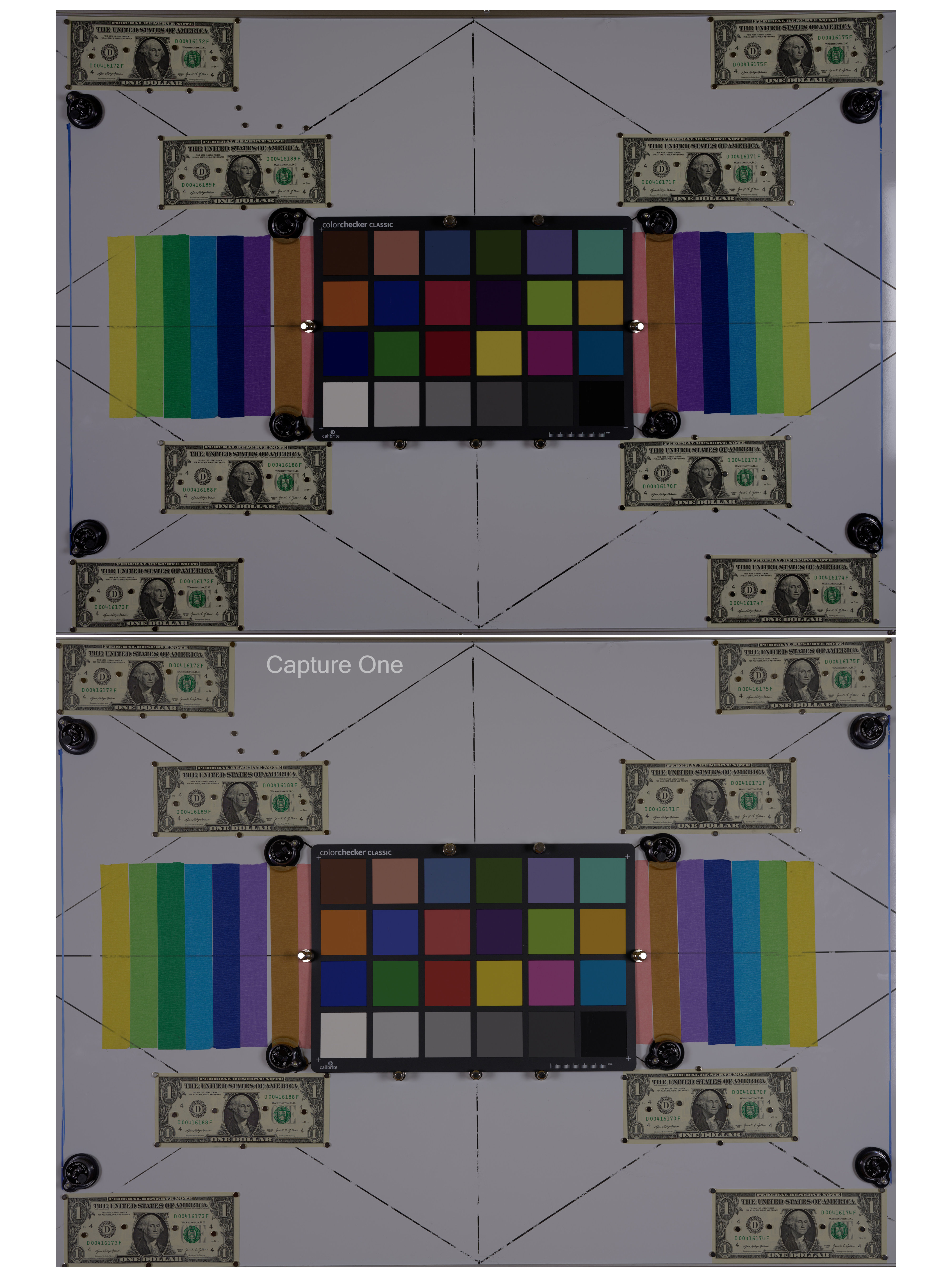
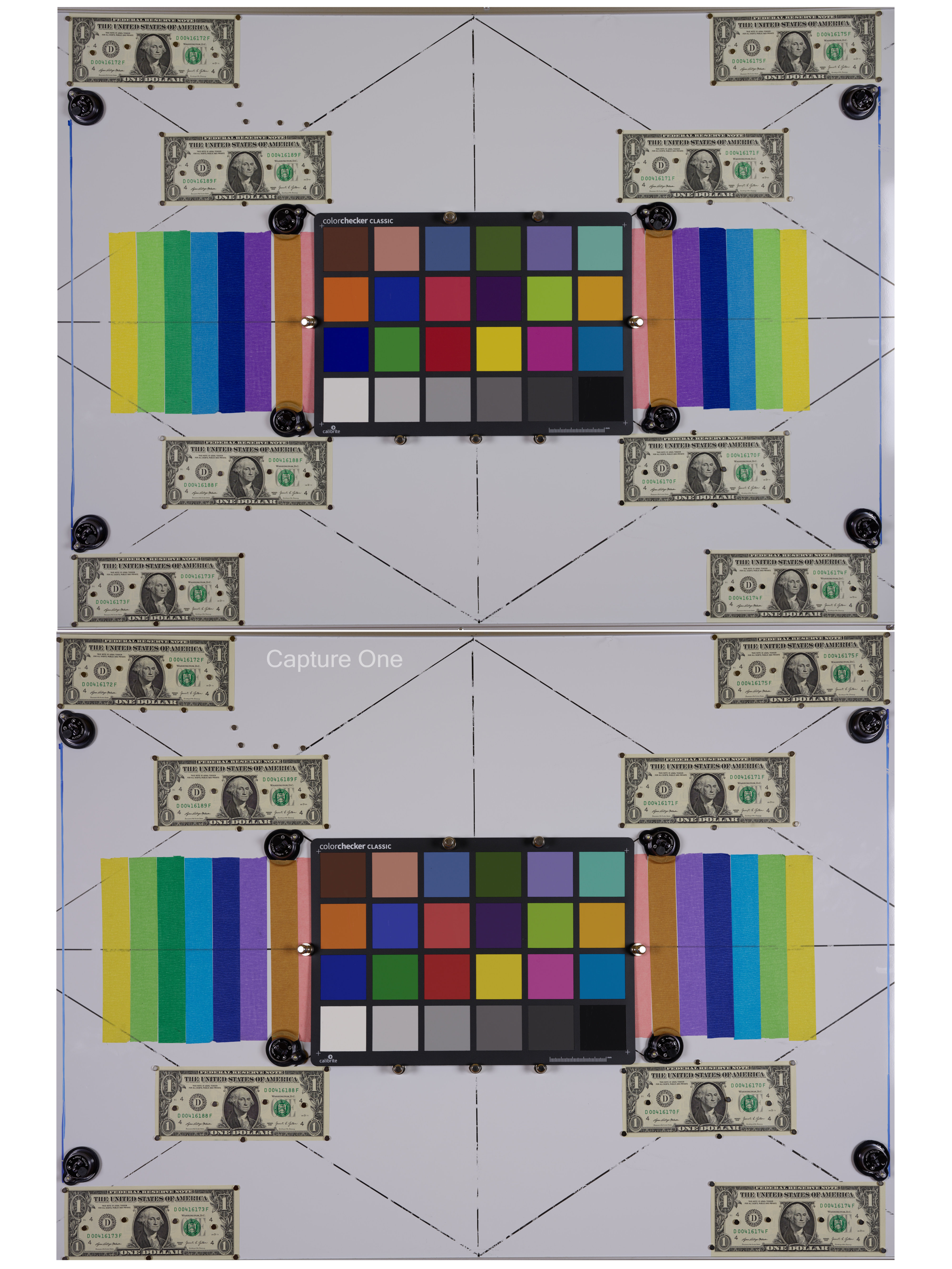
The corresponding Display P3 jpegs can be compared in the first upload below. The top image is from PL9, and it isn't as flat as the one from Capture One.
I normally use GFX100S II Generic profile with the Film Standard curve. However, with this curve (and no other adjustments) the image brightens considerably (this surprised me, actually). To roughly match this brightness in DxO Photolab while using the Generic Rendering with Neutral Color, I had to add exposure compensation of +1.2! The resulting jpegs can be compared in the second upload given below.
The obvious difference in contrast between the profiles in Capture One and DxO Photolab 9 make it difficult to make any definitive statement, except that superficially there is nothing that would seem to be terribly wrong about the colors.
Another possibly interesting observation is that WB is not only application-dependent. It is also lens-dependent.
In my exercise, WB with the Fujinon GF55mm F1.7 lens (at f/5.6) was
Temperature 5051 - Tint 47 in DxO Photolab 9
Temperature 4732 - Tint 12.1 in Capture One
When the lens was replaced by Fujinon GF20-35mm F4 (at 35mm f/5.6) while keeping everything else unchanged and unmoved, except the tripod that was moved closer to the white board to frame it as with the 55mm lens, then WB changed to
Temperature 5259 - Tint 44 in DxO Photolab 9
Temperature 4968 - Tint 10.7 in Capture One
If my understanding is correct, it seems that the 55mm lens has a relatively warmer color cast that was compensated by lowering the temperature in WB by about 200K.
Repeating what I said above, different converters do not necessarily use the same profile or response curve to render an image. As such, WB will be different.
Jack, I get this, and I really appreciate your input!
Let's be fair and acknowledge that the subject of this thread isn't common knowledge that everybody knows (correct me if I'm wrong).


 the diff between what DXO vs. C1 is doing, I'd rerun the test with an exposure that puts the whites into whites territory. 250's is specular highlight territory. Actual whites should be more in the 220's to 235 territory (iirc). Similarly, black patch should be closer to 20-30 (again, iirc).