fredmiranda.com
Login

Moderated by: Fred Miranda
  New fredmiranda.com Mobile Site
  New Feature: SMS Notification alert
  New Feature: Buy & Sell Watchlist
  

FM Forums | Canon Forum | Join Upload & Sell


EOS M6 Mark II shutter count


Pete Klinger
Offline
• •
Upload & Sell: Off
p.1 #1 · EOS M6 Mark II shutter count


I have this camera and I got it used and found I'm not going to use it. I have an original M and the M-6 which I like just fine.

Is there a way to read the shutter count, without buying software, that I won't ever use again? I've tried EXIF and sites that supposedly read from a photo. Apps... nothing works. I've never reset it and it shows 1337 images, but I don't know how video effects that? I got the camera used and never reset the counter, but I have no idea what the original owner did.

Can anyone help me with the answer? I'm selling the camera and I'd like to have a real answer for the potential buyer.


Nov 16, 2025 at 11:19 AM
jrhoffman75
Offline
• • •
Upload & Sell: Off
p.1 #2 · EOS M6 Mark II shutter count


Not free, but Shutter Count by Dire Studio is available for macOS and iOS.

I believe the M6 II, like other current Canon cameras, reports shutter count in blocks of 1000 so all you would see is "less than 2000" if your count is correct.


Nov 17, 2025 at 06:03 AM
Gochugogi
Offline
• • • • • •
Upload & Sell: Off
p.1 #3 · EOS M6 Mark II shutter count


I've never found a free shutter cycle counter that actually worked.

I've been using Shutter Count by Dire on my Mac for over a decade—maybe once every year or so when I sell a camera. It was really inexpensive at that time—$9.95—so less than BigMac meal or a bento. The cheapest trim level ShutterCount app only shows the mechanical shutter count (cycles and percentage). Electronic shutter actuations are ignored. The more expensive Pro edition ShutterCount adds the electronic shutter count ability.


Nov 17, 2025 at 09:54 AM
sirimiri
Offline
• • • • •
Upload & Sell: Off
p.1 #4 · EOS M6 Mark II shutter count


I'm only here to say you're not the only M6 II user


Nov 19, 2025 at 03:01 AM
Pete Klinger
Offline
• •
Upload & Sell: Off
p.1 #5 · EOS M6 Mark II shutter count


sirimiri wrote:
I'm only here to say you're not the only M6 II user


I'm still trying to decipher how to get the cable release to work on the M-6, but it's so frustrating that I'm just going to use a different camera. The other part was, supposedly the M-6 II was capable of doing stacking, in camera, which is my error, it just creates stacks. I can do that myself or with the Arsenal or with a rail that I built.

Not to be too critical, I love the size and quality of the M cameras. It's just what I wanted, when the first one came out. APS-C in a nice, pocket size, not imposing, camera. Instead of a DSLR and people staring at me, "Why are you taking photos", the M is no more threatening than a cell phone, to those who get nervous when they see a big camera, with a big white lens.

If anyone can actually tell me, how to make the cable release work, and please don't say "RTFM" I've done that, step by step, printed, highlighted, searched. The wired release doesn't trigger the shutter, and I need that for time lapse using an intervalometer. Not a phone, not RF, RC-6, not not anything else... I need a wired cable.

That's why the M-6 II went on ebay with the extra lenses.


Nov 19, 2025 at 06:17 AM


Search in Used Dept. 

voltaire
Offline
• • • •
Upload & Sell: On
p.1 #6 · EOS M6 Mark II shutter count


There is a wireless remote trigger that I used on the M5. Maybe that would work instead of a cable release.


Nov 19, 2025 at 12:19 PM
Gochugogi
Offline
• • • • • •
Upload & Sell: Off
p.1 #7 · EOS M6 Mark II shutter count


Pete Klinger wrote:
I'm still trying to decipher how to get the cable release to work on the M-6, but it's so frustrating that I'm just going to use a different camera. The other part was, supposedly the M-6 II was capable of doing stacking, in camera, which is my error, it just creates stacks. I can do that myself or with the Arsenal or with a rail that I built.

Not to be too critical, I love the size and quality of the M cameras. It's just what I wanted, when the first one came out. APS-C in a nice, pocket size,
...Show more

I can't claim to own a M6, but my wife has one and I just used the wired Canon RS-6-E3 Remote Release to take a few pictures. Works perfectly. No TAB menu setting to change, just plug it in, half-press the button on the RS-6-E3 to focus, and full press to take the picture. Maybe your RS-6-E3 is defective or the input port is hosed? With that said, my wife tried to use the RS-6-E3 by plugging it into the mic port on the left side! The correct input for the RS-6-E3 is under a tiny rubber boot on the side of the grip (right side of camera) and right above the bluetooth button.

What a tiny and hard to hold camera, but my wife—5'2"—loves it.


Nov 19, 2025 at 05:39 PM
Pete Klinger
Offline
• •
Upload & Sell: Off
p.1 #8 · EOS M6 Mark II shutter count


Maybe the problem is I'm not using an "official" $25 RS-6-E3 from Canon, and my generic eBay remote, from offshore, who knows where. 😉 I suppose I could splurge and buy a real one, just once. The remotes I have, work with every other camera I own.

Wow, that's strange, because there's a whole complex, settings, in the menus, that is only accessible when it's in Video, not photo. After I sat with the camera for an hour, trying to guess, do I put it in Video and take still images, or edit the settings in "Video", but then put it back into photo?

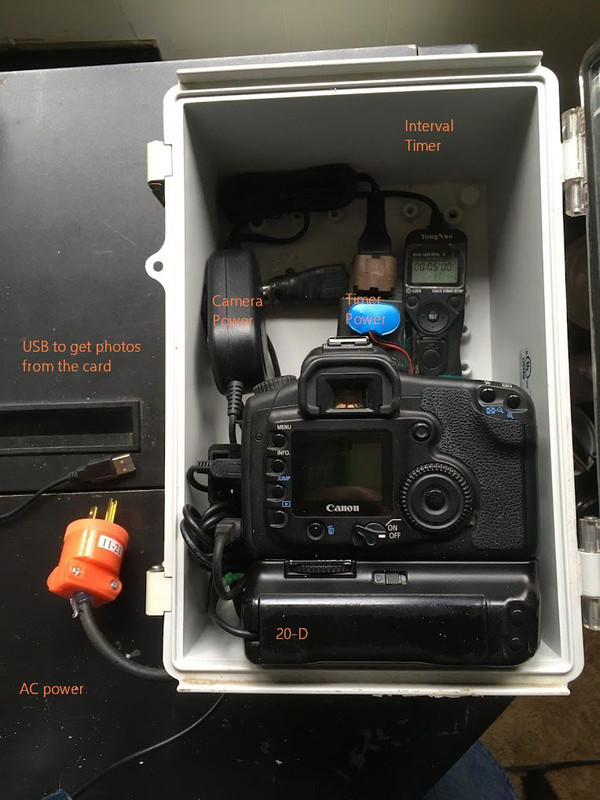
The whole project, is about a small camera, mounted in a waterproof box, for time-Lapse. I've had minor success with GoPro (a corn field for a year!) but the quality isn't there and they overheat, and shut down. This is mostly a personal challenge project. I don't think there's a demand or payback.

So, the M version, is because I want to do Night Sky. I'm already working with old 20-D and 40-D DSLRs, which are inexpensive. They don't have the excellent low light capabilities that the mirrorless cameras have. Yes, I'm married to Canon. Otherwise, it would be less stress to just buy something else, that has a remote cable release, and is designed for simplicity.


Just a recent example from the 40-D, which is mounted on a tripod. I can only work when it's clear and when there's no threat of rain or snow.

Enclosed unit, which I used for a Daffodil garden and then a squash plant over the Summer. The downloading images, was a bad idea. Next one, the camera will be landscape, and I'll swap the card out, every week.


Larger box would be good, but then the tripod or mount, starts to get large and heavy.


Nov 20, 2025 at 10:33 AM
Gochugogi
Offline
• • • • • •
Upload & Sell: Off
p.1 #9 · EOS M6 Mark II shutter count


Newer Canon cameras are hybrid video/photo designs, so Canon divided enablement of functions between picture and video modes. So if you set ISO, AF patterns, self-timer/IR remote, etc., in photo mode, they are not implemented in video mode and vice versa. In 2019, I think the 90D was the first camera I owned that did this. The M6 MK II was the same in this regard. I'm used to it now—all R series cameras are this way—but I recall not being able to trigger video recording on my 90D with a RC-6 after enabling self-timer/remote it in photo mode. Once I realized I had to enable IR remote in video mode, all was well. My prior 80D, 70D, etc., didn't divide the functions.


Nov 20, 2025 at 11:14 AM


FM Forums | Canon Forum | Join Upload & Sell


Welcome back
Log in to your account