p.1 #1 · Optimal ZR Red raw processing in Da Vinci Resolve?
Hi team,
is there a good tutorial on how to optimally configure Resolve for the ZR Red raw files (project set up, LUTs,...)? I have come up with something very simple that works, but I am not sure it's optimal. I have searched YouTube but couldn't find anything really perfect.
p.1 #2 · Optimal ZR Red raw processing in Da Vinci Resolve?
bernardl wrote:
Hi team,
is there a good tutorial on how to optimally configure Resolve for the ZR Red raw files (project set up, LUTs,...)? I have come up with something very simple that works, but I am not sure it's optimal. I have searched YouTube but couldn't find anything really perfect.
p.1 #3 · Optimal ZR Red raw processing in Da Vinci Resolve?
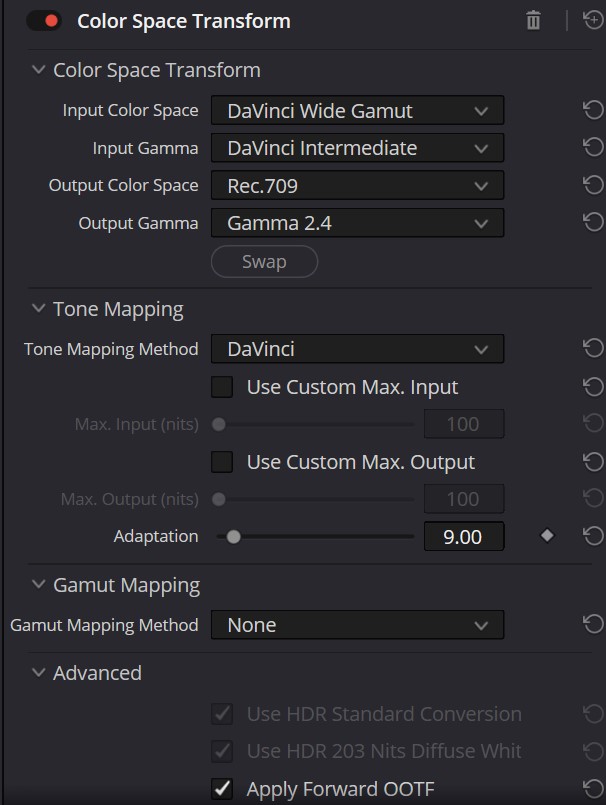
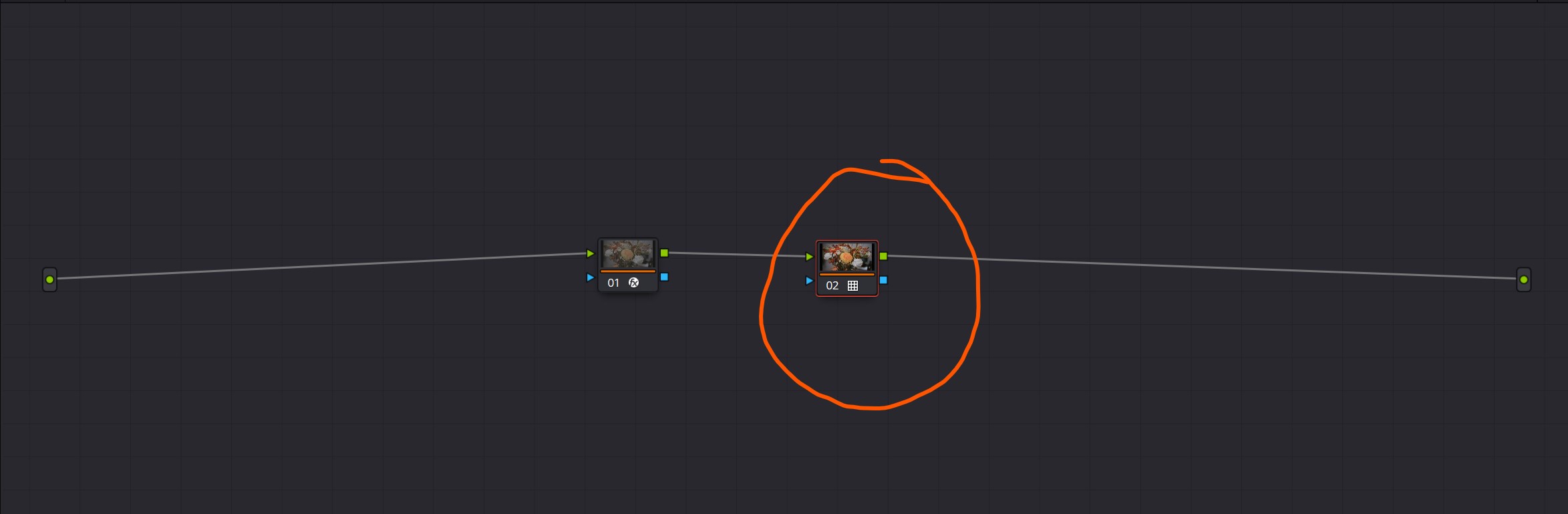
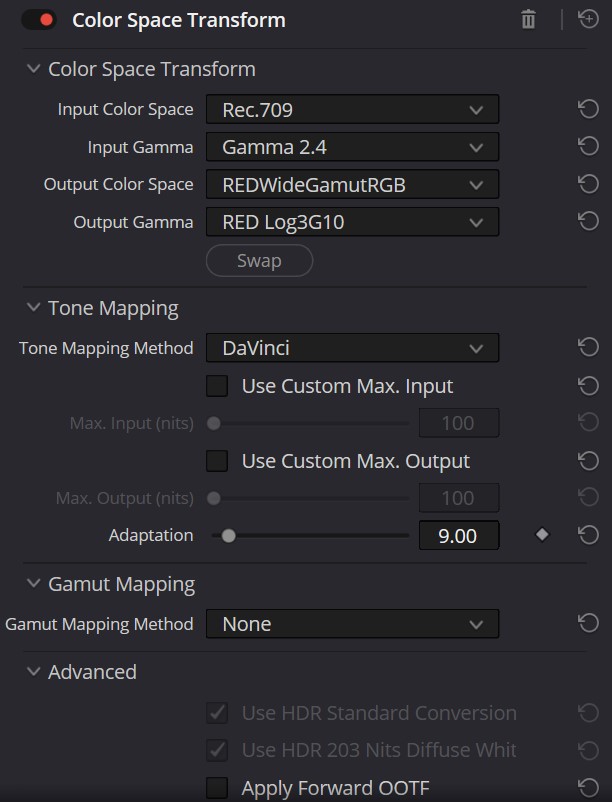
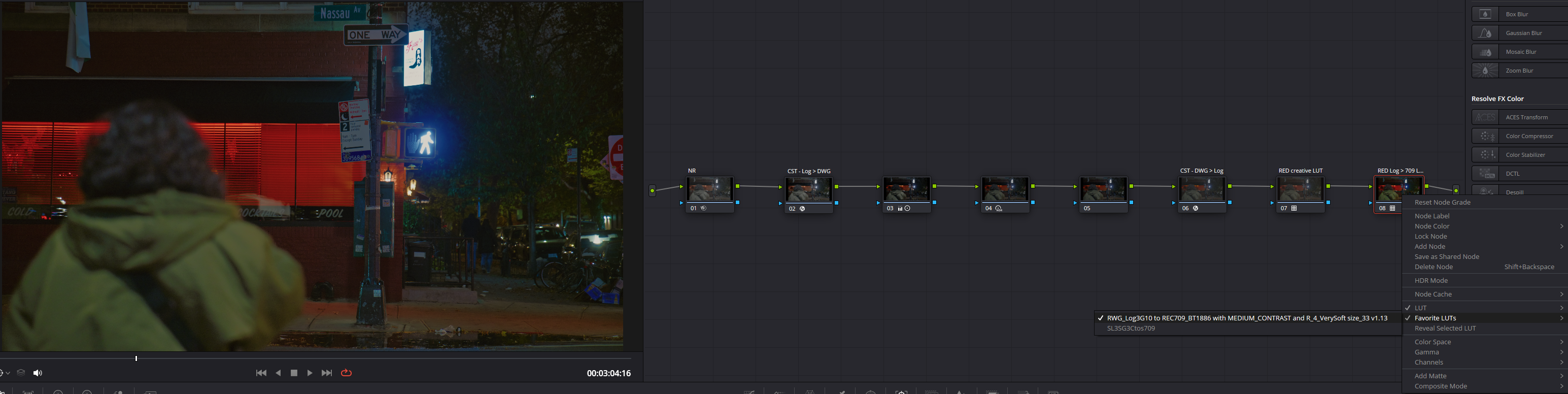
Here's my setup (see uploads in order)
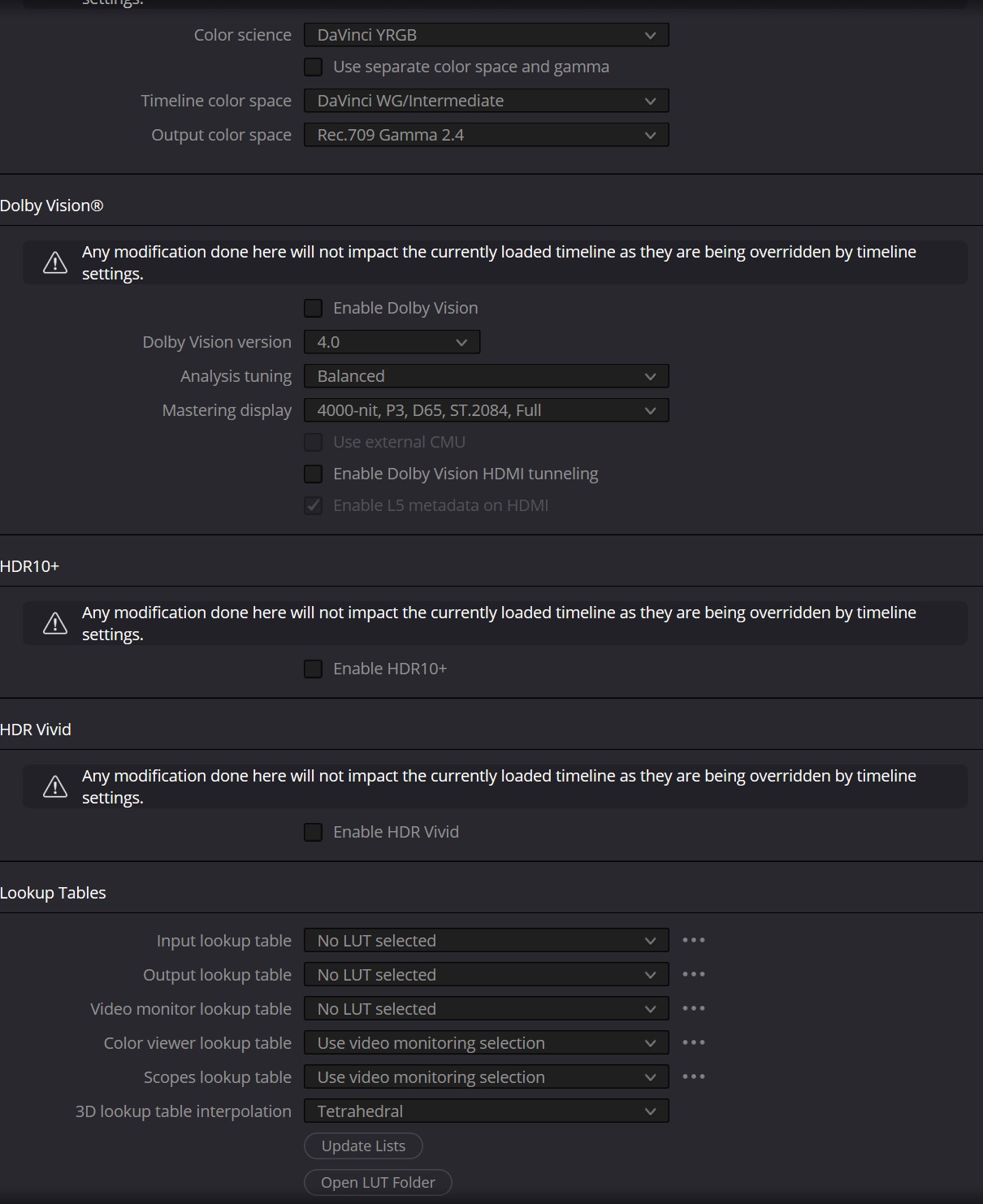
1.) Project Settings - Color Management
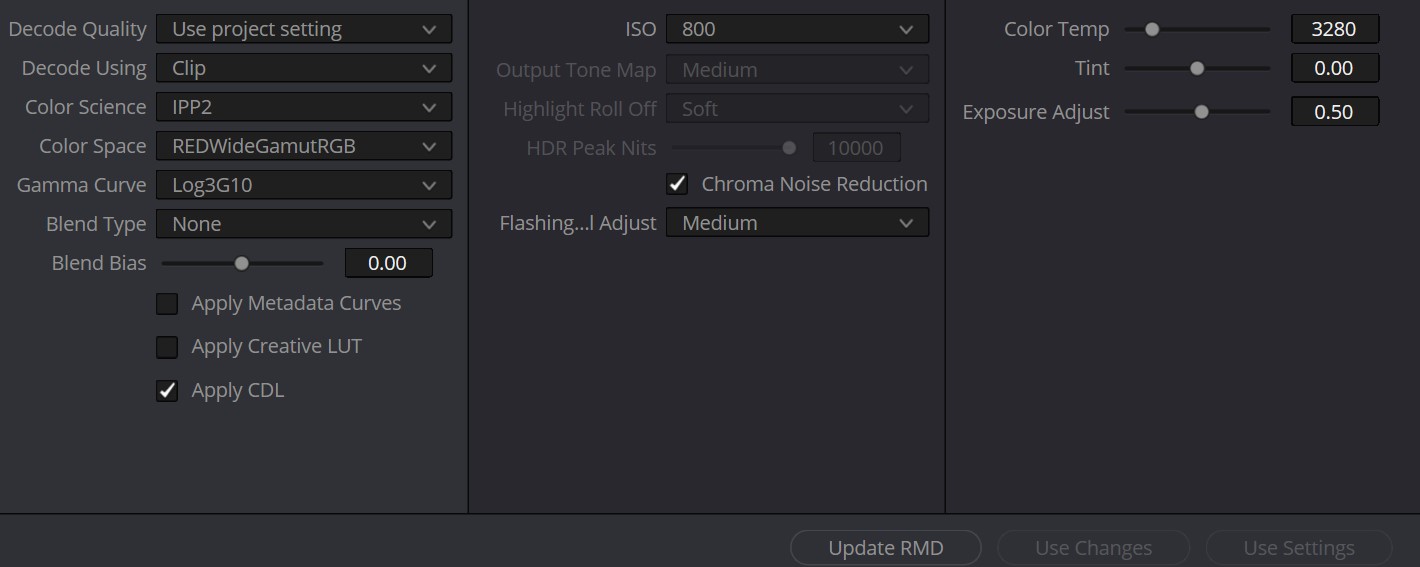
2.) Camera RAW in Davinci Resolve settings
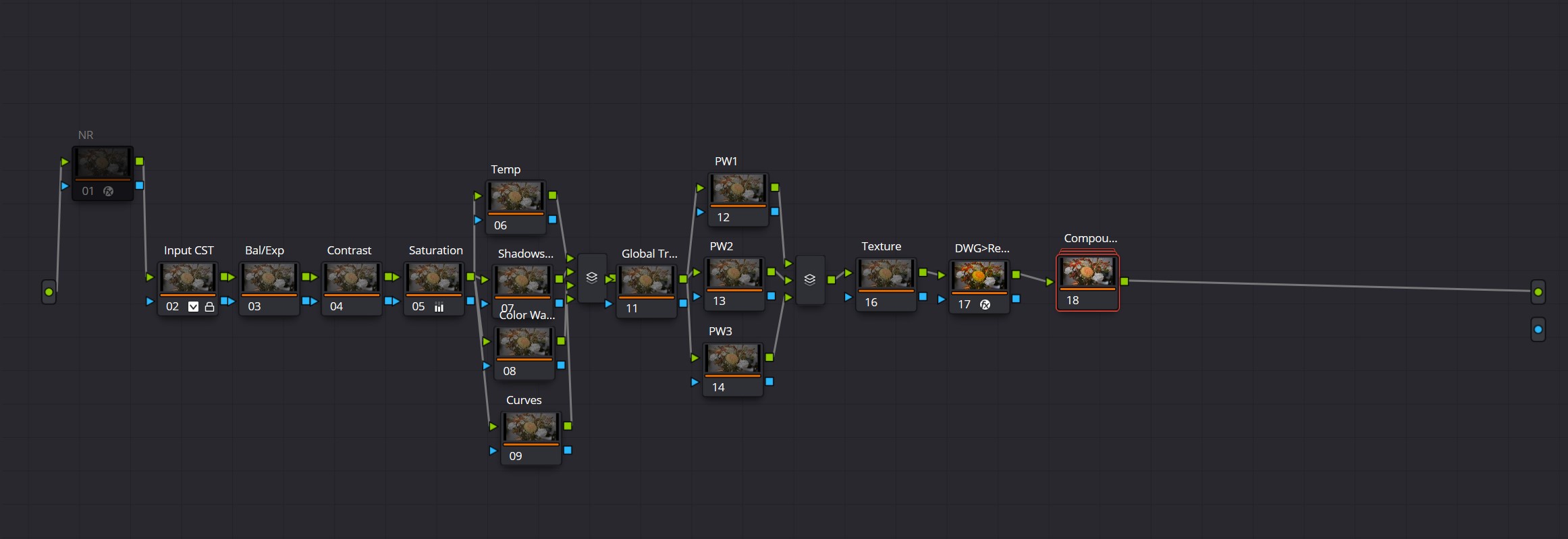
3.) Base Node Tree that I apply to all R3D clips (and converted .NEV to R3D clips). Final node is a compound node where I apply a RED Film Bias LUT
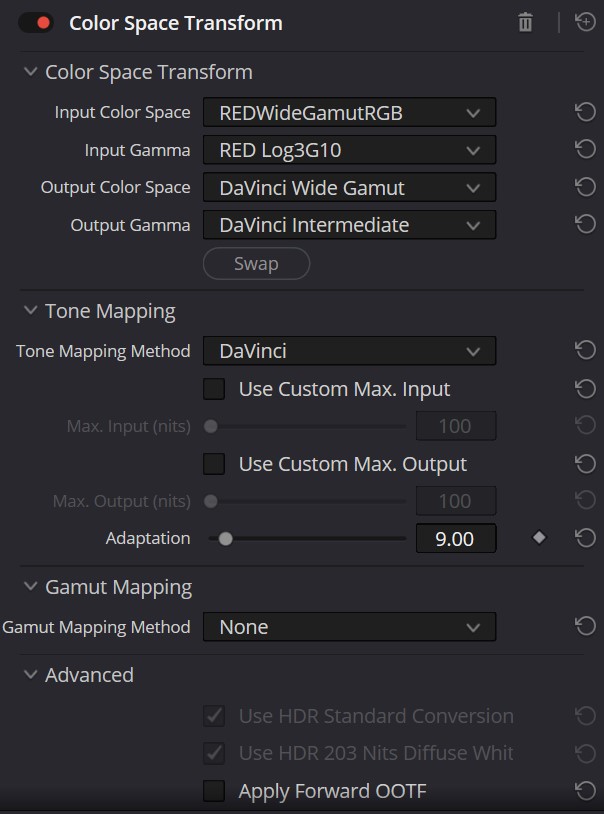
4.)Input color space transform
5.) Pre Compound Node CST
6.) Set of nodes stored within the compound node -> LUT applied in final node so all adjustments can be made underneath
7.) CST node settings before LUT node
This video is what I used to build this:
This is working for me so far, and seems to allow for good flexibility under the LUT.
p.1 #4 · Optimal ZR Red raw processing in Da Vinci Resolve?
Way too complicated. I think if you’re like me, where you’re creating beautiful footage as a solo shooter with one camera (or two of the same camera) and simply want it to return to that once you’re editing, you just need to set the color management settings window correctly, and Davinci takes care of the rest.
I suggest you watch these tutorials to get a firm grasp of the underlying workflow:
And from there here’s a good overview of setting up an R3D workflow… this is for the NEV->R3D hack, but it will give you a good overview of R3D settings…
p.1 #5 · Optimal ZR Red raw processing in Da Vinci Resolve?
Once you’ve gotten clear on the above, you can simply search using R3D LUTs correctly and you’ll find good videos. I’d stick with Cullen Kelly. Here’s a long form CK video covering LUTs:
p.1 #6 · Optimal ZR Red raw processing in Da Vinci Resolve?
One thing to understand is that most R3D LUTs will have, in their filename, the ingest and output color spaces. And once you set up a proper color workflow, you’re really just doing one node to handle primaries ahead of the LUT; then the LUT; then you should wrap with some noise reduction and sharpening. But people like Cullen Kelly will be quick to tell you that you can probably get 80-90% of your work done in terms of mood and tone simply mastering primary adjustments, without the need of a LUT.
You need to know what color space the LUT expects, and what color space it delivers, and setup your color management appropriately (or pick a LUT that is designed for your specific color management workflow)
And you need to color grade for exposure, contrast, balance downstream/under the LUT
p.1 #10 · Optimal ZR Red raw processing in Da Vinci Resolve?
That’s a pretty broad analogy. It’s a little more complicated. You need to understand color space and gamut, both input and output, of a given LUT. And then you need to set up your working space and output strategy based around those factors.
edit: A stills analogy would be kind of like this...
Your stills camera is set up in raw, and the display color space for it is AdobeRGB
But your retouching computer monitor is set to P3
And your output color space is sRGB for web
A LUT will often have all three of those factors contained within so you need to know which camera was used, what color space it was set to... then you need to know what color space your editing timeline is set to, and finally you need to know your delivery color space and gamma. And set all of that up correctly, using either a global color management settings window, or something called a CST (color space transform) at the editing level (you can even split your workflow up into multiple CSTs).
RoamingScott wrote:
I have tasked my 12 year old to learn Resolve and to report back in a few weeks to teach the old man what to do 😁
I assume a RED LUT (or any LUT really) is just akin to a Lightroom preset?
p.1 #12 · Optimal ZR Red raw processing in Da Vinci Resolve?
RoamingScott wrote:
I have tasked my 12 year old to learn Resolve and to report back in a few weeks to teach the old man what to do 😁
I assume a RED LUT (or any LUT really) is just akin to a Lightroom preset?
I would say it is akin to a LR preset plus color management.
Video grading is either undertaken in the camera's colour space/gamma or an intermediate editing colour space/gamma. Once the grading is done, the footage is converted to the output colour space/gamma (usually Rec.709/gamma 2.4).
A LUT will usually apply preset grading (colour, contrast etc.) plus perform the transform to the output colour space. So it is important to know what input colour space/gamma your LUT expects.
p.1 #13 · Optimal ZR Red raw processing in Da Vinci Resolve?
bernardl wrote:
As mentioned I am interested in Red Raw.
Regards,
Bernard
You have 2 basic choices; work with or without a LUT:
WIthout LUT:
1. In Project Settings > Camera Raw, ensure the RED footage is set to use the correct Color Space (REDWideGamutRGB) and Gamma Curve (Log3G10). This assumes your footage is in Log.
2. On the Color page, add a CST to the first node and set the Input Color Space to REDWideGamutRGB and Input Gamma to Log3G10. Set the Output Color Space and Output Gamma to your working space (e.g., DaVinci Wide Gamut Intermediate/Gamma).
3. Make 2 more sequential nodes AFTER this first one, one for exposure/contrast and then one for colour. Use these two nodes to make those adjustments to your taste.
4. Add a final CST to transform the colour space/gamma convert to your final delivery format (Rec. 709/gamma 2.4).
You can also achieve the same with Resolve's built in colour management but this "manual" way is good for understanding what is going on under the hood and also is necessary if you have a mix of footage in different codecs and/or from different cameras.
With LUT:
1. Download the official RED LUT Kit and the IPP2 Output Presets. These are all just LUT's. https://onlinemanual.nikonimglib.com/download_red/en/
2. Place the desired LUT (.cube file) into Resolve's LUT folder.
3. In Resolve, create just one node and try the various LUTS in that node to see which one(s) you like.
4. If you would like to further edit the outputs given by this LUT workflow, put a couple of nodes BEFORE the final LUT node as you did in (3) in the without LUT workflow above.
This is all a bit high level but will get you underway.
p.1 #15 · Optimal ZR Red raw processing in Da Vinci Resolve?
Well - Looks like you have multiple approaches here. Decide what works best for you.
One thing I'd highly recommend is if you do end up building out a node tree so you can have fine editing capabilities, save it as a PowerGrade that you can use across multiple projects with one click of the scroll wheel on your mouse (or whatever this maps to on your work station).
My tree is complex because I want to ensure I have maximum flexibility. I don't regularly use all of it, but it's there if I need it.
p.1 #17 · Optimal ZR Red raw processing in Da Vinci Resolve?
There's definitely a lot of YMMV and figuring out what approach works best for you.
I've been using a hybrid of CSTs and LUTs in Resolve. Mainly using CSTs to convert from RED Log to Davinci Wide Gamut, apply any corrections in that color space, then converting back to RED Log, and finishing things off with RED LUTs.
Arguably I could probably just skip the CST conversion step and get to similar results but I know the "proper" way is to work in Davinci Wide Gamut, so I'm playing by those rules (most of the time)
p.1 #20 · Optimal ZR Red raw processing in Da Vinci Resolve?
joyclr wrote:
I haven't shot video for years. My old camcorder workflow just involved transferring my files to my computer and then to a DVD using Apple software.
Can edited ZR Red files be copied to a DVD or blue-ray disk ?
You don't export as R3D, just like you don't export stills as RAW, so yes, you'd just export to whatever format you need.