Really just posting this so that maybe this gets seen and fixed, but I've had this happen on two shoots recently and it would be easily avoided with a minor firmware tweak.
When switching between burst modes, if high speed raw is set to 15fps, there is no indication (EDIT to clarify: I mean on the top display, where I am looking when I'm changing this setting) whether the camera is in RAW 15fps or JPG 15fps burst other than the number of shots remaining. This wouldn't matter as much, except that it is just one extra turn of the dial from 15fps RAW to accidentally put the camera in 15fps JPG. Once it's there, there is no visual indication. The display still just shows "15."
I never shoot JPG, and don't want to ever shoot in JPG except in very rare conditions. Twice recently, this has happened and negatively impacted the final product I'm able to deliver. Nikon either needs to add an option to disable these burst JPG modes, or at minimum more clearly indicate in the top display that it's in JPG, not RAW. I feel like these JPG burst modes are just a marketing gimmick anyway, which is fine, except when they get in the way of a professional RAW workflow.
Nikon, please offer the ability to disable these JPG burst modes. I love my Z8, but really despise this quirk.
What you could do is permanently activate Pre-Release Capture on the Z8/Z9, which will then also be displayed in the viewfinder and on the rear LCD for compatible JPEG fps modes.
This allows you to see immediately whether 15fps JPEG is activated, in which case “pre capture” is clearly displayed in the EVF/LCD, or whether 15fps RAW is selected in H mode, in which case no pre capture warning is displayed in the EVF/LCD.
This way, you can immediately see in the EVF whether 15fps JPEG or 15fps RAW is active.
This also has the advantage that pre-release capture does not need to be activated first, as it is only active in certain JPEG FPS modes anyway.
So if you need it quickly, it is immediately active in the compatible FPS modes and is also displayed in the EVF.
It's not the ideal solution, but it's better than nothing.
nhmorgan wrote:
When switching between burst modes, if high speed raw is set to 15fps, there is no indication whether the camera is in RAW 15fps or JPG 15fps burst other than the number of shots remaining. This wouldn't matter as much, except that it is just one extra turn of the dial from 15fps RAW to accidentally put the camera in 15fps JPG. Once it's there, there is no visual indication. The display still just shows "15."
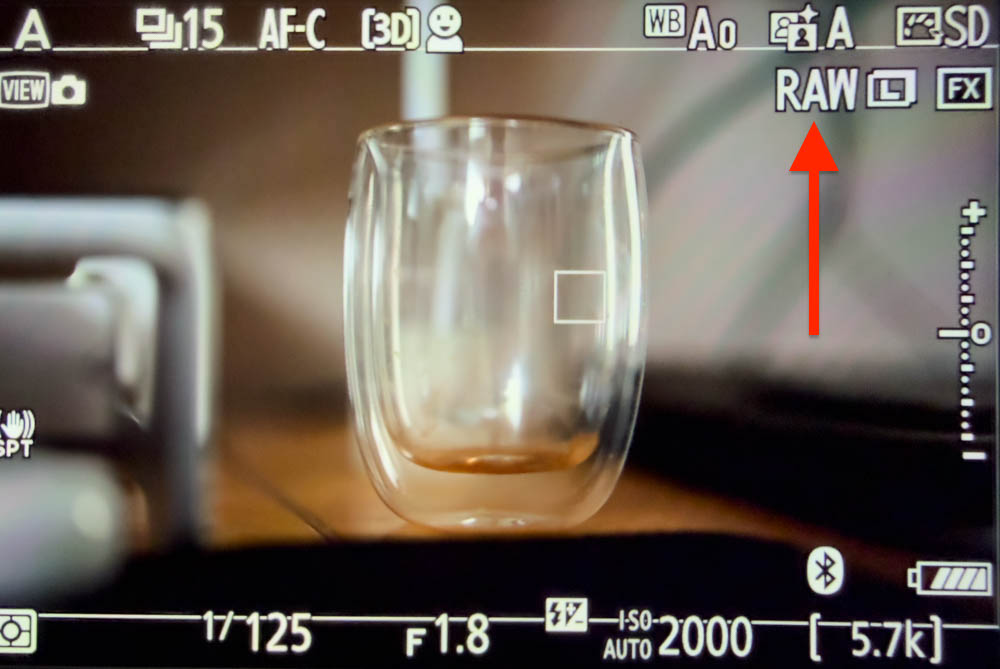
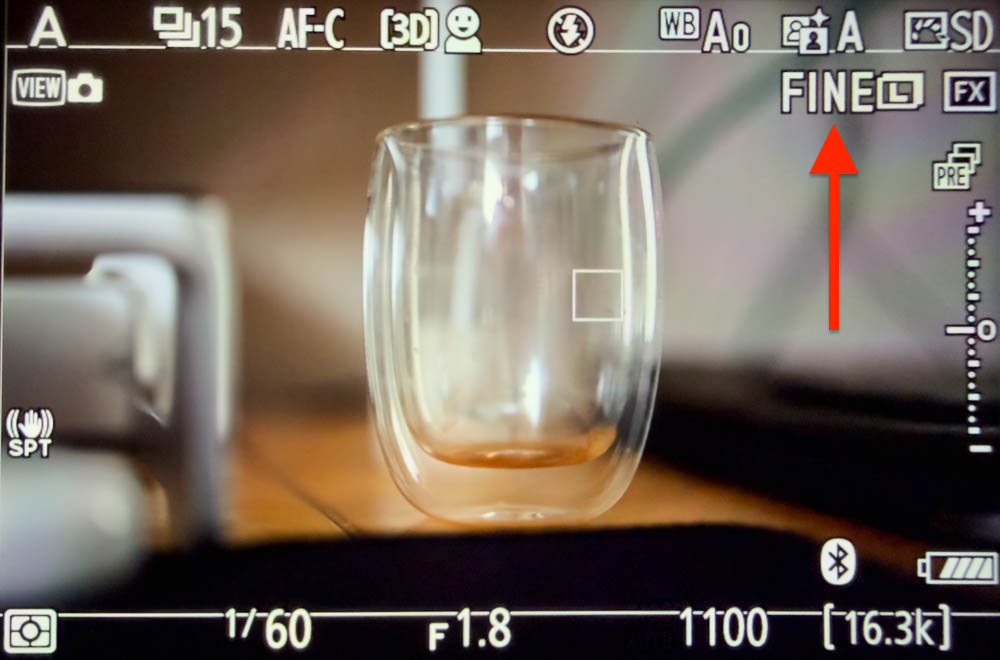
Unless I'm misunderstanding what you're saying, I think the camera already shows you that change. Here's my Z8, first in normal 15fps mode, then in C15fps mode. Notice that the viewfinder shows that the format has changed from RAW to FINE (jpeg).
That too, at least if you have activated the information indicators for it in the EVF, then it is also clearly displayed whether 15fps RAW or a 15fps JPEG mode has been selected.
If you don't want that, for reasons of clarity, the aforementioned method of permanently activating pre-release capture helps, which also flashes clearly in the viewfinder even with the EVF information reduced to a minimum when one of the JPEG pre-release modes has been selected.
MikeEvangelist wrote:
Unless I'm misunderstanding what you're saying, I think the camera already shows you that change. Here's my Z8, first in normal 15fps mode, then in C15fps mode. Notice that the viewfinder shows that the format has changed from RAW to FINE (jpeg).
It does show this is the viewfinder/back display, but that's not where I'm looking when I'm changing that setting, nor where most people will be looking. If you hold the camera and use the shooting speed selector switch, I think it favors using the left hand thumb and looking at the top display. Those on the fly settings changes are what I think the top display is really aimed at. I'm also not carefully examining all the clutter of the display modes in the viewfinder, as I think most shooters aren't in the heat of the moment when run and gunning. Whether it shows in the monitors also, depends on your overlays and most don't include that. l I just think it's really a fundamental bad idea to have two very very different camera settings right next to each other without easy differentiation which one the camera is in. Changing to pre-release does then show it on the monitor and viewfinder, but not on the top display.
It is also indirectly shown on the shoulder display, where the number of remaining images increases by a few thousand in jpeg mode.
Of course, it would be better if it were also shown directly on the shoulder display in this specific case, but if you know this and simply look at the number of remaining images, it amounts to the same thing in the end.
It's a very specific problem if neither the display in the EVF/LCD, which shows exactly whether you are shooting RAW or JPEG when configured with the appropriate information, nor the workaround via pre release capture, which allows you to see whether you are in 15fps RAW or 15fps JPEG mode even with minimal information displayed in the EVF/ LCD, nor the indirect method of checking the number of remaining images on the shoulder display is sufficient.
Ultimately, you can see it everywhere, whether on the EVF or rear LCD directly, or indirectly via pre release symbol, as well as on the shoulder display, if you know what to look for.
I ran into exactly this bug today. If you are not paying attention which dial you are using it is very easy to make a mistake. The reason I caught it is that I have pre-capture turned on and it is automatically enabled when I switch to any of the C modes. When I saw the "PRE" indicator I immediately knew what is going on.
h/t to @StevePerry for this setting. He had suggested it for another reason, but it saved my bacon today.
I agree with nhmorgan. My issue might be a little different
I shoot RAW mostly, for the same reasons others do.
But this last summer I used pre-capture on a project I’ll be continue to shoot next summer. I never shoot JPEG for the entire day….. unless by mistake. After I finish contributing JPEGs (at 120 fps) to my project, I often forget to change the Z8 back to RAW.
You can see the raw vs jpeg setting in the viewfinder and the screen as long as the appropriate level of detail is turned on in the display configuration. The problem that the OP describes is more insidious.
bs kite wrote:
I agree with nhmorgan. My issue might be a little different
I shoot RAW mostly, for the same reasons others do.
But this last summer I used pre-capture on a project I’ll be continue to shoot next summer. I never shoot JPEG for the entire day….. unless by mistake. After I finish contributing JPEGs (at 120 fps) to my project, I often forget to change the Z8 back to RAW.
Much appreciated thread. The JPEG engine in these cameras is good enough that at least for my purposes it's not catastrophic when this happens (contra, say, a D2H or D2HS where you absolutely wanted to stick on raw and fortunately it was unequivocal on instrumentation on this point), but it's very good to know definitively how to deal with it.