p.1 #1 · Should Phocus Desktop For Mac be My/Your X2Dii Best Option?
I mostly use my cameras when I travel. I’m retired, don’t shoot events, sports or in studio. I rarely keep more than 25% of the images that I shoot. I aggressively cull images. Much of what I do on Lightroom is recovering shadow detail, because in many dynamic environments I’m underexposing to capture cloud formations..etc. HDR will do this for me. It doesn’t mean that I can put my brain in my back pocket while shooting, but I think that it does mean that Phocus and HDR can do some of the legwork. I can cull in Phocus and export the culled TIFFs to Lightroom for final editing..along with the occasional Photoshop loop. The downside is that TIFFs are huge, but with fast computers, virtually unlimited storage, along with heavily culled workflow, this seems like a reasonable workflow.
p.1 #2 · Should Phocus Desktop For Mac be My/Your X2Dii Best Option?
Using Phocus will give you the best colors and lens corrections for your Hasselblad files. Phocus has its quirks, and sometimes the difference may not be relevant when compared to an image processed in Adobe alone.
I always import into LrC and process there. A very few images deserve a second version based on a round-trip to Phocus and back to LrC. However, I am much more proficient with Adobe software than with Phocus, so in-depth post-processing is simpler for me in Adobe.
p.1 #3 · Should Phocus Desktop For Mac be My/Your X2Dii Best Option?
My workflow is the same a SrMi. Lightroom for everything and special images get a first class ticket to Phocus and back. Adobe does work with HB on their profiles. It’s just that Adobe dual illuminant profiles are a bit more basic the the full HNCS workflow. HB colours in LR are actually good. There is no C1 support.
The HDR workflow is a bit more complex. Raw files do not benefit directly from HNCS HDR. You need to be shooting with either jpeg or HEIF turned on. You’ll get a HDR compressed file and a raw with some instructions for Phocus and the raw file. Basically it’ll underexpose to protect the highlights and add a special curve on import. You could do this without HDR.
I think the main advantage for shooting HDR is that the camera screen can show this. So you can see what you might be able to drag out of a raw file later better than you can on other camera displays. This might be useful for determining clipping but really I’ve not had issues with any of the X cameras in that regard.
Hasselblad files are extremely robust. Pulling detail from shadows is trivial compared to smaller formats. I often shoot for the highlights and then recover shadows in post, with almost no issues. At lower ISO’s several stops are easy. And when there’s a bit of noise LR or DXO (soon for the X2D I hope) sorts that easily.
p.1 #4 · Should Phocus Desktop For Mac be My/Your X2Dii Best Option?
I see a lot of Hasselblad images shared with the special Hasselblad frames. They are available only in Phocus Mobile 2. To share an HDR image with Phocus Mobile 2, you need to shoot in HDR mode.
p.1 #5 · Should Phocus Desktop For Mac be My/Your X2Dii Best Option?
When I got my first Hasselblad (which was X1D II) I curiously checked out the Phocus app for Mac because it was praised by its image quality and to preserve colors etc. I was pretty confused how it was intended to be used, and didn't get why I have to do one additional intermediary step to first convert 3FR files to FFF files, which I don't have to do in other editing softwares.
I noticed this thread and decided to try it again with CFV100C files. After finding out what each slider does for the image, I can get very surprising results. Highlight and shadow recovery are exceptional. The software do have its quirks and the UI is sluggish to use. I don't like the workflow where I have to convert the camera raw files to another raw format first. But, the final few images I produced made me confident I have to re-visit my raw files from all summer trips and edit them again...
p.1 #7 · Should Phocus Desktop For Mac be My/Your X2Dii Best Option?
At least for me the files do not open. All I can do is "Import" them to FFF format, and only then I see the preview and all the editing tools are available.
EDIT:
Just realized the software hasn't updated itself automatically..
We finally get HNNR on desktop too! That's a nice addition, I've tried it couple of times on Mobile Phocus and it has been great.
p.1 #9 · Should Phocus Desktop For Mac be My/Your X2Dii Best Option?
Well the curves in Phocus is very hard to duplicate in any other image processor and for that reason alone Phocus is a real first step. My second choice for color profile is LRC’s Adobe Color. The modify functionality in Phocus is a time saver, the bin function works but it’s like a dial up modem.
Phocus has many other deep tools but overall after 15 years of using it besides the tethered functions it Sucks!
p.1 #10 · Should Phocus Desktop For Mac be My/Your X2Dii Best Option?
Now that winter is approaching and the sun is setting earlier and earlier, I wish I had faster lenses for my 907x. I often have to use relatively slow shutter speeds with relatively high ISOs of 3200-6400.
Speaking of high ISOs..
I started to use Phocus as my main editing software for Hasseblad photos, because it preserves the most natural colors and the highlight & shadow recovery tools work very well. Contrast, clarity, sharpening, saturation, lens corrections etc. are also very good and unique. I think they work better than other software with 3FR files.
What I'm really disappointed with, is the automatic de-noise that cannot be disabled. There's a setting panel 'Noise Filter' but if I disable the whole panel by removing the checkmark from its upper corner, it doesn't revert the opened photo to more grainy state. Sometimes it works OK and you don't really pay any attention to it, but there are times it fails and completely ruins the image. The result looks like some 'watercolour effect layer' from two decades old Photoshop. See attached screenshot below (click the link for full size version):
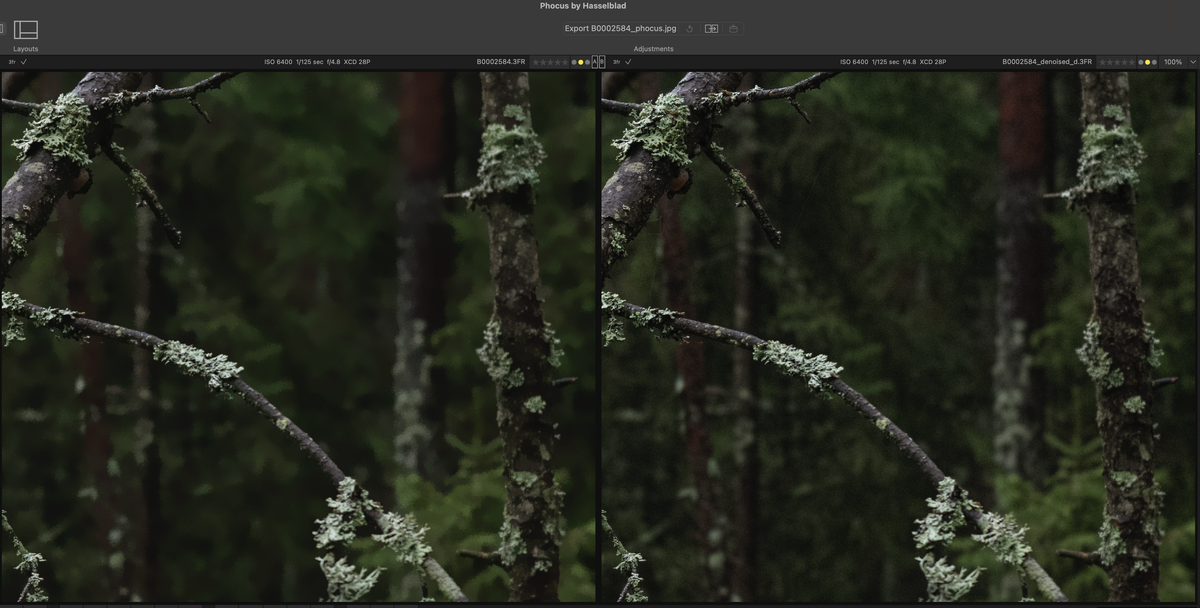
I'm so relieved that Hasselblad brought HNNR to desktop Phocus. The difference is such enormous. There's so much more detailed preserved after HNNR (right side in the screenshot) than using the default automatic de-noise (left side). There should be a setting to choose which files HNNR should be applied automatically, like should it be for every photo, or every high (>1600) ISO photo etc.
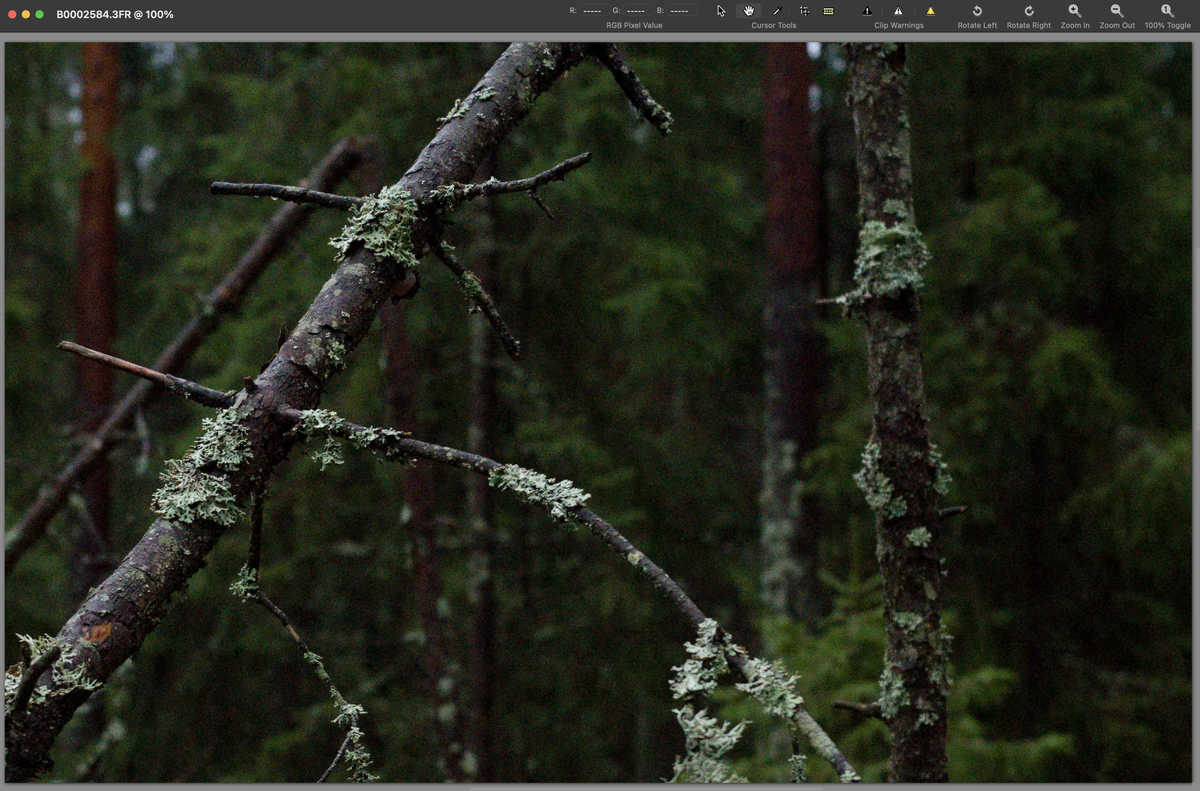
When HNNR is applied, Phocus actually automatically saves a new 3FR file with _denoised suffix, that can be edited in other software too. Here's a screenshot of the original raw opened in Iridient Developer without applying any de-noise.
The background still has detail in it while it is not that noisy, considering it's ISO6400 and how the RAW opened in Iridient looked. You can very very faintly see the spider webs running which are completely gone when first opened in Phocus, but preserved with HNNR applied.
I'm more and more convinced that one has to deeply understand by trial and error how to edit Hasseblad files in order to unlock the full potential of them. My philosophy is to edit RAW, export JPG, discard RAW but gladly I have full system backups which include the RAW files too, and I can get back to old photos if I get the urge to re-edit them..
p.1 #11 · Should Phocus Desktop For Mac be My/Your X2Dii Best Option?
Phocus is really good, but it's also the reason I quit with Hasselblad. I didn't like the LR colors, and starting with Phocus was an annoyance. If Hasselblad were the only system I shot, perhaps it would make sense.. but I've got a Leica Q3, Ricoh GR IV, XE-5, and Canon R1 on my desk as the moment, with a Z6ii and GFX 100s in the basement studio. I don't need the hassle, CaptureOne works great for everything else, and while I love the colors HNCS provides, it's not *that* special for what I shoot with it that I'm willing to create a special workflow just for Hasselblad.
p.1 #12 · Should Phocus Desktop For Mac be My/Your X2Dii Best Option?
tommmi wrote:
Now that winter is approaching and the sun is setting earlier and earlier, I wish I had faster lenses for my 907x. I often have to use relatively slow shutter speeds with relatively high ISOs of 3200-6400.
Speaking of high ISOs..
I started to use Phocus as my main editing software for Hasseblad photos, because it preserves the most natural colors and the highlight & shadow recovery tools work very well. Contrast, clarity, sharpening, saturation, lens corrections etc. are also very good and unique. I think they work better than other software with 3FR files.
What I'm really disappointed with, is the automatic de-noise that cannot be disabled. There's a setting panel 'Noise Filter' but if I disable the whole panel by removing the checkmark from its upper corner, it doesn't revert the opened photo to more grainy state. Sometimes it works OK and you don't really pay any attention to it, but there are times it fails and completely ruins the image. The result looks like some 'watercolour effect layer' from two decades old Photoshop. See attached screenshot below (click the link for full size version):
link
I'm so relieved that Hasselblad brought HNNR to desktop Phocus. The difference is such enormous. There's so much more detailed preserved after HNNR (right side in the screenshot) than using the default automatic de-noise (left side). There should be a setting to choose which files HNNR should be applied automatically, like should it be for every photo, or every high (>1600) ISO photo etc.
When HNNR is applied, Phocus actually automatically saves a new 3FR file with _denoised suffix, that can be edited in other software too. Here's a screenshot of the original raw opened in Iridient Developer without applying any de-noise.
The background still has detail in it while it is not that noisy, considering it's ISO6400 and how the RAW opened in Iridient looked. You can very very faintly see the spider webs running which are completely gone when first opened in Phocus, but preserved with HNNR applied.
I'm more and more convinced that one has to deeply understand by trial and error how to edit Hasseblad files in order to unlock the full potential of them. My philosophy is to edit RAW, export JPG, discard RAW but gladly I have full system backups which include the RAW files too, and I can get back to old photos if I get the urge to re-edit them.....Show more →
Thank you for the HNNR report. With the advent of Phocus 4.1, I’ve started to use desktop HNNR and from what I’ve seen, your praise seems to be spot on. It seems to be a modern addition in that it extensively uses GPU processing for HNNR. My go to camera, in general, has been the Leica M11 Monochrom. No amazing colors there, but the high ISO capabilities of this camera are impressive. Now with the X2Dii IBIS and HNNR, I think that the advantages of using one camera, vs carrying a color and monochrome camera have me retiring my Leica.
I’ve upsized my NVMe external drives and made my NAS communication 10GbE. This has eased my concern regarding the increase file size when I export 16 bit Tiffs to LRC.
p.1 #13 · Should Phocus Desktop For Mac be My/Your X2Dii Best Option?
tommmi wrote:
Now that winter is approaching and the sun is setting earlier and earlier, I wish I had faster lenses for my 907x. I often have to use relatively slow shutter speeds with relatively high ISOs of 3200-6400.
Speaking of high ISOs..
I started to use Phocus as my main editing software for Hasseblad photos, because it preserves the most natural colors and the highlight & shadow recovery tools work very well. Contrast, clarity, sharpening, saturation, lens corrections etc. are also very good and unique. I think they work better than other software with 3FR files.
What I'm really disappointed with, is the automatic de-noise that cannot be disabled. There's a setting panel 'Noise Filter' but if I disable the whole panel by removing the checkmark from its upper corner, it doesn't revert the opened photo to more grainy state. Sometimes it works OK and you don't really pay any attention to it, but there are times it fails and completely ruins the image. The result looks like some 'watercolour effect layer' from two decades old Photoshop. See attached screenshot below (click the link for full size version):
link
I'm so relieved that Hasselblad brought HNNR to desktop Phocus. The difference is such enormous. There's so much more detailed preserved after HNNR (right side in the screenshot) than using the default automatic de-noise (left side). There should be a setting to choose which files HNNR should be applied automatically, like should it be for every photo, or every high (>1600) ISO photo etc.
When HNNR is applied, Phocus actually automatically saves a new 3FR file with _denoised suffix, that can be edited in other software too. Here's a screenshot of the original raw opened in Iridient Developer without applying any de-noise.
The background still has detail in it while it is not that noisy, considering it's ISO6400 and how the RAW opened in Iridient looked. You can very very faintly see the spider webs running which are completely gone when first opened in Phocus, but preserved with HNNR applied.
I'm more and more convinced that one has to deeply understand by trial and error how to edit Hasseblad files in order to unlock the full potential of them. My philosophy is to edit RAW, export JPG, discard RAW but gladly I have full system backups which include the RAW files too, and I can get back to old photos if I get the urge to re-edit them.....Show more →
Thanks for this test, would it be possible to get the raw file for this shot? I'd like to test how Luminar handles this scene if possible.
I usually don't discard RAWs for this very reason of both my processing skills improving over time as well as the tech that allows it.
p.1 #14 · Should Phocus Desktop For Mac be My/Your X2Dii Best Option?
ftllens wrote:
Thanks for this test, would it be possible to get the raw file for this shot? I'd like to test how Luminar handles this scene if possible.
I usually don't discard RAWs for this very reason of both my processing skills improving over time as well as the tech that allows it.
Remember that HNNR gives a choice of two approaches to noise reduction. One is go for broke and maximally reduce noise..at least maximum with regards to HNNR. The other approach is emphasize detail preservation. So, you really should be comparing RAW vs two HNNR files to your preferred noise reduction workflow.
p.1 #17 · Should Phocus Desktop For Mac be My/Your X2Dii Best Option?
For users of any of the XD cams or the 907x 50c, there's Colbat support via Adobe, if LR/PS alone aren't doing it for you. I want 907x 100c support so I can use their Elite Fuji Pos emulations. I think they do Velvia better than Fuji themselves.
p.1 #18 · Should Phocus Desktop For Mac be My/Your X2Dii Best Option?
ftllens wrote:
Thanks for this test, would it be possible to get the raw file for this shot? I'd like to test how Luminar handles this scene if possible.
I usually don't discard RAWs for this very reason of both my processing skills improving over time as well as the tech that allows it.
Sorry, unfortunately none of the photos from that day were worthy to be preserved. Gone for good.
(This got me thinking, maybe I should trigger the backups immediately after import, although Time Machine takes them every hour, but I can be done with the culling before that. That's exactly what happened here, but these weren't kind of shots that I would worry about..)
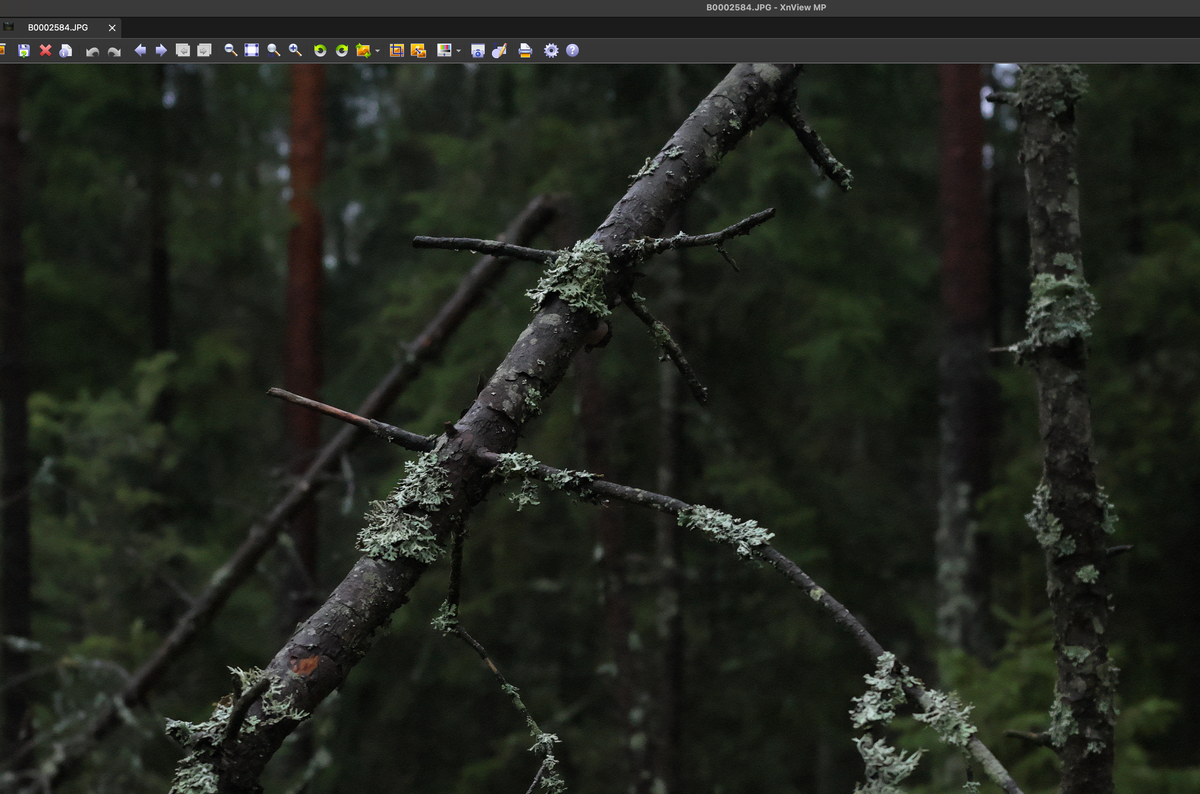
But this can be easily reproduced. Here's an example photo, taken with CFV100C with 75P using ISO6400.
Didn't touch any adjustment or setting in neither software. Just open file and export to JPG.
Phocus applies lens corrections, that's why the jpg's seem a little different.
Feel free to play with these
I just noticed that HNNR RAW files produced from the latest version on Phocus (v4.1) are looking different in Iridient than in Phocus. My preferred choice from these would be detail-prioritised HNNR exported from Phocus. For some reason, that looks worse in Iridient, almost as watercolorly as original un-edited RAW in Phocus..
p.1 #19 · Should Phocus Desktop For Mac be My/Your X2Dii Best Option?
Thanks for doing the work above. Interesting, but HDR JPG/HEIF are probably one place where HNNR can produce a great end product without extra workflow steps and time spent, but who buys a $10K++ system to produce only JPG? I know, likely someone here does this, but most in this camp shoot Fuji (no HDR..correct me if I’m wrong) and HEIF is rather limited outside of the Phocus ecosphere.
Here is a review that might be interesting to some..first a quote:
“ There's an uncomfortable reality that emerges from the technical limitations described above, and it's worth stating plainly: you can have any two of these three things, but not all three:
HNCS color rendering - Hasselblad's signature color science
Intermediate editing in another app via TIFF - Capture One, Photoshop, etc.
HDR output with gain maps - for display on HDR-capable screens
Here's why each combination works - and why all three together doesn't:
HNCS + HDR requires editing entirely in Phocus and exporting Ultra HDR JPEG directly. No intermediate editing elsewhere - no Capture One's superior masking tools, no Photoshop's content-aware fill, no third-party plugins. You're limited to Phocus's editing capabilities, which many users find constraining. There's also a workflow nuance here that's easy to miss: Ultra HDR JPEGs contain an SDR base layer for backward compatibility, and Phocus maintains separate settings for SDR and HDR rendering. If you only ever work with the HDR checkbox enabled, your SDR fallback - what most viewers will actually see - may be essentially unprocessed. Part 3 covers the recommended processing order in detail.
HNCS + TIFF editing means exporting TIFF from Phocus with HNCS baked in, then editing in your preferred application. This is the workflow many X System photographers have adopted to combine Hasselblad's color science with more capable editing tools. But your final output is limited to SDR - no gain map, no HDR luminance on displays. The luminance relationships in your highlights have already been tone-mapped to fit within the TIFF's SDR ceiling, and no software can recover what's been compressed.
HDR output + external editing means working from RAW in Lightroom Classic 14+ and exporting with gain map enabled. You get true HDR delivery with highlights that actually glow on capable displays. But you're using Adobe color science, not HNCS - you've traded Hasselblad's rendering for Adobe's.
This is a significant limitation that Hasselblad's "end-to-end HDR" marketing glosses over. Their HDR pipeline essentially requires you to do all your editing in Phocus if you want both HNCS and HDR output. The moment you export a TIFF to take advantage of Capture One's superior editing tools or Photoshop's retouching capabilities, you've exited the HDR pipeline permanently.
For photographers who've built workflows around Phocus-to-Capture One handoffs - which many X System users have, given Phocus's limited editing tools - this creates a genuine choice: accept SDR-only output to keep HNCS and your preferred editor, or sacrifice one of those to gain HDR delivery.
I've raised this point repeatedly in discussions on the Hasselblad forums and subreddit, and it's remarkable how often the Lightroom enthusiasts overlook or ignore the HNCS trade-off. Yes, Lightroom can export HDR with gain maps - but the resulting images don't have Hasselblad's color science, which for many users is a significant part of why they bought into the system in the first place.”
p.1 #20 · Should Phocus Desktop For Mac be My/Your X2Dii Best Option?
I’m using a second post in order to ask this question.
In the above quote the author states that, “ HNCS + TIFF editing means exporting TIFF from Phocus with HNCS baked in, then editing in your preferred application. This is the workflow many X System photographers have adopted to combine Hasselblad's color science with more capable editing tools. But your final output is limited to SDR - no gain map, no HDR luminance on displays. The luminance relationships in your highlights have already been tone-mapped to fit within the TIFF's SDR ceiling, and no software can recover what's been compressed.”
Is this true? I thought that TIFF contains all information available in the RAW..edited RAW files. In Lightroom the HDR check box remains active in TIFF, but without adjustment the histogram remains in the more restricted SDR range. Am I throwing away information when importing TIFF from Phocus into Lightroom Classic?


 link
link
