p.1 #1 · Airglow or an artifact of editing? Milky Way at Big Sur
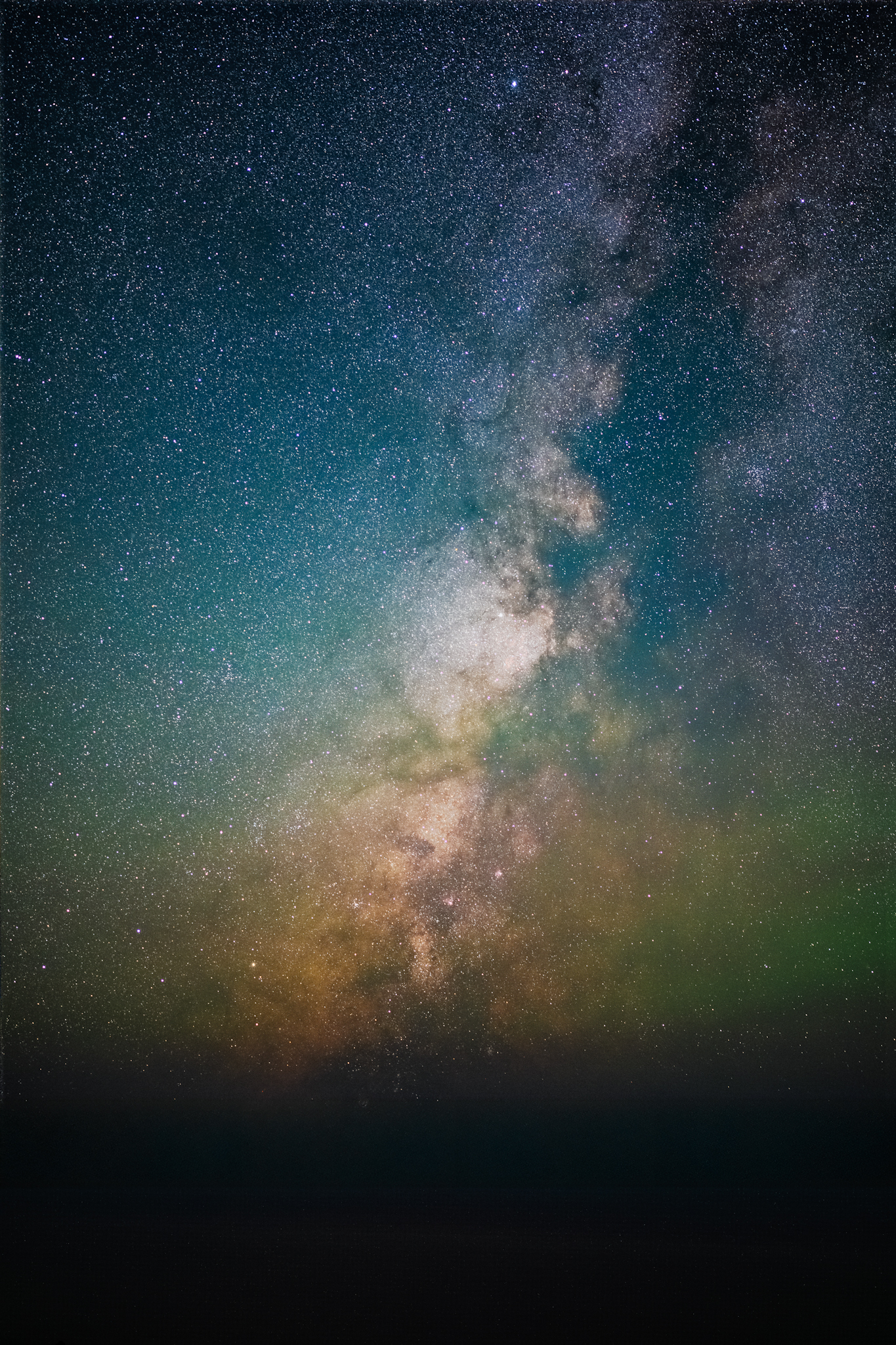
Hey all. I am an experienced nature photographer; novice Milky Way photographer but getting obsessed quickly. I captured this shot of the Milky Way yesterday over the pacific ocean from Highway 1 in Big Sur. It’s a bortle 2 area, the weather was unusually clear though still humid, and the moon set early. I traveled for the shot.
This is a 15 frame stacked image in starry landscape. I denoised the raw files in dxo first and then processed the stack in starry landscape afterwards. Then I isolated the nebulae in PS using starxterminator for a contrast and curves edit and then added back in the stars. I didn’t do any selective color editing or hue shifts and didn’t crank saturation or vibrance.
But…clearly there is a lot of color in the image. I have been reading about airglow and suspect that might be where the color is coming from but I wanted your more expert opinions. It is very humid here and we get marine layer coming off the ocean, not sure if that could be a factor.
I like the image but I don’t want to have accidentally faked it.
p.1 #2 · Airglow or an artifact of editing? Milky Way at Big Sur
Beautiful.
The green is airglow.
It seems that the humidity has reduced the contrast of the horizon.
The sea in the foreground is too dark, brightening it would be better.
p.1 #3 · Airglow or an artifact of editing? Milky Way at Big Sur
I agree that the green is airglow. I'm not so sure about the blue/cyan color above it, near the middle of the image. I haven't gotten airglow that color. I've certainly gotten blue from Rayleigh scattering if there is any moon at all, but the moon shouldn't have been out at the time and place you were shooting. I'd just want to be careful that I wasn't introducing that somewhere in post.
I know some photographers dislike airglow. I feel the opposite and consider it beautiful. With sunsets, we're always shooting the same sun, and it's the sky conditions and whatever else you've included in frame that make the photo different from others. Similarly, it's always the same Milky Way, but airglow, foreground, and various temporal conditions can make our images fresh.
Edit to add: The red-orange brown above the green airglow is about the right color for the galactic dust that makes up a large portion of good Milky Way images.
p.1 #5 · Airglow or an artifact of editing? Milky Way at Big Sur
I’m still working on my workflow. I prefer dxo to topaz and dxo cannot take a tiff so I did it in that order. I should probably compare the two methods. Any additional processing advice?
bmike-vt wrote:
Wondering why you denoised first? The point of stacking is to reduce the noise… so I would have done that step last after you processed the images.
I bring all images to Lr, and have a preset where all I apply is Lens corrections - vignette, distortion and CA, etc.
Then export to TIFF for stacking. I was using Starry Landscape Stacker and Starry Sky Stacker depending on the image.
If it was a mosaic like the above image link I then would take the stacked TIFFS into AutoPano Giga or PTgui for stitching.
The stitched file (or the single file) would then go to Ps for stretching.
The stretched file would then come into Lr for final tweaks - noise, CA, saturation, clarity etc etc.
For your image - I see a lot of fringing (purple ones stand out) around the brighter stars. You can remove that with Lr pretty easily by adjusting the CA. You could try and bring the foreground up in brightness a bit with a graduated mask / filter. I also sometimes will apply a bit of negative dehaze / negative clarity on the sky near the horizon. But that depends on the night and the mood I witnessed.
The cyan tone is a bit strange, maybe it works, maybe it was there. I’d play with a circular mask / filter in Lr to color adjust just that area and see if you like it one way or the other.
mraifman wrote:
I’m still working on my workflow. I prefer dxo to topaz and dxo cannot take a tiff so I did it in that order. I should probably compare the two methods. Any additional processing advice?