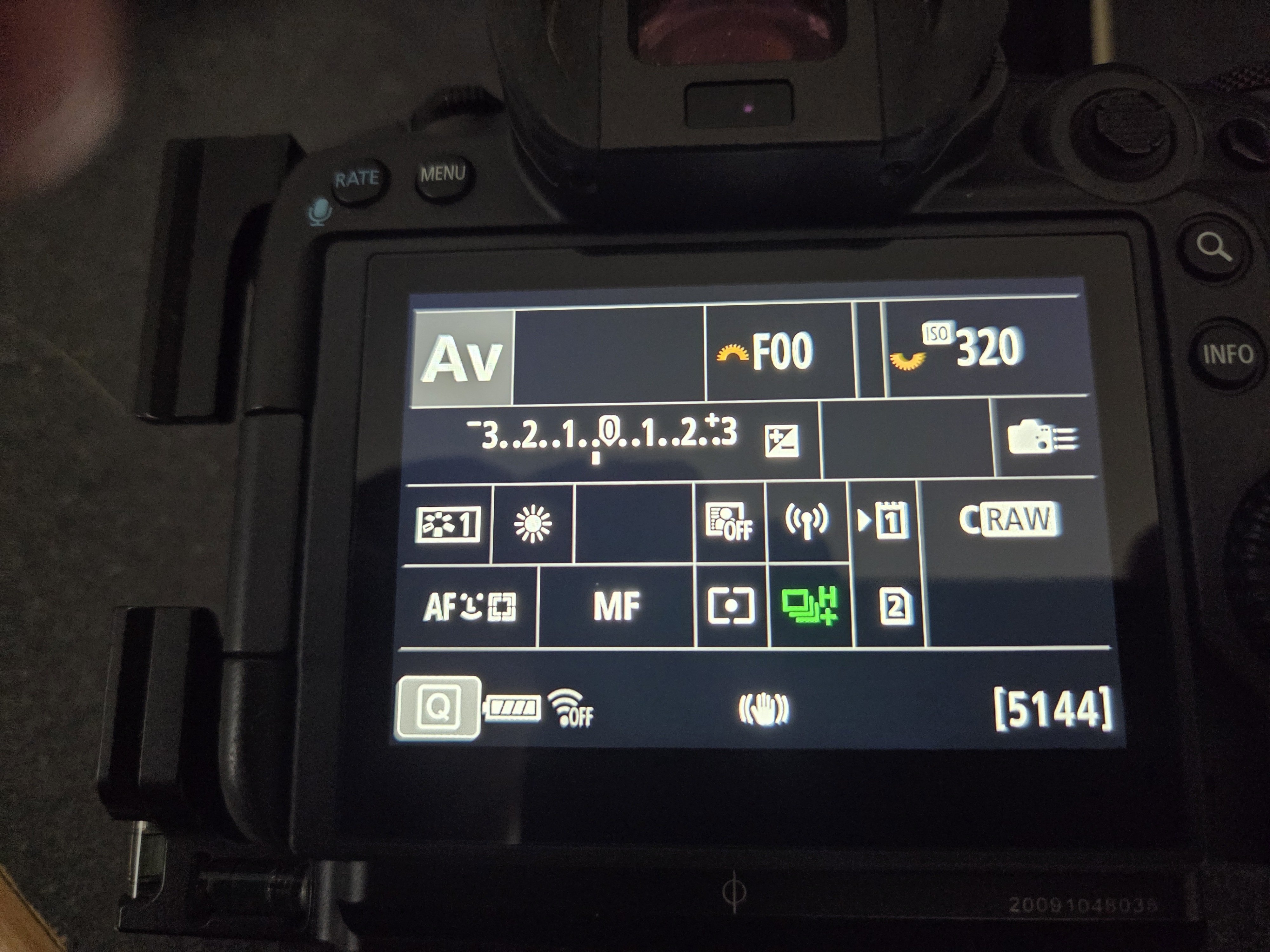
I've run into a situation I can't seem to figure out.. I've spent hours searching in the manual and online and still can't find the answer. I want to be able to see this screen with when pressing the Q button (see photo) as I do on my 2 R5s and my R7.. I used to be able to until recently on my R3 so I know it can be done... Any help appreciated
I took a quick look, and that certainly is an interesting one. There is no button customization for the "Q" button, so it could not have been something you changed there. From what I can tell the only way the Q button controls editing that menu is after you hit info a bunch of times to get to that particular screen.
My guess is that you had the screen timeout after x seconds, and then pressing the "Q" button turns the screen back on. But pressing any button will also wake the camera from sleep, so the info screen reappears. Pressing "Q" after the screen timed out doesn't just go into edit mode, you actually need to press it a second time to start editing.
I'm not finding a way that Q will control any particular screen directly, it's more of a modifier of whatever screen you last had up by pressing the info button. So could be used to make the menu reappear, but only if you left the display on that screen and then the screen times out.
Really not sure you understand what I want. I control pretty much everything with this screen. Works on both my R5's and my R7 before selling it. I press the Q button and this screen appears 1st. There I can control ISO, exposure compensation, WB, drive mode etc just by hitting Q button a second time and scrolling through using the joystick. I had this working fine on the R3 but have lost it and can figure out how to get back there.
drobertfranz wrote:
Been through that a dozen times and I cannot get the screen back to the way it functioned before and does currently on my R5s
I posted this just in case you had not reviewed it.
A real pain it be!! My Fuji 100s ii is reacting the same way. The menus are way to complicated for this olde fart to manuever through consistently.
Good luck!
Dan
So my guess then is that you disabled the screen on your R3, and just had to go into the menu and enable it again?
The part I was confused about is that you presented a photo showing the screen you wanted, which I incorrectly thought was on the camera you were troubleshooting.
bman212121 wrote:
So my guess then is that you disabled the screen on your R3, and just had to go into the menu and enable it again?
The part I was confused about is that you presented a photo showing the screen you wanted, which I incorrectly thought was on the camera you were troubleshooting.
Yes that's what happened.. Not sure how? Yes I showed the screen of my R5 to show what I was looking for!
Thank you it all makes sense now. So you already did post the correct solution, which is the red menu, tab 9, Shooting info display, Screen info settings. Then go find the screen with the missing check mark and press set.
What really threw me off is that I went a grabbed a DSLR real quick and pressing the Q button will bring up that screen no matter what is on the back display. On an R series camera it seems like Q either changes what's in the EVF or enables / displays the Info display (Top display). There are a lot of complaints about this, and from what I can tell you have to first switch through the displays using "INFO" to get the Q menu, and then from there the Q button will let you edit settings.
So for anyone wondering when you press INFO a bunch of times you should see that screen. If you don't see it, you need to go enable it. But pressing Q only works after you switched to that screen, otherwise it won't bring up that menu like it used to on DSLRs.