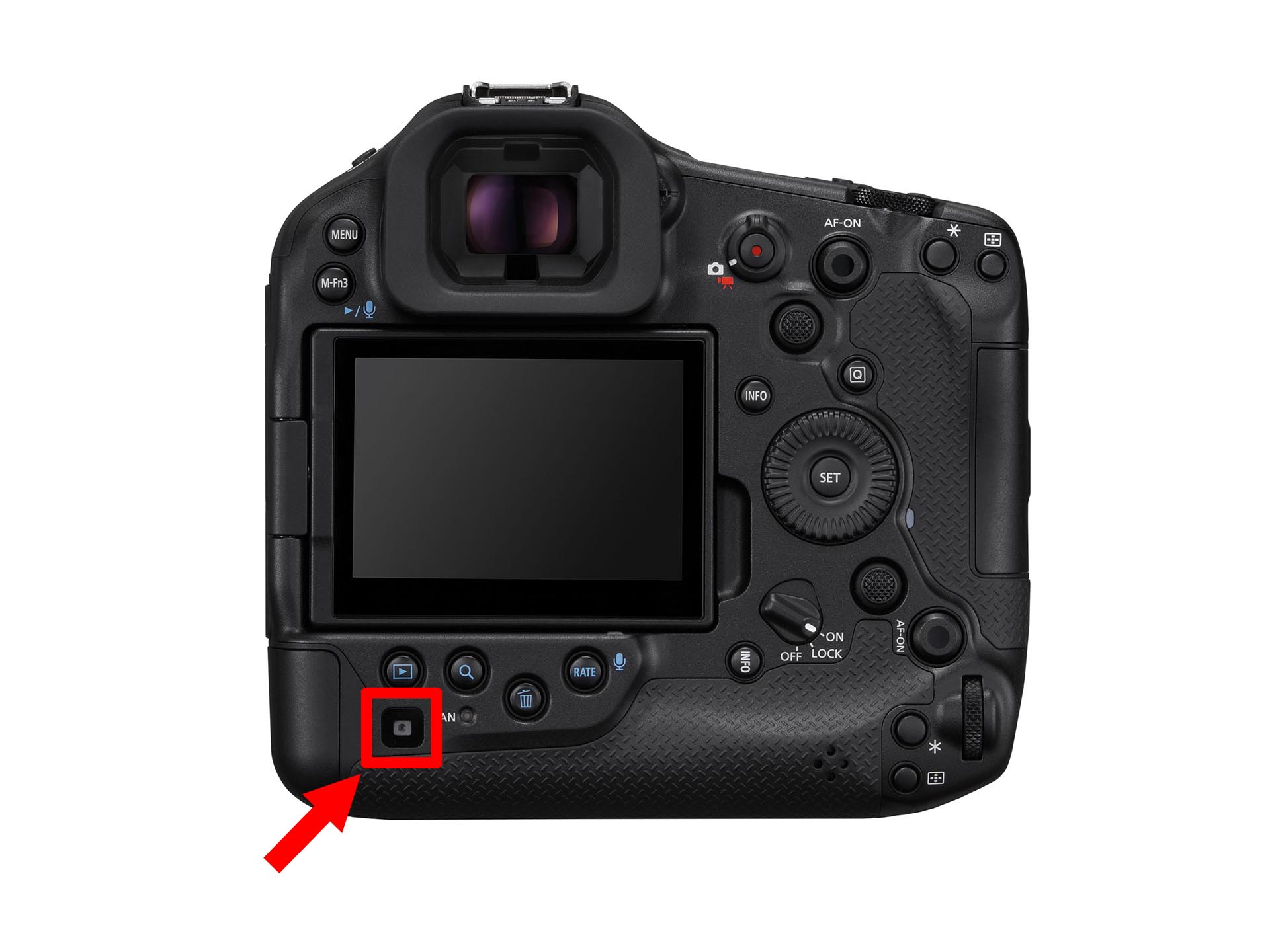
We finally get to know what that left corner sensor is for on the R1.
Viewfinder Display Priority Mode [EOS R1 only]
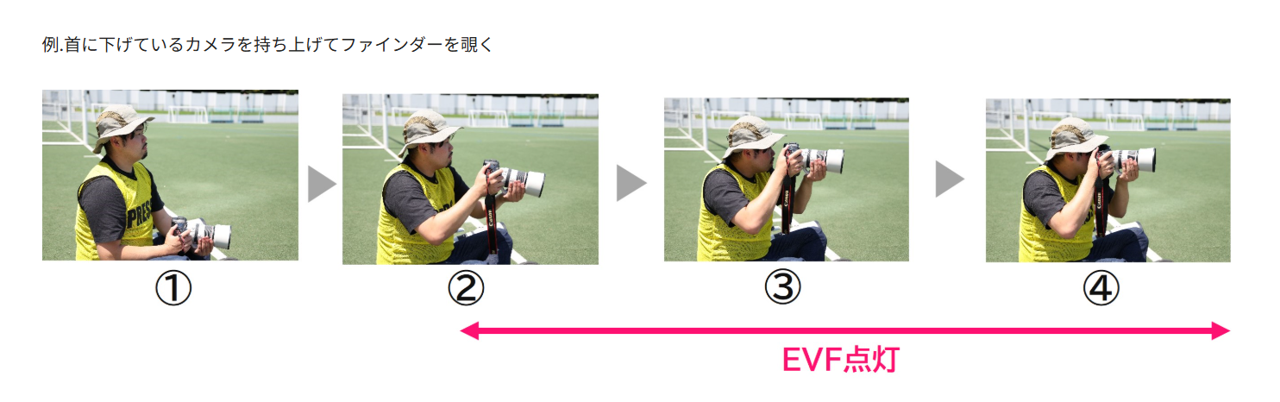
One of the new features, "viewfinder display priority mode," uses a "rear sensor" that has not been used since the release of the EOS R1. When the "rear sensor" in the lower left corner of the back of the main unit detects the photographer, the live view display on the rear monitor is stopped and the live view display is switched to the viewfinder.
Since it can change the display faster than the automatic switching (screen display destination AUTO) with the eye sensor, it is said that it is advantageous to shoot at the decisive moment when shooting through the viewfinder immediately. In addition, the live view screen is displayed only in the viewfinder, and the MENU screen and playback screen are displayed on the rear monitor. You can also set up such settings.
From a web browser translated version of the Canon Japan website release notes:
EOS R1 Firmware Version 1.1.2
Information posted on July 24, 2025
Firmware Changes
This firmware (Version 1.1.2) includes fixes for the following bugs identified in firmware (Version 1.1.0).
Fixed an issue where recording videos with the [Pre-Record] setting using a card larger than 2TB could not be recorded correctly.
Fixed an issue where the camera would not work properly when the function of the still image shooting/video recording toggle switch was changed to [Silent Shutter] or [Disabled] and updated to firmware version 1.1.0.
In addition, this firmware includes the following changes to firmware (Version 1.1.0).
Improved security features.
You can now request a password when the power is turned on.
You will need to set a password for the first time.
You can also change the settings to prevent the password request screen from appearing.
You can check the history of password changes, network information changes, etc.
※ Check out the detailed guide "Set a password" on cam.start.canon.
Even with a single camera, you can now download firmware from the Internet and update it.
When a person is detected by the camera's rear sensor, the viewfinder is turned on in a "viewfinder display priority mode".
It is now possible to automatically detect 100/120 Hz flicker during live view.
Camera Remote Application It is now possible to register the focus position in the CR-A100's preset functions. When used with the CR-S700R robotic camera system, it is easier for the photographer to focus and shoot at the intended subject distance.
[Camera Assist] has been added to the menu. When shooting in a pan using a compatible lens, "image stabilization" and "subject stabilization" are performed during exposure.
Added [Case Special] to the servo AF characteristics, which is suitable for shooting "subjects over the net", such as badminton and volleyball.
Added support for the Software Development Support Kit (EDSDK/CCAPI) for digital cameras.
When rating images, we have a function to protect images at the same time.
CFexpress cards up to 8TB are now supported.
Cards larger than 8TB require Physical Format on the camera
Cards larger than 8TB are treated as 8TB cards
Cards larger than 2TB cannot be used for firmware updates
When connecting the CR-A100 for long periods of remote shooting, a setting has been added to reduce the frame rate to suppress heat generation.
When transferring images with voice memos via FTP, → changed to transfer voice memos in the order of images. In addition, if you add a voice memo to an image waiting to be transferred, the image and voice memo will be transferred in the last order.
You can now set the number of recordings in units of one during pre-continuous shooting.
[Airplane mode] has been added to the button customization when shooting.
Exposure simulation can now be performed when using a strobe.
In AF during video, AF tracking for subjects that are difficult to focus has been improved.
Fixed an issue where Err70 could occur when [Blackout Free View] was set to "Set" and [Release during Servo AF 1st frame release/release during one-shot AF] was enlarged after shooting with the setting of "Release Priority".
Fixed an issue that could cause Err70 to occur due to interference from other Bluetooth devices during Bluetooth communication.
Fixed an issue where Err70 would occur very rarely when shooting repeatedly with "High-Speed Continuous Shooting+".
Fixed an issue where shooting with an electronic shutter immediately after activation would cause the ERR70 to occur very rarely.
Fixed an issue where Err70 would rarely occur while recording a video with the "FHD239.8P/200.0P" setting.
Fixed an issue where Err70 could occur in very rare cases when using the frame rate "50.00P", "Video Electronic IS", "In" or "Strong" in video mode.
Fixed an issue where Err70 might occur while waiting for a shot when [Pre-Record] is set to "On" and [Auto Forward] to image.canon is set to "On".
Fixed an issue where the camera might not work properly when the monitor was displayed at a low brightness after pre-continuous shooting was set to "Off".
Fixed an issue where video recording could not be done while shooting a remote live view with EOS Utility while using HDMI output.
Fixed an issue where RAW images with large file sizes could not be transferred via Camera Connect.
Fixed an issue that prevented you from connecting to a Wi-Fi 7-enabled router.
If the camera's firmware is already in version 1.1.2, you do not need to change the firmware. When changing firmware, please read this page carefully before using the download service.
Please note
In line with this functional improvement, we are revising the instructions for use. Please download and use it together with the new firmware. The latest instructions for use can be downloaded from our website.