Nice. And you can rent out the basement for income. No need for home air circulation or the furnace.
I learned a long time ago... a real long time ago... that buying/building a high-end machine will last a way longer time than expected and more than worth it (in money and grief) over the long haul. The "value point" is a short-lived concept.
When building... I buy the top of the line for performance unless that top top processor or whatever jumps nutty high in price. So it is either top or second from the top.
Thanks for the kind words Bruce. That's something I subscribe to also. I named the new machine Cray2. Its not after the original Cray machine but rather from one of my sons' response when I showed him a pic under construction and the specs - "cray cray"
EB it is a large case even for an eatx. I have plenty of space on my desk I added an image while under construction that shows the layout better. The included tft screen in the corner of the case can be programmed to display just about anything. I'll probably just use it for operating parameters of the gpu and cpu. Yes, that's a riser, turning the gpu vertical - blocks a lot of the mb.
ctgoldwing wrote:
Thanks for the kind words Bruce. That's something I subscribe to also. I named the new machine Cray2. Its not after the original Cray machine but rather from one of my sons' response when I showed him a pic under construction and the specs - "cray cray"
EB it is a large case even for an eatx. I have plenty of space on my desk I added an image while under construction that shows the layout better. The included tft screen in the corner of the case can be programmed to display just about anything. I'll probably just use it for operating parameters of the gpu and cpu. Yes, that's a riser, turning the gpu vertical - blocks a lot of the mb.
The decription is that it fits several half-height cards it a bit concerning. How are you moving data in and out of that computer, CNA with SFP+, SFP28 or other? I'm struggling to fit anything larger than a 5080 and I'm not convinced that a riser will make more space. Maybe if it is higher up, but I'm not sure how efficicient that case is.
Are you seeing good AI processing times with the 5090?
EB-1 wrote:
The decription is that it fits several half-height cards it a bit concerning. How are you moving data in and out of that computer, CNA with SFP+, SFP28 or other? I'm struggling to fit anything larger than a 5080 and I'm not convinced that a riser will make more space. Maybe if it is higher up, but I'm not sure how efficicient that case is.
Are you seeing good AI processing times with the 5090?
EBH
The Hyte Y70 can fit a 422mm length gpu EB. When you use a riser I don't believe you can get that. I used the Gigagbyte Aorus RTX5090 which is a full height 360mm long card. btw I replaced the PCIe 4 riser that came with the case for a LINKUP PCIe 5 unit.
I am still in the setup / install mode so haven't done any photo editing yet. I have run several Passmark performance tests on the entire system. At 100% gpu, the temps only got to 77c. The average score for a RTX5090, according to their site, is 40,896. Mine scored 42,331. As long as its in the ballpark I'm ok with it.
I don't use fiber here on my lan, just a 1gb cat6 wired system. The only really long xfers to my NAS is on the actual install. Day to day xfers are really small. The .5TB of data I xferred for my initial setup took less than 2 hours.
As far as efficiency goes. . . depends what you mean. Spacewise it sure could be smaller - not a concern of mine.
Cooling efficiency? It does run cool. There are 13 fans, 4 on the gpu, 3 on the cpu radiator and 6 on the case.
Aesthetically? It's a knock your socks off build
I am still setting up - I must have disconnected a sata cable from the ssd, system doesn't see it now. Fortunately all the panels are no tools, snap on / off. Can't wait to start editing with it
Just a follow up - I just imported 12.5k images to create a new library on this pc. Total time including creating the preview images was under 22 minutes. That number really doesn't mean anything to me as I have no basis to measure it against.
What I do know is that it takes a hair over 1 second to denoise a 6000 x 4000 pixel image. That is a pretty great improvement from my last machine.
ctgoldwing... Quite recently, I happened to watch a video about PC assembly that suggested the liquid cooler on the CPU should be below the connections from the radiator rather than above them. The thinking is that if air bubbles form then they will rise and you don't want to get them trapped at the CPU because they will greatly undermine the CPU cooling. If all of that is actually valid then you should move the cooler connections from where they are at the bottom of your CPU to the top of your CPU by rotating the cooler 180 degrees..
Apart from that, you've got more fans than I have so I'm guessing it's a noisy beast if it ever does get hot.
Alan321 wrote:
ctgoldwing... Quite recently, I happened to watch a video about PC assembly that suggested the liquid cooler on the CPU should be below the connections from the radiator rather than above them. The thinking is that if air bubbles form then they will rise and you don't want to get them trapped at the CPU because they will greatly undermine the CPU cooling. If all of that is actually valid then you should move the cooler connections from where they are at the bottom of your CPU to the top of your CPU by rotating the cooler 180 degrees..
Apart from that, you've got more fans than I have so I'm guessing it's a noisy beast if it ever does get hot.
I have heard that theory before but never had an issue and I'm somewhat skeptical Its a closed system. There should be no way for air to get in unless there is a leak. I can see where that might happen if you fabricate your own water system. . .
As far as noise goes, it is VERY quiet. When the cpu is running at 100% you know the fans are running but its pretty muted. The Lian Li SL Infinity fans are the quietest I've ever used. This is my 12th build and it garnered the biggest smiles.
@ctgoldwing, after a lot of planning and speccing out my dream system, I finally gave up and bought a pre-built system, since it was only getting more and more pricier.
I got the Lenovo Legion 10i Tower (with Intel Core Ultra9 285K, RTX5090, 64GB DDR5, 2TB NVME) for a hair under 3.7K. Got 2 18TB Toshiba Professional HDDs and installed them in the system (it was already wired up). My original plan was to wait for sometime and get Gen5 PCIe M2 drives, but the way prices are going right now, I will repurpose a 4TB Gen4 M2 drive that I have in another system. Connected a pair of 4TB external SSDs to my TB4 dock for photo-editing and everything is up and running smoothly
@Sashi
Sounds like an awesome machine Sashi. The 5090 is a killer. Last week I drove down to FL for the winter and brought my old college roommate a new computer that I built for him. He was amazed at the difference in speed over his 5 year old machine - and its a 7600X with a 5060ti. For what he uses it for its 10X what he needs. It's amazing what the new chips can do!
Thanks. With the way RAM and SSD prices are going, I am glad I pulled the trigger on this just before the prices shot up.
Planning to deploy some local LLMs now that I have the processing power. Also will be doing more video on my mirrorless too for the same reason. With about 32TB of storage on the HDDs, and about 10TB on SSDs (excluding boot drives), I think I am set for the next couple of years at least :-)
ctgoldwing wrote:
@Sashi@
Sounds like an awesome machine Sashi. The 5090 is a killer. Last week I drove down to FL for the winter and brought my old college roommate a new computer that I built for him. He was amazed at the difference in speed over his 5 year old machine - and its a 7600X with a 5060ti. For what he uses it for its 10X what he needs. It's amazing what the new chips can do!
EB-1 wrote:
The 5080 is quite good and fits well within 3 slots. It also keeps the system power manageable within the <1000W constraints.
EBH
From the 30x0 series through the current 50x0 series the x080 cards have always been the best values, giving you almost 90% of the processing power for a greatly reduced price.
Jack Flesher wrote:
And here I sit, really happy with the speed of my M4 Mac Studio at about 1/10th that footprint 😎
Yeah, I have to use PCs for some of the applications we need at my business, so I have both and have often posted comparative testing numbers here. The only configurations that can consistently beat my M3 Ultra or M4 Max in Lightroom not only cost more, but they take up a huge amount of space and and generate tons of heat and lots of noise (relatively speaking), and of course suck up vastly more power as well. Those configurations also cost the same or more than my Apple Silicon machines and the performance differential is pretty minute.
I've never been more surprised and pleased with a technological change than I have been with Apple's release of their whole Apple Silicon line--and I was a huge skeptic when it was announced.


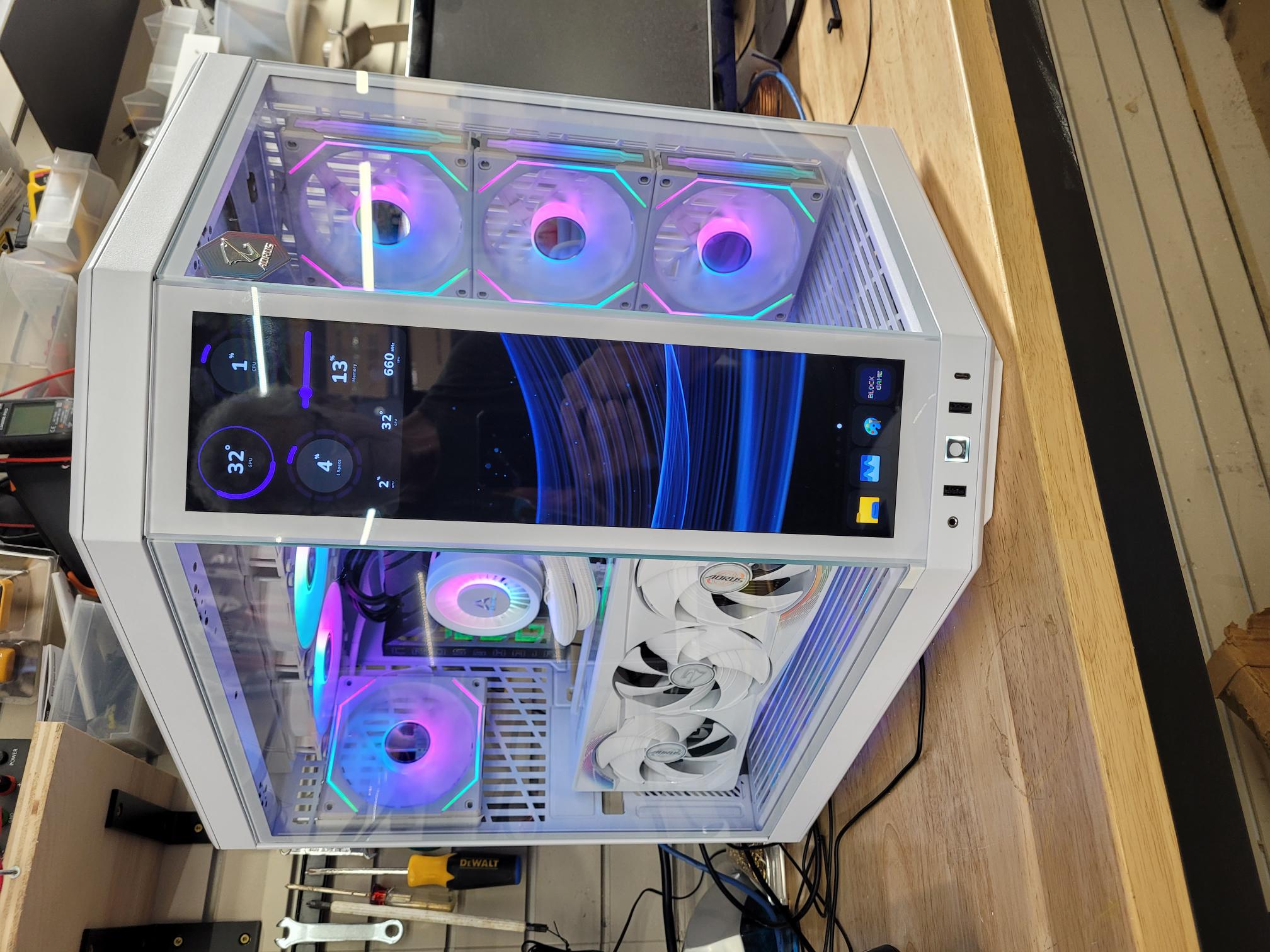
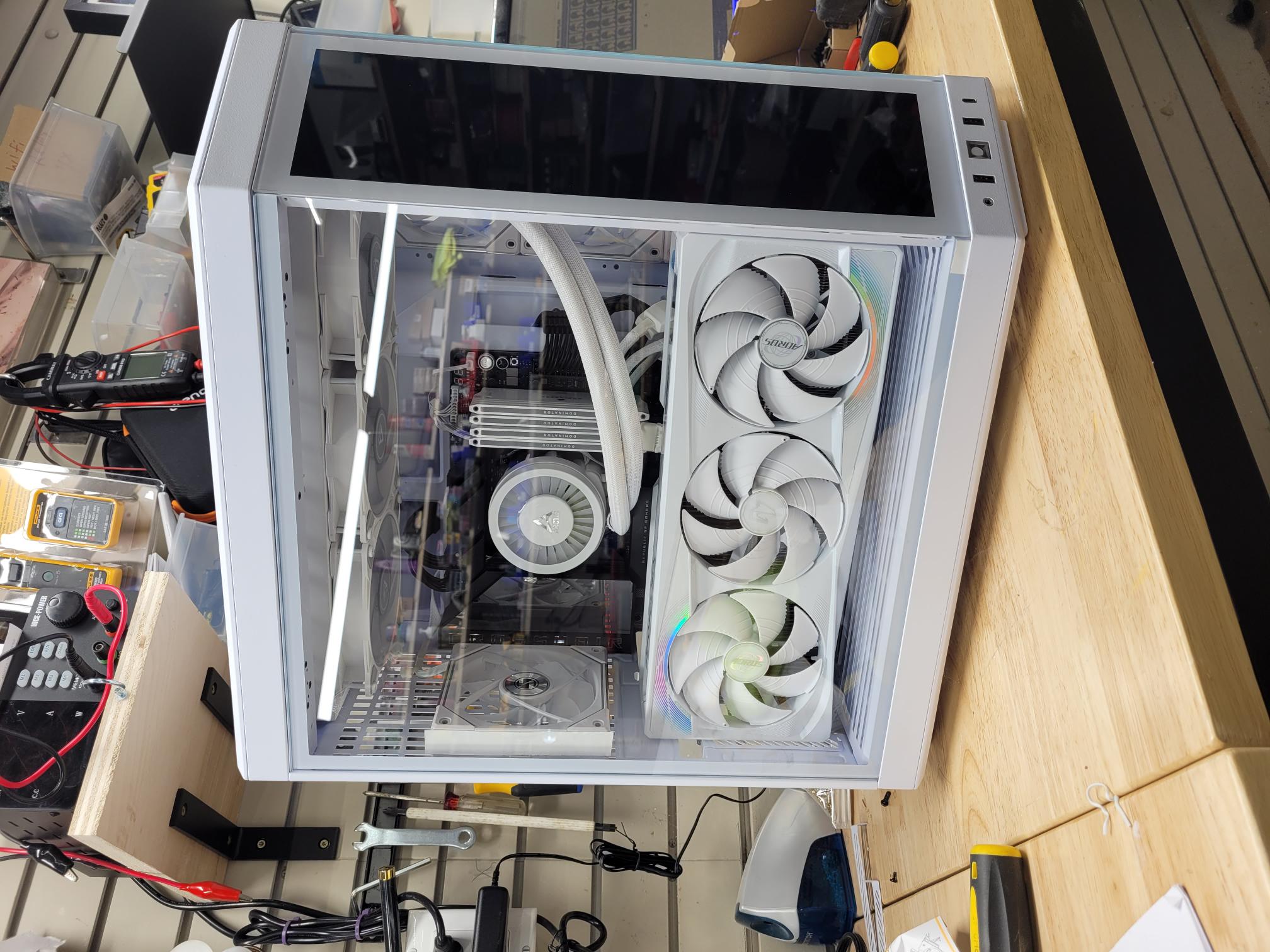

 I added an image while under construction that shows the layout better. The included tft screen in the corner of the case can be programmed to display just about anything. I'll probably just use it for operating parameters of the gpu and cpu. Yes, that's a riser, turning the gpu vertical - blocks a lot of the mb.