fredmiranda.com
Login

Moderated by: Fred Miranda
  New fredmiranda.com Mobile Site
  New Feature: SMS Notification alert
  New Feature: Buy & Sell Watchlist
  

FM Forums | Post-processing & Printing | Join Upload & Sell

       2       end
  

Archive 2025 · Denoising in DxO PL8 vs Topaz Photo AI


ruthenium
Offline
• • • •
Upload & Sell: On
p.1 #1 · Denoising in DxO PL8 vs Topaz Photo AI


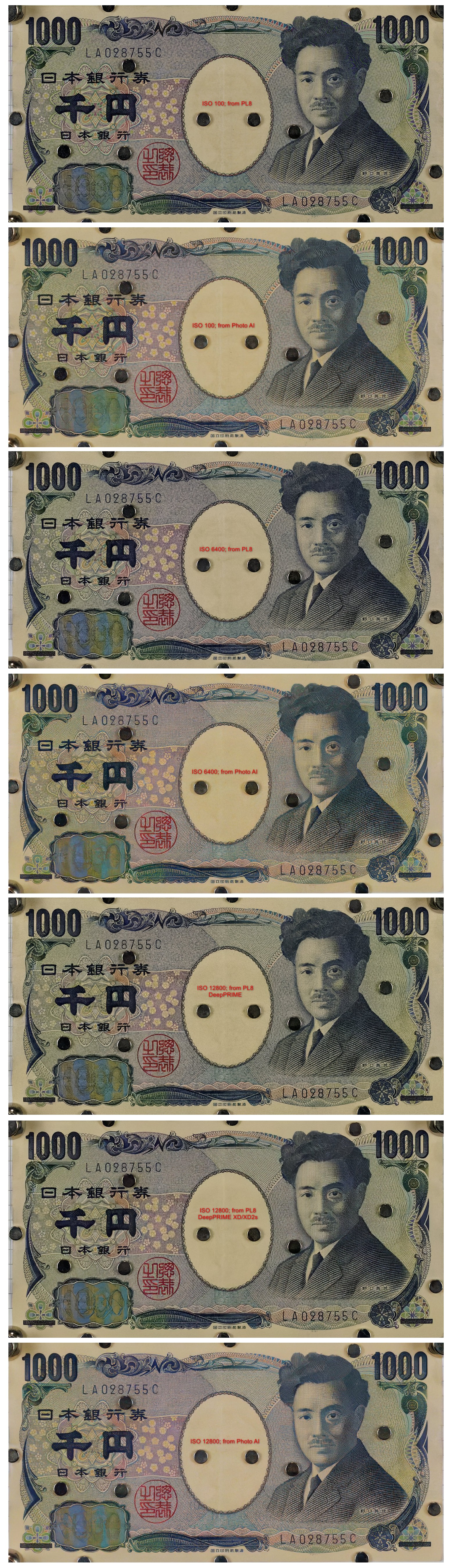
The following compilation is a close comparison of crops from images processed in DxO PL8 and Topaz Photo AI.
The three raw files are from my Sony A1 + 35mm F1.4 closed to F4, taken at ISO 100, 6400, and 12800. The camera was on a tripod and a remote shutter was used.
I optimized processing in PL8 as follows:
1) DxO Standard preset was applied.
2) DxO Smart Lighting was turned off,
3) DeepPRIME denoising was used with the default settings (the ISO 12800 raw was additionally denoised with DeepPRIME XD/XD2s)
4) DxO Clear View Plus was set to 10
5) Microcontrast was set to 15
6) Lens Sharpness Optimization was set to +0.1 (down from the default +1)

I optimized processing in Photo AI as follows:
1) Raw denoise was set to Normal at ISO 100 and to Strong at 6400 and 12800
2) Sharpen was Standard (on All) with Strength at 20 and Minor denoise at 1
3) Adjust lighting was v1 with Strength at 8.

The raw files are available from
https://www.dropbox.com/scl/fo/lzxmgph0siz8d6bmo3cmc/AHfRm-rmYZ9O1IaY85Ofows?rlkey=6hsj3yeybdv6xam52wkwz4d7g&st=urwcn9eq&dl=0

Feel free to process these in your favourite app, and if you can achieve better quality on the ISO 6400, and especially on the ISO 12800 image, please post your results and observations.


Feb 19, 2025 at 10:27 PM
danny_j1971
Offline
• •
Upload & Sell: Off
p.1 #2 · Denoising in DxO PL8 vs Topaz Photo AI


Click the thumbnails to open full size images in new browser tab.


Your raw files are actually shots of multiple USD notes and a 1000 Japanese yen note. A better comparison would have been posting jpegs of the entire image from the raw file and not just crops of the image.

Anyway, I don't have a 1 USD note or any Japanese notes so it's difficult to fine tune the denoising without having a reference point. You can add/remove texture as much as you like using the options and sliders in Denoise AI.

In any case I spent a couple of minutes fiddling with _A1_0053.ARW (ISO 12800 shot) in Topaz's standalone Denoise A! v3.6.2.

On the left is the raw file as opened in Denoise AI with all the adjustments set to zero. I don't have Photo AI because I am not yet convinced its denoising is significantly better than the standalone version. On the right is a quick denoising with the model set to Raw and fiddling with the sliders a bit.

On my screen this looks pretty much on par if not slightly more realistic in some parts than the equivalent DXO crops you posted.

At the end of the day, anyone interested in this type of comparison can do their own tests using their own images and come to their own conclusions on which is best for their needs and work flow.

Edited on Feb 20, 2025 at 01:25 AM · View previous versions


Feb 20, 2025 at 12:51 AM
TimMunsey
Offline
• • •
Upload & Sell: Off
p.1 #3 · Denoising in DxO PL8 vs Topaz Photo AI


Thank you for showing this. I find it interesting as I use DXO PureRaw and I see a major speed advantage of deep prime over the new XD models, do you just process all your images with the new models or do you process only from say 6400 upwards and those below with Deep Prime? Do you think the new models have better lens correction?

Tim

ruthenium wrote:
rocessing in PL8 as follows:


Feb 20, 2025 at 01:06 AM
ruthenium
Offline
• • • •
Upload & Sell: On
p.1 #4 · Denoising in DxO PL8 vs Topaz Photo AI


danny_j1971 wrote:
Click the thumbnails to open full size images in new browser tab.

Your raw files are actually shots of multiple USD notes and a 1000 Japanese yen note. A better comparison would have been posting jpegs of the entire image from the raw file and not just crops of the image.

Anyway, I don't have a 1 USD note or any Japanese notes so it's difficult to fine tune the denoising without having a reference point. You can add/remove texture as much as you like using the options and sliders in Denoise AI.

In any case I spent a couple of minutes fiddling
...Show more

Danny, regarding "it's difficult to fine tune the denoising without having a reference point" - please, use the ISO 100 image as the reference. The objective of successful denoising is to process the high-ISO images to obtain jpegs that look as close as possible to the ISO 100 reference.

I added my jpegs from PL8 and Photo AI into the same folder where the raw files are stored:
https://www.dropbox.com/scl/fo/lzxmgph0siz8d6bmo3cmc/AHfRm-rmYZ9O1IaY85Ofows?rlkey=6hsj3yeybdv6xam52wkwz4d7g&st=j663p1q0&dl=0

I disagree with "A better comparison would have been posting jpegs of the entire image from the raw file and not just crops of the image." I believe looking at the close crops, side-by-side, allows one to see the detail (lost or added in denoising) and the residual noise. If you would be willing to do this, please post a crop (e.g. one $1 bill) from your jpeg at ISO 12800 side by side with the corresponding crop from my jpeg from PL8.

Regarding "anyone interested in this type of comparison can do their own tests using their own images and come to their own conclusions on which is best for their needs and work flow" - I am interested in what we can collectively learn from this experience and whether there might be some consensus on the success of denoising, after people have formed their own conclusion.


Feb 20, 2025 at 09:09 AM
ruthenium
Offline
• • • •
Upload & Sell: On
p.1 #5 · Denoising in DxO PL8 vs Topaz Photo AI


TimMunsey wrote:
Thank you for showing this. I find it interesting as I use DXO PureRaw and I see a major speed advantage of deep prime over the new XD models, do you just process all your images with the new models or do you process only from say 6400 upwards and those below with Deep Prime? Do you think the new models have better lens correction?

Tim


Tim, this is a good question on when (and whether) to use DeepPRIME XD. To answer this, let's state the broad objectives of denoising:
Objective 1) removing visible noise while faithfully retaining the image content
Objective 2) restoring the image content from the pixels where the weak signal is overwhelmed by noise.

DeepPRIME succeeds in objective 1
DeepPRIME XD/XD2s attempts reaching objective 2

DeepPRIME XD/XD2s does obliterate noise and succeeds in restoring some fine detail that was "lost" in noise. However, DeepPRIME XD/XD2s may produce artefacts. Fortunately, this seems to be rare, in my experience. One that I have seen a few times is the loss of regular patterns, e.g. a grid, or a dot pattern. DeepPRIME XD/XD2s refines details to the effect akin to sharpening. Thus one should watch for signs of over-sharpening and may want to reduce the amount of extra sharpening (set with Lens Sharpness Optimization in PL8) when using DeepPRIME XD/XD2s vs the amount of sharpening that can be used with DeepPRIME.

One question that should be asked is whether we want the processed images be faithful to the subjects in finest details, or whether we want the processed images look pleasing. This is decided differently for different subjects. One example is portrait photography where, I believe, the objective is to produce a pleasing image. Another case is wildlife photography. Humans have only a general, and possibly vague, idea of how the feathers of a particular bird look like in real life. Therefore, the objective of processing is to produce a picture that should look realistic and pleasing, while it is not generally required to be a faithful reproduction of the subject (that would be simply impossible at high ISO when much detail is lost anyways).

I think the correct approach is a balanced one. At low ISO (100 - 1600 and possibly up to 6400), DeepPRIME does everything it needs to do. However, even if this is not really necessary for denoising, one may want to use DeepPRIME XD/XD2s even at relatively low ISO, e.g. 800, on wildlife photos, especially when cropped, because the resulting images may look "better", with more refined and sharper fine details. This experimenting with denoising can be time consuming, thus it makes sense to reserve it to working on the pictures that are "worth" the invested time.

Regarding "Do you think the new models have better lens correction?" I believe that lens corrections and sharpening are appplied independently. At least, this is how it seems to work in Photolab 8.
Dmitri


Feb 20, 2025 at 10:38 AM
danny_j1971
Offline
• •
Upload & Sell: Off
p.1 #6 · Denoising in DxO PL8 vs Topaz Photo AI


ruthenium wrote:
Danny, regarding "it's difficult to fine tune the denoising without having a reference point" - please, use the ISO 100 image as the reference. The objective of successful denoising is to process the high-ISO images to obtain jpegs that look as close as possible to the ISO 100 reference.

I added my jpegs from PL8 and Photo AI into the same folder where the raw files are stored:
https://www.dropbox.com/scl/fo/lzxmgph0siz8d6bmo3cmc/AHfRm-rmYZ9O1IaY85Ofows?rlkey=6hsj3yeybdv6xam52wkwz4d7g&st=j663p1q0&dl=0

I disagree with "A better comparison would have been posting jpegs of the entire image from the raw file and not just crops of the image." I believe looking at the close crops, side-by-side,
...Show more

Posting the output image of all the notes is better imo because people can then compare any of the notes side by side while viewing at 100%.

Clicking my posted images opens them in separate browser tabs enabling them to be scrolled to any of the notes for side by side comparison at 100%.

Obviously any discussions in threads like this are not going to come up with anything definitive on which app is better. That would need many more images of various types for a valid test.

Of course there will be images where DXO might be more suited than Topaz just as there will be images where Topaz might be more suited than DXO.


Feb 20, 2025 at 02:07 PM
ruthenium
Offline
• • • •
Upload & Sell: On
p.1 #7 · Denoising in DxO PL8 vs Topaz Photo AI


danny_j1971 wrote:
Posting the output image of all the notes is better imo because people can then compare any of the notes side by side while viewing at 100%.

Clicking my posted images opens them in separate browser tabs enabling them to be scrolled to any of the notes for side by side comparison at 100%.

Obviously any discussions in threads like this are not going to come up with anything definitive on which app is better. That would need many more images of various types for a valid test.

Of course there will be images where DXO might be more suited than Topaz just
...Show more

We might be approaching testing denoising differently.
We agree on the need of a reference image.
To me this reference image must be well-defined, reproducible by others as much as possible (not a bird or brick wall), and rich in extra-fine detail like a paper bill/note.
The sharpest part of an image is expected to be in the central area; thus, I see no value in "people can then compare any of the notes side by side" - the central $1 and 1000 yen paper bills at ISO 100 should be the reference.
In my experience, this reference is highly sensitive to artifacts when artifacts are introduced by processing from raw. It is very easy to see if something isn't right, like I demonstrated in the related post when testing sharpening in Topaz Photo AI with their Lens Blur v2 and Natural sharpening models.
https://www.fredmiranda.com/forum/topic/1891945/0#16755942


Feb 20, 2025 at 03:07 PM
danny_j1971
Offline
• •
Upload & Sell: Off
p.1 #8 · Denoising in DxO PL8 vs Topaz Photo AI


And I disagreed with your opinion that at high iso DXO will always outperform Topaz.

As I said originally, anyone interested can do their own testing using their own images to see which app is best for their needs and workflow.

Topaz is not a dedicated raw converter. I get better results with Topaz by first doing the raw conversion in ACR, exporting a 16 bit tiff and denoising the tiff in Topaz.


Feb 20, 2025 at 03:12 PM
Bruce n Philly
Offline
• • •
Upload & Sell: Off
p.1 #9 · Denoising in DxO PL8 vs Topaz Photo AI


danny_j1971 wrote:
And I disagreed with your opinion that at high iso DXO will always outperform Topaz.

As I said originally, anyone interested can do their own testing using their own images to see which app is best for their needs and workflow.

Topaz is not a dedicated raw converter. I get better results with Topaz by first doing the raw conversion in ACR, exporting a 16 bit tiff and denoising the tiff in Topaz.


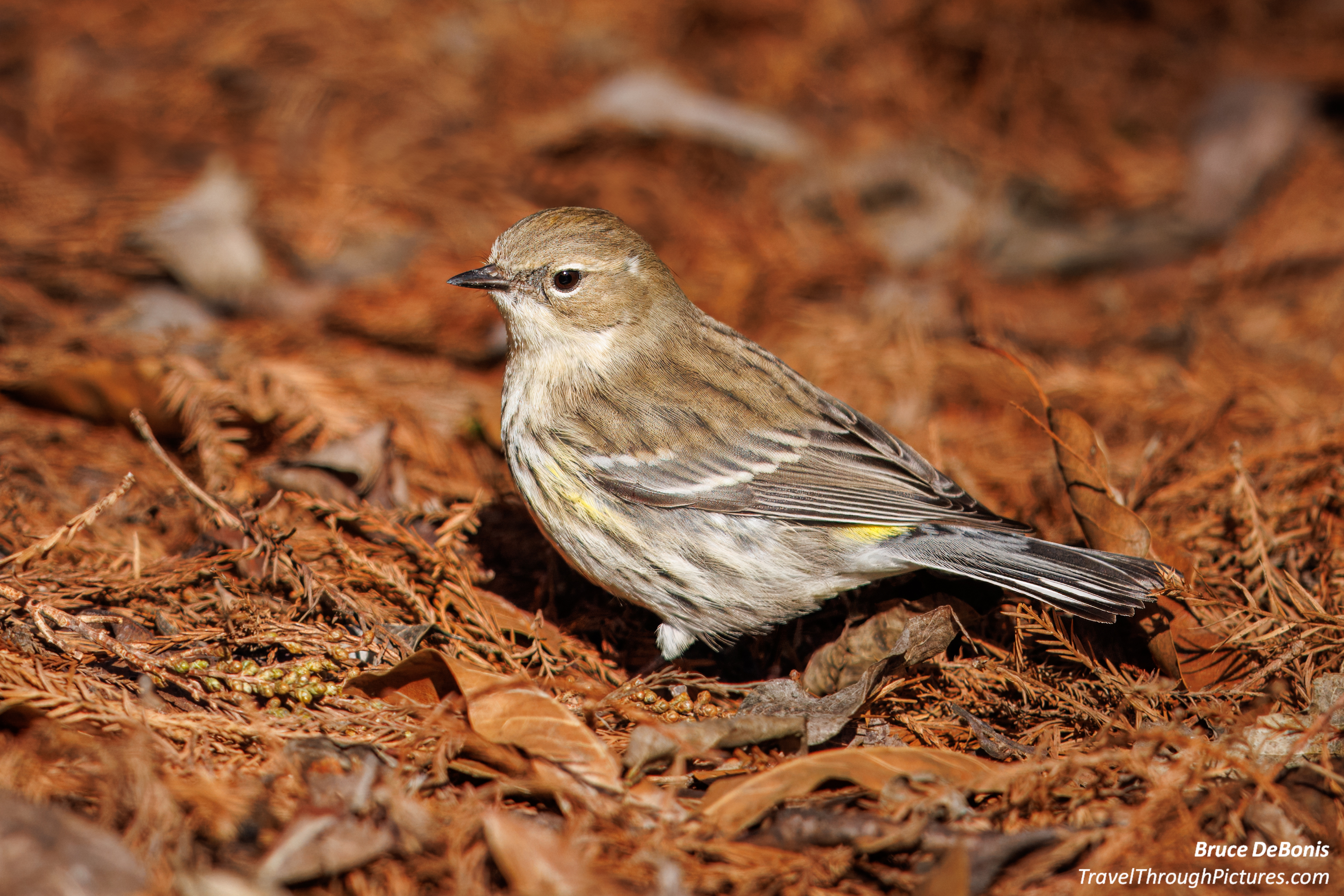
Interesting... I found the opposite true for me... sort of. I shoot alot of birds and this present two problems: 1) deep crops, and 2) fine feather detail that gets crunchy fast. These issues are actually more important than the ISOs I shoot at.


I had been using the latest stand alone Topaz tools and got really great results by the TIFF route. Then I just purchased the full Topaz Photo AI and then all of sudden, my results via Rt Click - TIFF were not as good... too crunchy in places. The older stand alone tools gave me better results. The models in the stand alone version appeared to be really different models and I could play around and get really good results.

With the new Photo AI version... not as good. Until I tried the export function File - PlugIn Extras - Process with Topaz Photo AI that presented a DNG to Photo AI... then I got much better results.

BTW, if you crop in Photo AI, the DNG gets much smaller.

So... my workflow is import int LR with a custom camera profile, slider settings, and no sharpening. Then choose a file and File - PlugIn Extras - Process with Topaz Photo AI... where I denoise, crop, then sharpen. To get even better results, I sharpen twice... in shooting close cropped birds, I sharpen the head, then another sharpen of the body as one is in the DOF and the other out. Now I get great results. Then back in LR, do the real heavy lift editing there to the new DNG. This is backwards from what I learned but now, with Photo AI... denoise/sharpen/crop first.

BTW, Photo AI appears to: 1) Apply modifications made during import to LR.. presets/profiles... to the DNG when you come back from Topaz. Maybe Topaz is not doing the application, but LR treating its entry into LR as a a typical import and therefore getting your presets. Topaz warns not to make edits to the original RAW and then export to Photo AI... they just say something like "the photo may look different". Gotta learn its quirks.

Peace
Bruce in Philly

I just finished this one up a few moments ago... getting better... but Photo AI handles differently than the stand alones... and IMO, you need to go DNG via FILE menu.


Feb 20, 2025 at 04:27 PM
danny_j1971
Offline
• •
Upload & Sell: Off
p.1 #10 · Denoising in DxO PL8 vs Topaz Photo AI


Bruce n Philly wrote:
... To get even better results, I sharpen twice... in shooting close cropped birds, I sharpen the head, then another sharpen of the body as one is in the DOF and the other out. Now I get great results. ....


I'm not sure why you need to sharpen the birds' head and body separately. In your image above, all of the bird seems to be within the DOF according to the sharpness of the leaves on the ground.

On the right is a photo I took standing about 7-10m from the bird and all of the bird is within the DOF (f/6.3, 552mm on APS-C sensor). I denoised and sharpened using the standalone Topaz Denoise AI.

With the same focal length and aperture the DOF would be even larger if I stood more than 10m from a subject.

Click image to see large version.


Edited on Feb 20, 2025 at 11:46 PM · View previous versions


Feb 20, 2025 at 06:24 PM
Bruce n Philly
Offline
• • •
Upload & Sell: Off
p.1 #11 · Denoising in DxO PL8 vs Topaz Photo AI


danny_j1971 wrote:
I'm not sure why you need to sharpen the birds' head and body separately. In your image above, all of the bird seems to be within the DOF according to the sharpness of the leaves on the ground.


You are correct, this one is in the same plane. I have been working on a bunch of birds and I did not write a correct commentary. In general, this last trip, I am using a 600mm prime on a full frame R5... at the very close distances I was, the DOF is very thin and unless the bird was perpendicular, as was this one, I have been using two different sharpen masks.

Overall, I went from disappointment to very impressed with Topaz Photo AI. Being able to sharpen different parts of the shot differently is a big plus for this tool.

Peace
Bruce in Philly


Feb 20, 2025 at 10:13 PM
danny_j1971
Offline
• •
Upload & Sell: Off
p.1 #12 · Denoising in DxO PL8 vs Topaz Photo AI


Bruce n Philly wrote:
... Overall, I went from disappointment to very impressed with Topaz Photo AI. Being able to sharpen different parts of the shot differently is a big plus for this tool. ...


I'm glad you're getting great results The last time I downloaded Photo AI for a trial was around Oct/Nov last year. I found it's denoising and sharpening were largely still on par with the older standalone versions (which I still use) or maybe a little better in some parts.

The main thing holding me back from getting Photo AI is that for some weird reason, at least to me, Photo AI does not have the Edge-Aware function that the standalones do have. Edge-Aware makes complex selections so much easier to create.

Have you seen the Edge-Aware function anywhere in Photo AI as an option to switch on?

If Photo AI had Edge-Aware I'd most likely buy a copy tomorrow


Feb 21, 2025 at 01:54 AM
Bruce n Philly
Offline
• • •
Upload & Sell: Off
p.1 #13 · Denoising in DxO PL8 vs Topaz Photo AI


danny_j1971 wrote:
I'm glad you're getting great results The last time I downloaded Photo AI for a trial was around Oct/Nov last year. I found it's denoising and sharpening were largely still on par with the older standalone versions (which I still use) or maybe a little better in some parts.

The main thing holding me back from getting Photo AI is that for some weird reason, at least to me, Photo AI does not have the Edge-Aware function that the standalones do have. Edge-Aware makes complex selections so much easier to create.

Have you seen the Edge-Aware function anywhere in Photo AI
...Show more


No edge aware... pretty lame without it.... work takes longer now.

Peace
Bruce in Philly


Feb 21, 2025 at 01:11 PM
macwest
Offline
• • •
Upload & Sell: Off
p.1 #14 · Denoising in DxO PL8 vs Topaz Photo AI


isn't edge detection in Topaz Ai called super pixel?


Feb 21, 2025 at 02:36 PM
danny_j1971
Offline
• •
Upload & Sell: Off
p.1 #15 · Denoising in DxO PL8 vs Topaz Photo AI


macwest wrote:
isn't edge detection in Topaz Ai called super pixel?


When I last trialled Photo AI, Super Pixel didn't have an adjustable concentric circles cursor to run along edges to accurately select them like Edge Aware in the standalone version of Denoise AI.

As you run along close to edges with the Super Pixel cursor the selection would 'snap' to edges but it was far too hit and miss in finding edges accurately. Cleaning up the selection's edges was too time consuming.

In my experience the Edge Aware function is far more efficient and accurate in edge detection.


Feb 21, 2025 at 03:02 PM
jbear
Offline
• • •
Upload & Sell: Off
p.1 #16 · Denoising in DxO PL8 vs Topaz Photo AI


Topaz is continually making improvements and taking suggestions for changes (they seem to actually be responsive), so it wouldn't surprise me if they added that feature it if people asked. I haven't been using it long, but I've like it very much so far.


Feb 26, 2025 at 02:14 PM
CanadaMark
Offline
• • • • •
Upload & Sell: Off
p.1 #17 · Denoising in DxO PL8 vs Topaz Photo AI


FWIW I've still been spending a ton of time comparing the various RAW converters as their versions are changing quite frequently. I feel this is the single most important step in post processing as it has the largest effect on image quality, plus it is the single biggest time saver, so it's critical to me that I'm always using the best one possible, for my work anyway.

I haven't bothered to put together any more comparisons to post on forums, only because they are quite time consuming to make and the conclusions/results haven't changed materially from the last ones I posted. For context, my comparisons focus primarily on real world wildlife images, rather than studio setups or anything like that, but I don't notice any significant performance differences when changing subject matter to, for instance, landscapes or macro.

DXO PureRAW 4.x in my opinion is still the best of the bunch by quite a large margin, and they are still doing many things that the other programs do not in terms of how the NR is handled, how the sharpening is done, near pixel perfect edge detection, and how the lens profiles/corrections are applied. It is also still the only program that builds an all-new RAW file from the ground up. Until the others catch up in those areas, it's hard to imagine them competing with DXO without some major innovation. I am still on their BETA development team because I believe in the software, I have no financial affiliation with them. I had to sign an NDA, but I can tell you one of my suggestions did make it into the public release of Pure RAW 4.0 though so that was nice to see. Batch processing is still the fastest, assuming you have a fairly modern discrete GPU as PureRAW 4 leverages the GPU much more so than earlier versions of the software. It will also use all the CPU cores/threads that you can throw at it, but the GPU is doing the heavy lifting. The primary downside of DXO remains the same - profiles aren't available immediately when a new lens/camera is released, and the reason for that is due to how the profiles themselves are created. Less popular or hard to get camera gear, drones, and smartphones can take a very long time to get support. At times, the waits can be quite long if the equipment is hard to get into their lab. Popular gear gets support more quickly but it still is not immediate.

Topaz AI still has all the same problems it has always had with edge detection, obviously fake detail, artificing, still no great way to batch process images, and as a company they are starting to lean into the "credits" business model with is almost universally hated by customers. I don't like the results, and I don't like the direction the company seems to be headed. Every time they advertise an improvement, I run my tests and never seem to come to any different conclusion. Maybe one day they will surprise me. YMMV.

Adobe is pretty good, but overall I still have the same complaints as it applies the NR more globally, and cannot compete with the sharpening and distortion correction modules DXO uses because of how those profiles are made. You can get the Adobe result pretty close to DXO, it just takes several extra steps which means spending more time. The main advantage here is you only need one piece of software and most people already own Lightroom/ACR. It also works on any image and you don't have to wait for specific profiles. This remains my #2 choice, and what I use for camera/lens combinations that do not yet have a DXO profile. I also think this is going to get a lot better over time with Adobe's vast resources.

Luminar, Capture One and ON1 aren't even really in the conversation as they aren't competitive, in my opinion anyway.

The only caveat I would add is that occasionally, for certain individual photos, one method might work slightly better than another, but it's not realistic when processing hundreds or thousands of photos at a time to try every method combination with every photo. What matters to me is what gives the best results most of the time and in the majority of scenarios. After I cull my images, I want to be able to dump all the RAWs into a single batch process and be able to trust that the results will be ideal or at least very close to it.

DXO releases new versions of PureRAW around March every year (Photo Lab is refreshed every Fall), so it won't be long until we see what they have in store for the next iteration


Feb 28, 2025 at 03:52 PM
jwpstl
Offline
• • •
Upload & Sell: On
p.1 #18 · Denoising in DxO PL8 vs Topaz Photo AI


DXO PureRaw 5 announced.

https://www.dxo.com/news/introducing-pureraw-5/


Feb 28, 2025 at 07:43 PM
Tom In Arizona
Offline
• • • •
Upload & Sell: Off
p.1 #19 · Denoising in DxO PL8 vs Topaz Photo AI


I noticed that DXO PureRaw requires a video card with at least 8GB of VRAM. I'm wondering what brand and specs. you all are using with a Windows system. Do you find that 8GB of VRAM is sufficient, or do you think more is necessary for better results.

Tom


Feb 28, 2025 at 08:28 PM
EB-1
Offline
• • • • • • •
Upload & Sell: Off
p.1 #20 · Denoising in DxO PL8 vs Topaz Photo AI


There are many variables, so it is difficult to compare NR software exactly, and that is not even considering that certain subjects are better with one than another.

Topaz changes too frequently and some of the changes have created issues. I'm not a worker that processes images constantly and then is done with that gig and moves on. I want to be able to get consistent results for a while and not have to tweak the settings for a batch of images taken with the same camera and lens at the same ISO.

EBH


Mar 01, 2025 at 05:33 PM
       2       end


FM Forums | Post-processing & Printing | Join Upload & Sell

       2       end


Welcome back
Log in to your account