p.1 #1 · Demystifying Log ISO, Exposure, and Noise
This is the first part of a series, where I hope to take the mystique out of log video and make it as understandable and approachable to use as regular video. Topics covered:
0:00 - Introduction
0:37 - Photography exposure analogy
1:32 - Log ISO vs Sensor ISO
3:35 - Why Log uses a higher native ISO
7:07 - ISOs above native ISO
9:29 - ISOs below native ISO
10:10 - Why Log has more noise
11:53 - How Expanded ISOs work
17:27 - Overexposing Log (ETTR)
19:08 - Additional Technical Details
20:15 - Conclusion
While this video uses N-Log for its examples, the material covers all camera log formats and is not specific to N-Log.
p.1 #4 · Demystifying Log ISO, Exposure, and Noise
Hi snapsy,
Wow, that video was clearly a labor of love, thank you, kind sir, for taking the time to create it and share it here with the community!
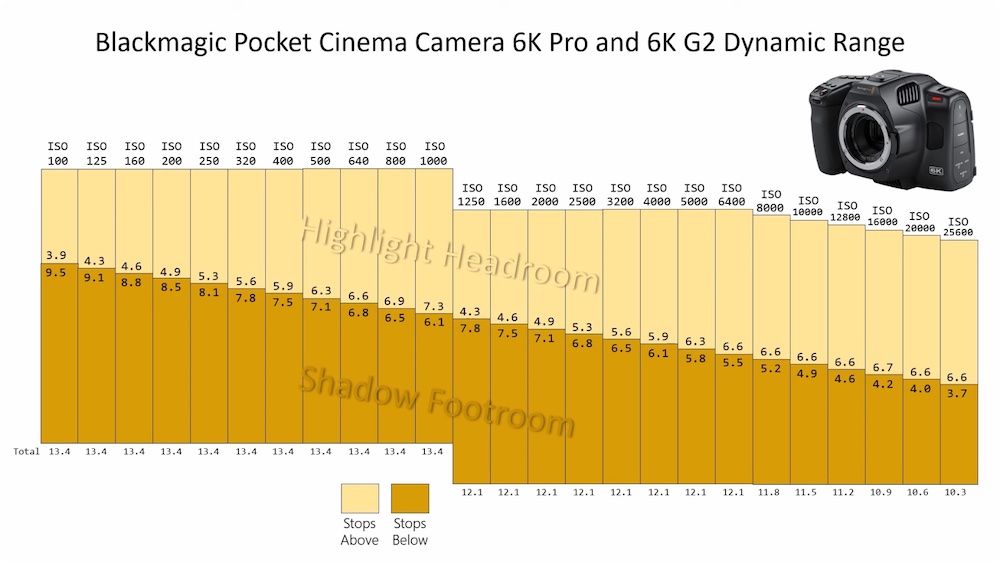
I'm curious as to how the data was attained and compiled for the headroom graphic for BM 6K Pro and G2 shown at the 8:14 Mark (image below)? If this was your handiwork I would be curious to see what those values might/would be for N-RAW in the Z6 III and Z8/Z9 and/or is determining this data something we mere mortals can do on our end(s)?
p.1 #5 · Demystifying Log ISO, Exposure, and Noise
The dynamic range of our Cameras is so much higher then a tv screen, and that's where the Log curves does his job by reducing the DR making the whites less white and the black less black.
But in fact we throw away information.
Can be handy and safe time to adapt to tv screens.
As it is handy to make jpg's for magazines, newspapers and web pages.
p.1 #6 · Demystifying Log ISO, Exposure, and Noise
jimmy462 wrote:
Hi snapsy,
Wow, that video was clearly a labor of love, thank you, kind sir, for taking the time to create it and share it here with the community!
I'm curious as to how the data was attained and compiled for the headroom graphic for BM 6K Pro and G2 shown at the 8:14 Mark (image below)? If this was your handiwork I would be curious to see what those values might/would be for N-RAW in the Z6 III and Z8/Z9 and/or is determining this data something we mere mortals can do on our end(s)?
Many thanks! JG
Thanks Jimmy. The DR range info came directly from BM - they produce a chart with the info, which I used to craft an identical-looking chart from scratch so that I could animate potions for my video.
You can view their chart on page 55 of their manual for the camera:
p.1 #7 · Demystifying Log ISO, Exposure, and Noise
All video codecs that are not lossless raw throw away some information to make the file sizes practical but the image quality can still be excellent. Storing in log format doesn't throw away much information in itself (compared to linear) because the least significant bits in midtones and highlights are overwhelmed with photon shot noise and thus need not be recorded with high precision. In the shadows the log format stores more information than linear with the same bit depth and compression ratio (not speaking about raw video). In the end log format stores a greater dynamic range than linear because it allocates bits where they are needed on the tonal scale and throws away the the LSBs of highlights.
There are (consumer-priced) TVs that have a very high ratio between brightest and darkest pixel values and furthermore they can often automatically do tone-mapping and even adjust the picture to compensate for variations in ambient lighting. What the realistic faithful contrast range is is dependent on ambient lighting conditions but I wouldn't be surprised if my OLED TV exceeded the dynamic range of my cameras in video mode.
Chaliel wrote:
The dynamic range of our Cameras is so much higher then a tv screen, and that's where the Log curves does his job by reducing the DR making the whites less white and the black less black.
But in fact we throw away information.
Can be handy and safe time to adapt to tv screens.
As it is handy to make jpg's for magazines, newspapers and web pages.
p.1 #9 · Demystifying Log ISO, Exposure, and Noise
snapsy wrote:
Thanks Jimmy. The DR range info came directly from BM - they produce a chart with the info, which I used to craft an identical-looking chart from scratch so that I could animate potions for my video.
You can view their chart on page 55 of their manual for the camera:
I'm actually working to create my own DR tester, which I can use to generate the same info on other cameras like the Nikons.
Nice job animating that BM graphic, it'll sure be familiar to those shooting with those cameras. What is interesting to me is that in looking at the sudden shift at ISO 1250 one might think (as I initially did) that that value would indicate the second native ISO...which it does not. According to BM, the, er, "native" ISO's for those cameras are actually at 400 and 3200!
<<When the ISO setting is between 100 and 1,000 the native ISO of 400 is used as
a reference point. The ISO range between 1,250 and 25,600 uses the native ISO
of 3,200 as a reference.>> (Also from page 55 of your linked document.)
Further discussion on that graphic and BM's dual-gain implementation here from the kind folks at Frame Voyager (I have zero affiliation, link provided for educational purposes only)...
BMPCC6K Pro | DUAL NATIVE ISO & its effect On Dynamic Range - YouTube
So, onto Nikon's N-RAW and N-LOG, it's not clear to me that when the dual gain kicks in on Z9/Z8/Z6 III how it might differ from what Nikon might consider it's two, um, "native" ISO's, and whether their implementation of Dual-Gain(?) results in the same (or similar) progressive highlight/shadow headroom/floor shifts as BM reports.
My use-case here would be BIF against bright clouds and whether highlight headroom can be optimized by one's ISO choice. I.e. if Z6 III had the BM graph, then ISO 1000 would make better sense for preserving cloud details than 400 when shooting N-RAW/N-Log?
p.1 #10 · Demystifying Log ISO, Exposure, and Noise
jimmy462 wrote:
Nice job animating that BM graphic, it'll sure be familiar shooting with those cameras. What is interesting to me is that in looking at the sudden shift at ISO 1250 one might think (as I initially did) that that value would indicate the second native ISO...which it does not. According to BM, the, er, "native" ISO's for those cameras are actually at 400 and 3200!
<<When the ISO setting is between 100 and 1,000 the native ISO of 400 is used as
a reference point. The ISO range between 1,250 and 25,600 uses the native ISO
of 3,200 as a reference.>> (Also from page 55 of your linked document.)
Further discussion on that graphic and BM's dual-gain implementation here from the kind folks at Frame Voyager (I have zero affiliation, link provided for educational purposes only)...
BMPCC6K Pro | DUAL NATIVE ISO & its effect On Dynamic Range - YouTube
So, onto Nikon's N-RAW and N-LOG, it's not clear to me that when the dual gain kicks in on Z9/Z8/Z6 III how it might differ from what Nikon might consider it's two, um, "native" ISO's, and whether their implementation of Dual-Gain(?) results in the same (or similar) progressive highlight/shadow headroom/floor shifts as BM reports.
My use-case here would be BIF against bright clouds and whether highlight headroom can be optimized by one's ISO choice. I.e. if Z6 III had the BM graph, then ISO 1000 would make better sense for preserving cloud details than 400 when shooting N-RAW/N-Log?
Jimmy, the shift at ISO 1250 represents the second gain level on the sensor - this is independent of the native ISO. The native ISOs are 400 and 3200. ISOs 100 through 1000 use the first gain level. ISOs 1250 through 6400 use the second gain level. ISOs 100 through 320 and ISOs 1250 through 2500 are "expanded" ISOs, ie they share the same gain level as their corresponding native ISOs of 400 and 3200.
p.1 #11 · Demystifying Log ISO, Exposure, and Noise
jimmy462 wrote:
So, onto Nikon's N-RAW and N-LOG, it's not clear to me that when the dual gain kicks in on Z9/Z8/Z6 III how it might differ from what Nikon might consider it's two, um, "native" ISO's, and whether their implementation of Dual-Gain(?) results in the same (or similar) progressive highlight/shadow headroom/floor shifts as BM reports.
My use-case here would be BIF against bright clouds and whether highlight headroom can be optimized by one's ISO choice. I.e. if Z6 III had the BM graph, then ISO 1000 would make better sense for preserving cloud details than 400 when shooting N-RAW/N-Log?
On the Z8 there is a drop in noise going from 3200 to 4000 in N-Log and thus the second gain is likely used at ISO 4000 and higher values.
When you consider the highlight latitude, you can achieve it by simply underexposing your subject, but then the subject SNR decreases and you might end up unhappy with the result because of that reason. I think shooting at ISO 1000 is perfectly fine but if you go with 3200 then you'd probably find that your subject is very noisy.
p.1 #12 · Demystifying Log ISO, Exposure, and Noise
ilkka_nissila wrote:
On the Z8 there is a drop in noise going from 3200 to 4000 in N-Log and thus the second gain is likely used at ISO 4000 and higher values.
When you consider the highlight latitude, you can achieve it by simply underexposing your subject, but then the subject SNR decreases and you might end up unhappy with the result because of that reason. I think shooting at ISO 1000 is perfectly fine but if you go with 3200 then you'd probably find that your subject is very noisy.
Hi ilkka_nissila, thanks for those insights. Is there a reference for those Z8 ISO values? (I'm a big fan of sources as it helps those following along to cross-reference and read more if they so choose.)
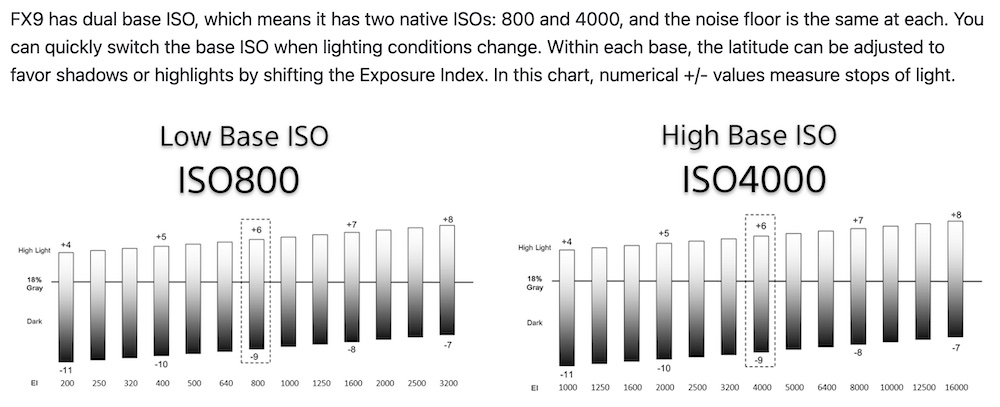
My original query here was to ask if Nikon had provided a similar, er, educational graphic for their cameras/sensors as did BlackMagic for the 6K Pro (as adapted in snapsy's video and provided above). Seems that BM is not the only one providing such dual-ISO sensor performance graphics for video as I unearthed this one from Sony (below) for their FX9. I'm hoping that Nikon has followed suit for Z9/Z8/Z6 III? (It would be nice to know in advance where one's highlights and shadows, er, wiggle-room actually starts and stops!)
p.1 #13 · Demystifying Log ISO, Exposure, and Noise
jimmy462 wrote:
Hi ilkka_nissila, thanks for those insights. Is there a reference for those Z8 ISO values? (I'm a big fan of sources as it helps those following along to cross-reference and read more if they so choose.)
My original query here was to ask if Nikon had provided a similar, er, educational graphic for their cameras/sensors as did BlackMagic for the 6K Pro (as adapted in snapsy's video and provided above). Seems that BM is not the only one providing such dual-ISO sensor performance graphics for video as I unearthed this one from Sony (below) for their FX9. I'm hoping that Nikon has followed suit for Z9/Z8/Z6 III? (It would be nice to know in advance where one's highlights and shadows, er, wiggle-room actually starts and stops!)
I'm working on putting together my own DR tester to create DR graphs for Nikon and others, similar to the home-grown one John Hess made on his Filmmaker IQ YouTube channnel. This is an alternative to the expensive DR testers DSC lab makes which Gerald Undone uses in his videos.
p.1 #14 · Demystifying Log ISO, Exposure, and Noise
I don't think Nikon provide this information. They basically say that the base ISO in Log video is 800 and that this gives the maximum dynamic range which in h.265 10-bit mode is 12 stops (Z8 reference manual).
How sensor dynamic range can be measured in video is tricky as it can be algorithmically increased using temporal noise reduction yet this has its drawbacks if the subject is moving. Noise reduction can be spatial as well (like in photos) but this can compromise detail. So how to determine the dynamic range without falling for the effect of this kind of fakery can be tricky. Starting from RAW and turning all noise reduction off in the post-processing would be a start. Even then I would prefer patch based techniques so that different sensor sizes and resolutions can be compared fairly.
jimmy462 wrote:
Hi ilkka_nissila, thanks for those insights. Is there a reference for those Z8 ISO values? (I'm a big fan of sources as it helps those following along to cross-reference and read more if they so choose.)
My original query here was to ask if Nikon had provided a similar, er, educational graphic for their cameras/sensors as did BlackMagic for the 6K Pro (as adapted in snapsy's video and provided above). Seems that BM is not the only one providing such dual-ISO sensor performance graphics for video as I unearthed this one from Sony (below) for their FX9. I'm hoping that Nikon has followed suit for Z9/Z8/Z6 III? (It would be nice to know in advance where one's highlights and shadows, er, wiggle-room actually starts and stops!)
I'm working on putting together my own DR tester to create DR graphs for Nikon and others, similar to the home-grown one John Hess made on his Filmmaker IQ YouTube channnel. This is an alternative to the expensive DR testers DSC lab makes which Gerald Undone uses in his videos.
Thanks for reposting those test images, snapsy, they're good for revealing where shadow noise can become an issue (depending on one's goals). I'm in an opposite camp, if you will, where retention of the sky details will be my goal and shadow noise is irrelevant for me (one can always crush/post-NR the blacks but one cannot bring back blown highlights!).
As for John Hess, a thoroughly-enjoyable master of communicating for lay-folks IMHO, haven't watched him in a while...I'm guessing this is the DIY/homemade Xyla device you're looking to recreate?
p.1 #16 · Demystifying Log ISO, Exposure, and Noise
ilkka_nissila wrote:
I don't think Nikon provide this information. They basically say that the base ISO in Log video is 800 and that this gives the maximum dynamic range which in h.265 10-bit mode is 12 stops (Z8 reference manual).
How sensor dynamic range can be measured in video is tricky as it can be algorithmically increased using temporal noise reduction yet this has its drawbacks if the subject is moving. Noise reduction can be spatial as well (like in photos) but this can compromise detail. So how to determine the dynamic range without falling for the effect of this kind of fakery can be tricky. Starting from RAW and turning all noise reduction off in the post-processing would be a start. Even then I would prefer patch based techniques so that different sensor sizes and resolutions can be compared fairly.
I'm not finding any such info-graphic from Nikon, I'll be sure to pester their reps about this oversight at the next expo I attend!
In reading the user manual for the Z6 III, it seems that disabling some of the NR features will be possible, but I'll have to do my own series of field testing (vs my Lumix S1's) to get a feel for highlight protection at all (including intermediate) ISOs. Would have been nice to have a Nikon-supplied graphic showing that breakdown (re: BM and Sony graphs) upfront to guide me,...ah well, they're kinda new at this N-RAW N-Log video thing, I'll cut them some slack! Ha!
p.1 #17 · Demystifying Log ISO, Exposure, and Noise
jimmy462 wrote:
Thanks for reposting those test images, snapsy, they're good for revealing where shadow noise can become an issue (depending on one's goals). I'm in an opposite camp, if you will, where retention of the sky details will be my goal and shadow noise is irrelevant for me (one can always crush/post-NR the blacks but one cannot bring back blown highlights!).
As for John Hess, a thoroughly-enjoyable master of communicating for lay-folks IMHO, haven't watched him in a while...I'm guessing this is the DIY/homemade Xyla device you're looking to recreate?
Diving into Dynamic Range - YouTube
Yep that's the one. IMO John Hess is the gold standard for explainer videos in this space. Rare combination of explaining complex technical subjects in an approachable way while still getting all the details correct while not glossing over too much. Very hard to do.
The shadow noise measurements are important even for your scenario because to achieve the extra highlight headroom you described you'll need to do your own further middle gray relocation, ie underexposing at native log ISO and pushing in post.
p.1 #18 · Demystifying Log ISO, Exposure, and Noise
If you shoot N-RAW it should be with minimal or no noise reduction; the NR settings normally affect video stored in a compressed codec like h.264, h.265, or Prores HQ. N-RAW is likely to be noisier in appearance for this reason as it is ... RAW. Manufacturers do sometimes apply some adjustments to the data such as hot pixel mapping etc. but there shouldn't be much noise reduction applied before the data is written to the file, otherwise it wouldn't be really RAW.
p.1 #20 · Demystifying Log ISO, Exposure, and Noise
Alistair1 wrote:
Does Nraw NLog also use sensor ISO 100 while reporting ISO 800?
Yep. Of course shooting raw means you can also shoot SDR ISO 100 and then apply N-Log as the initial conversion on Resolve's raw tab. That opens up the ability to use N-Log without the -3EV exposure metering but that's mostly only useful for experiments.


 JG
JG