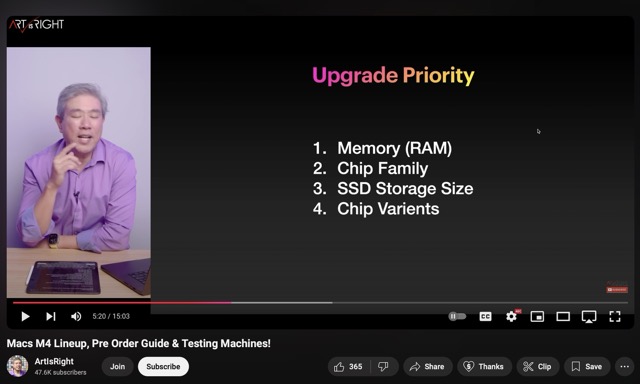
EDIT: This might help those who are looking for advice how to configure a new Apple computer, aka where to put your money for photography/editing. Of course YMMV depending upon your own requirements. However, I think Art's advice might be a good place to start for input.
His advice starts about 5:20 marker in the video to about 7:15 marker. So just a few minutes to listen to his comments in context might be beneficial to some. *ArtIsRight is an experienced Photographer and known for his test videos for several M1, M2, M3 and now M4 configurations.
Those might be for a specific user type of processing priority, but entire computer usage and ecosystem are not always considered in the balance. Storage in SSDs and HDDs is my priority. Saving one second on an image often is not. Can you finally get more than 16TB of SSDs in a system?
But is maxed out SOC storage a priority when you have TB5 coming with some of the M4 options and can therefore add very fast external storage as you need it, much more economically, and in a small footprint? I can appreciate you might not want an external drive attached, but I suspect for many the 'Apple tax' once you get into 2, 4 and 8TB of internal storage becomes a deterrent.
rscheffler wrote:
But is maxed out SOC storage a priority when you have TB5 coming with some of the M4 options and can therefore add very fast external storage as you need it, much more economically, and in a small footprint? I can appreciate you might not want an external drive attached, but I suspect for many the 'Apple tax' once you get into 2, 4 and 8TB of internal storage becomes a deterrent.
ArtIsRight (a photographer) does not recommend to max-out expensive Apple internal SSD storage. According to what he says in this video with regards to his # 3 out of 4 configuration priorities:
At about 6:12 in the video:
"For the M4 generation, 256[GB storage] is really not enough for a pro [photographer] work flow. I recommend at least 512. The comfortable number for me is 1 TB SSD." –ArtIsRight
I agree. TB5 is indeed very exciting, seems to promise a major leap in performance compared to already speedy TB4. I currently use a few USB4 external SSD devices with my Apple computers and am looking forward to having access to TB5 external storage performance at some point too.
rscheffler wrote:
But is maxed out SOC storage a priority when you have TB5 coming with some of the M4 options and can therefore add very fast external storage as you need it, much more economically, and in a small footprint? I can appreciate you might not want an external drive attached, but I suspect for many the 'Apple tax' once you get into 2, 4 and 8TB of internal storage becomes a deterrent.
I went with 2TB in my M2 MBP. That jump to 4TB and 8TB is $$$ buzzkill.
Imo, 512 is a no-go. That leaves only 1TB or 2TB as options. The up $$$ for that extra 1TB, is "Apple-sized" ... but, for the extra amount it is (vs. adding external of same volume for $$$ comp), the internal performance / package made that "extra" vs. external options not a big deal. Particularly, if you are thinking about keeping a rig for 5 years or so. Spread that extra cost over 1,000 - 1,500 days of operation, and you're into pennies / day.
I've still got my external storage for larger amounts, but (imo) 2TB is the sweet spot for internal, untethered.
RustyBug wrote:
I went with 2TB in my M2 MBP. That jump to 4TB and 8TB is $$$ buzzkill.
Imo, 512 is a no-go. That leaves only 1TB or 2TB as options. The up $$$ for that extra 1TB, is "Apple-sized" ... but, for the extra amount it is (vs. adding external of same volume for $$$ comp), the internal performance / package made that "extra" vs. external options not a big deal. Particularly, if you are thinking about keeping a rig for 5 years or so. Spread that extra cost over 1,000 - 1,500 days of operation, and you're into pennies / day.
I've still got my external storage for larger amounts, but (imo) 2TB is the sweet spot for internal, untethered....Show more →
I went with 2TB on MBP and 4TB on Mac Studio ( both M1). But I also use several external SSDs and Cloud for longer term photo/video storage. I've experienced very fast performance on Apple's internal SSD storage on my M1 computers, even compared to my TB4 PCIe Gen 4 NVMe M.2 external drives which at the time of purchase were some of the fastest external drives I could get my hands on.
The promises of "actual" vs TB5 spec performance however as mentioned, might just shake things up considerably when deciding between internal and external for those of us willing to spend more on supper fast internal Apple SSD storage...til now 😎
rscheffler wrote:
But is maxed out SOC storage a priority when you have TB5 coming with some of the M4 options and can therefore add very fast external storage as you need it, much more economically, and in a small footprint? I can appreciate you might not want an external drive attached, but I suspect for many the 'Apple tax' once you get into 2, 4 and 8TB of internal storage becomes a deterrent.
rscheffler wrote:
But is maxed out SOC storage a priority when you have TB5 coming with some of the M4 options and can therefore add very fast external storage as you need it, much more economically, and in a small footprint? I can appreciate you might not want an external drive attached, but I suspect for many the 'Apple tax' once you get into 2, 4 and 8TB of internal storage becomes a deterrent.
RustyBug wrote:
I went with 2TB in my M2 MBP. That jump to 4TB and 8TB is $$$ buzzkill.
Imo, 512 is a no-go. That leaves only 1TB or 2TB as options. The up $$$ for that extra 1TB, is "Apple-sized" ... but, for the extra amount it is (vs. adding external of same volume for $$$ comp), the internal performance / package made that "extra" vs. external options not a big deal. Particularly, if you are thinking about keeping a rig for 5 years or so. Spread that extra cost over 1,000 - 1,500 days of operation, and you're into pennies / day.
I've still got my external storage for larger amounts, but (imo) 2TB is the sweet spot for internal, untethered. ...Show more →
I agree, 2TB is a good compromise and 'comfortable' for most uses. At the time I bought my MBP M1 Pro, my budget only allowed the 1TB option and because I'm a packrat with data on my devices, it's perpetually full. Probably would still be the same problem with 2TB, but I can fool myself into thinking it wouldn't. I have a few NVMes in TB3/4 enclosures and that is where most of my 'work in progress' resides until completed, when it is then moved to HDDs for cold storage. The speed boost of TB5 would better take advantage of native NVMe speeds. I'm guessing for most normal uses, it would be indistinguishable from internal storage.
Essentially, no free lunch. It appears that for a laptop, a M3 Max is a great all rounder though the M4 Pro for the Mini is ok for most tasks except video.
That's exactly where I found my test results that made my decision to go with the M2 Max 64GB.
He mentions the RAM ... but, since it is RAM intensive, the memory bandwidth is also doubled when you bump from Base > Pro > Max. So, 32GB on Max will perform quicker with 400GB/s vs. 200GB/s on Pro, even if configured with same amount of RAM (e.g. 32GB). As I've said before, I think 32GB Pro is the sweet spot, but doubling the memory bandwidth when you move to Max is where I noticed the difference.
I also used Pano Stitching for my torture testing, so it is not surprising to see his results being similar. Just while folks do get focused on the amount of memory, don't forget the memory bandwidth doubles with each jump from Base > Pro > Max, too. For many routine operations, the bandwidth difference doesn't reveal its benefits. Here, with the memory intensive operation tapping hard ... the extra lanes of pipeline earn their keep.
The extra lanes also help with heat distribution, so throttling doesn't kick in as soon, either. Again, only when you're pushing things does this stuff reveal its benefit ... but, yup, that's where my testing revealed things for me.
Note that at 20:33 he points out that with the SAME 32GB in the Max vs. the Pro, the Max is 2X faster. Hmmm, doubled memory bandwidth = 2X, too.
Then, when looking at the M4 (Base), it was double the time of the Pro. Here again, the memory bandwidth difference is a factor of 2X.
Some of my thoughts from a while back ... pretty much saying the same thing.
I emailed Art about the pano results and he said they are messed up. He sent me an updated graph with data more in line. It's not complete yet but the top 3 were a Studio with M2 Ultra, 16" MBP with M1 Max and a 16" MBP with M4 Max. It will be posted in his next video.
I like the Photoshop Cafe website. I think he does a lot of good, short, concise, how-to videos for LR and PS. He's not a hardware tester so this was a bit of a surprise but has some good info.
Art has posted the MacBook Max review showing results for both CPU/GPU configs along with comparing results with older MacBooks and all three M4 MacBook Pro configs.
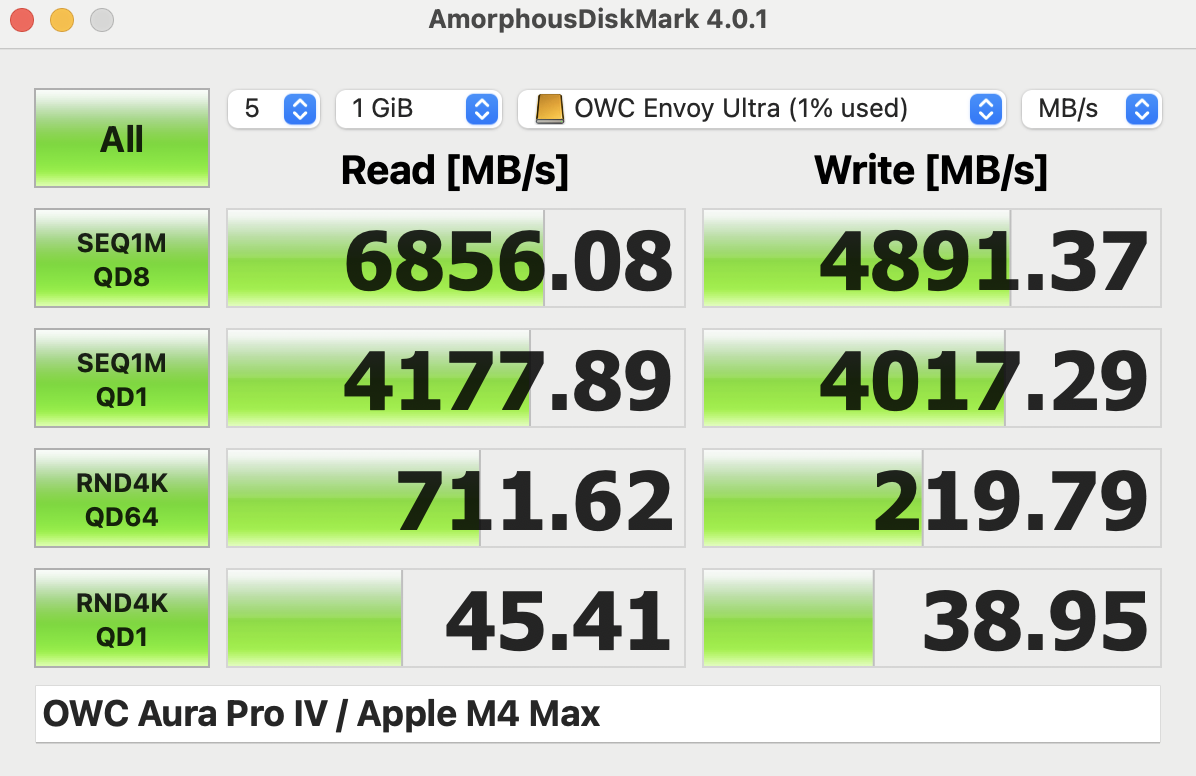
So I got one of the OWC TB5 drives to fiddle with because I just like playing with technology.
Crazy fast as expected but still not as fast as the internal drives. Also, they are currently limited to 4TB due to power draw requirements, according to a post on Reddit by someone from OWC. Of course, I did open mine up and slapped an 8TB Sabrent drive in it, and its functioned perfectly fine. I bet the power draw issue is during sustained stress like large copies, etc.
I haven't done any large sustained tests of moving files, etc yet. That can be more affected by the SSD architecture than the TB bandwidth--if the DRAM buffer isn't large enough/fast enough the drive will throttle down way below the theoretical transfer rates pretty quickly.
All of that said the speed of current TB4/USB4 drives is so high that you will never notice any issue using them for things like storing/editing raw video or your Lightroom libraries. I keep all of my LR libraries on external TB4 drives. I highly recommend the current Acasis cases and the Sabrent TLC NAND NVMe drives. For about $1300 all in you can get 8TB of very fast external storage in a tiny package. They can run hot during sustained use; the case doesn't have enough thermal mass to dissipate all of the heat. I use a Rain Design iLap holder for my laptop (with the front soft wrist pad removed) and I tuck the drive into the fold in the metal at the base. Just that alone is enough to keep it pretty cool as the aluminum of the laptop holder acts as big heat sink. In the office I put the drive on top of the body of my Mac Studio and it has the same effect.
Speaking of which...OWC made the Envoy Ultra quite a large brick of aluminum. Still pretty compact, but about twice the size and 3x the weight of the Acasis cases. It works well as it never gets more than slightly warm.
I recently received a batch of the SN850X 8TB and internally striping them 20GB/sec. is feasible (not on Apple). In practice there are no notable application improvements with high transfer rates after a certain point.
I recently received a batch of the SN850X 8TB and internally striping them 20GB/sec. is feasible (not on Apple). In practice there are no notable application improvements with high transfer rates after a certain point.
EBH
Oooh, thanks for the heads up on that, I didn't realize it was out now. The price on that is really good and it has slightly better performance than the Sabrent TLC drive.
Sabrent also apparently has a TB5 external drive in the works.


 Please carry on.
  I have a few NVMes in TB3/4 enclosures and that is where most of my 'work in progress' resides until completed, when it is then moved to HDDs for cold storage. The speed boost of TB5 would better take advantage of native NVMe speeds. I'm guessing for most normal uses, it would be indistinguishable from internal storage.