p.1 #1 · Fujifilm X RAW Studio editing from camera?
Can "RAF" files be edited directly from the camera's memory card using Fujifilm X RAW Studio, or do I need to download them to my computer first?
Also one can only use custom recipes in RAW Studio or can Fujifilm's own film simulations be used to convert RAF files to JPEG? I don't see the option for Fuji's simulations there.
p.1 #2 · Fujifilm X RAW Studio editing from camera?
I am trying it now, and it doesn't appear so.
As you know, X RAW Studio requires that the camera communication mode be set to "RAW Converter..." mode, which seems to be mutually exclusive of the USB card reader mode.
In other words, when the camera is in RAW converter communication mode, the memory card does not show up as a mounted file system in Windows, and is also not browseable in X RAW Studio. So you'll need to transfer the files first.
p.1 #3 · Fujifilm X RAW Studio editing from camera?
Sorry Fred, I missed your second question completely.
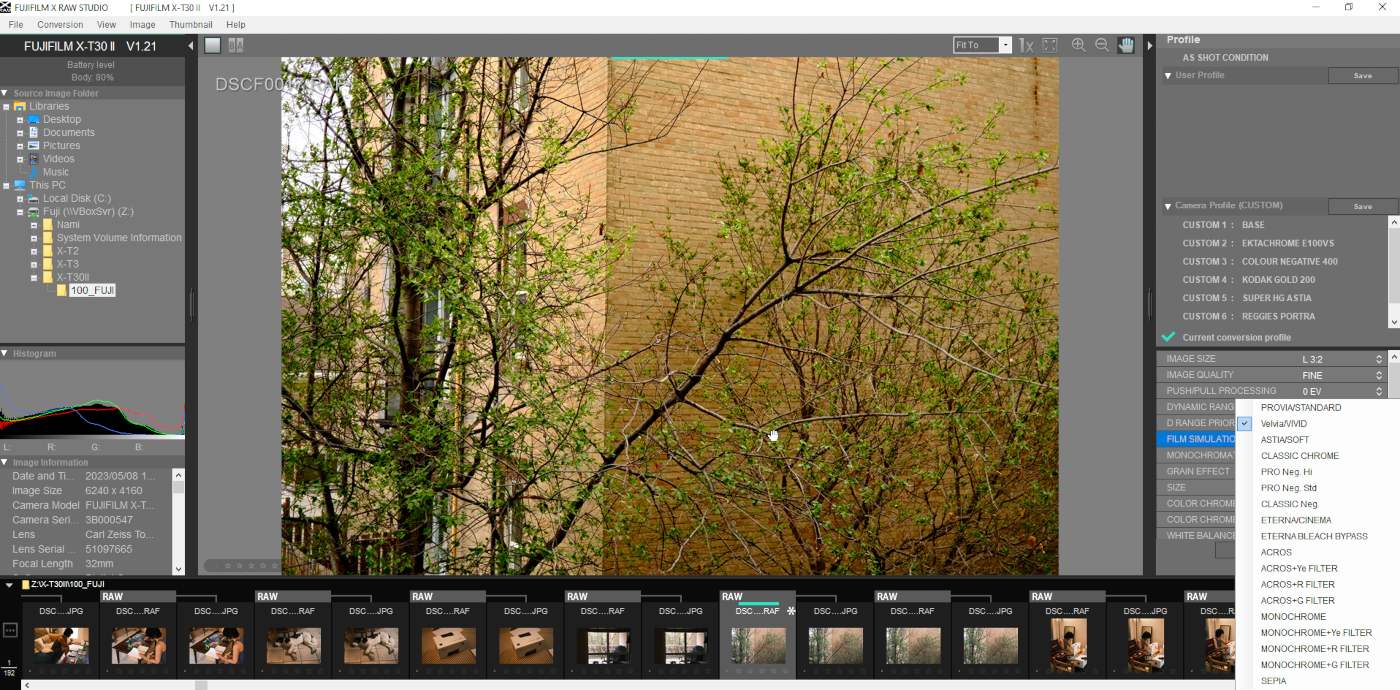
Fujifilm's own (built-in) simulations can be used in X RAW Studio. They are located here (see screenshot, bottom right):
Just set all the other JPEG output settings to "zero" or whatever you determine is a reasonable default and select the film sim you want, and you will have a plain "recipe" with only that film sim applied.
p.1 #4 · Fujifilm X RAW Studio editing from camera?
cogitech wrote:
I am trying it now, and it doesn't appear so.
As you know, X RAW Studio requires that the camera communication mode be set to "RAW Converter..." mode, which seems to be mutually exclusive of the USB card reader mode.
In other words, when the camera is in RAW converter communication mode, the memory card does not show up as a mounted file system in Windows, and is also not browseable in X RAW Studio. So you'll need to transfer the files first.
Thanks for confirming this! I wish it could read the memory card directly but I'm sure there is a technical explanation for this.
p.1 #5 · Fujifilm X RAW Studio editing from camera?
cogitech wrote:
Sorry Fred, I missed your second question completely.
Fujifilm's own (built-in) simulations can be used in X RAW Studio. They are located here (see screenshot, bottom right):
Just set all the other JPEG output settings to "zero" or whatever you determine is a reasonable default and select the film sim you want, and you will have a plain "recipe" with only that film sim applied.
Found it!! Thanks for the screenshot. Somehow I had overlooked it.