To facilitate getting battery power outside the body, would a battery grip block any body cooling capability? It allows a ‘dummy’ battery scenario but blocks the bottom surface. Any issues expected with that setup?
- 4K24 using highest possible bitrate
- Camera had screen open sitting on my office desk while recording (no hand holding at all)
- High temp mode on
- Test conducted in coldest area of my house (basement) during Winter time in Canada
Camera recorded for 35 Min and was pretty hot but did not overheat and shutdown.
I stopped the recording and immediately switched over to 4K60 highest possible bitrate
- Camera had screen open sitting on my office desk while recording (no hand holding at all)
- High temp mode on
- Test conducted in coldest area of my house (basement) during Winter time in Canada
Camera overheated and shut off after 2min of recording.
As a professional this scenario to me proves this is not a professional workhorse video camera. Imagine filming a wedding ceremony in a church where the camera could run for 40-50min straight or more at 4K24 and going outside to get some slow-mo 4K60 of the bridal party after the church and the camera overheats after 2-3min of shooting.
I don't know if I have a dud but I am surprised way more people are not talking about this. I also am surprised that people test this cameras ability to overheat by simply leaving it in one mode forever, professionals don't shoot that way, they shoot different timelines all throughout the day hence why a test like I just did is a more accurate representation of what a professional would run into....Show more →
I think you have a dud, I'd return it. I decided to test my copy after seeing this thread and the one on EOSHD. I'm at over 4 hours of 4k60p and counting, only stopping for battery swaps and to reformat the card. Batteries have been at about 35% when pulled, the first take didn't start at 100%, so it was a little lower when pulled. With the settings below my 128gb card can only record for 1hr 20min so I've been stopping it just before its full. Batteries are warm to the touch, but not anything to worry about. Same for the back of the body where the LCD screen sits, I don't even have a temp warning yet.
My settings with a 128gb Prograde V90 card:
XAVC S - 4k60p - 10 bit 422 - 200mbps
AF-c - wide area - Face/eye detection and touch tracking on
Screen out like I always shoot
Airplane mode to prolong battery life (always unless I'm transferring files)
Temp warning set to high
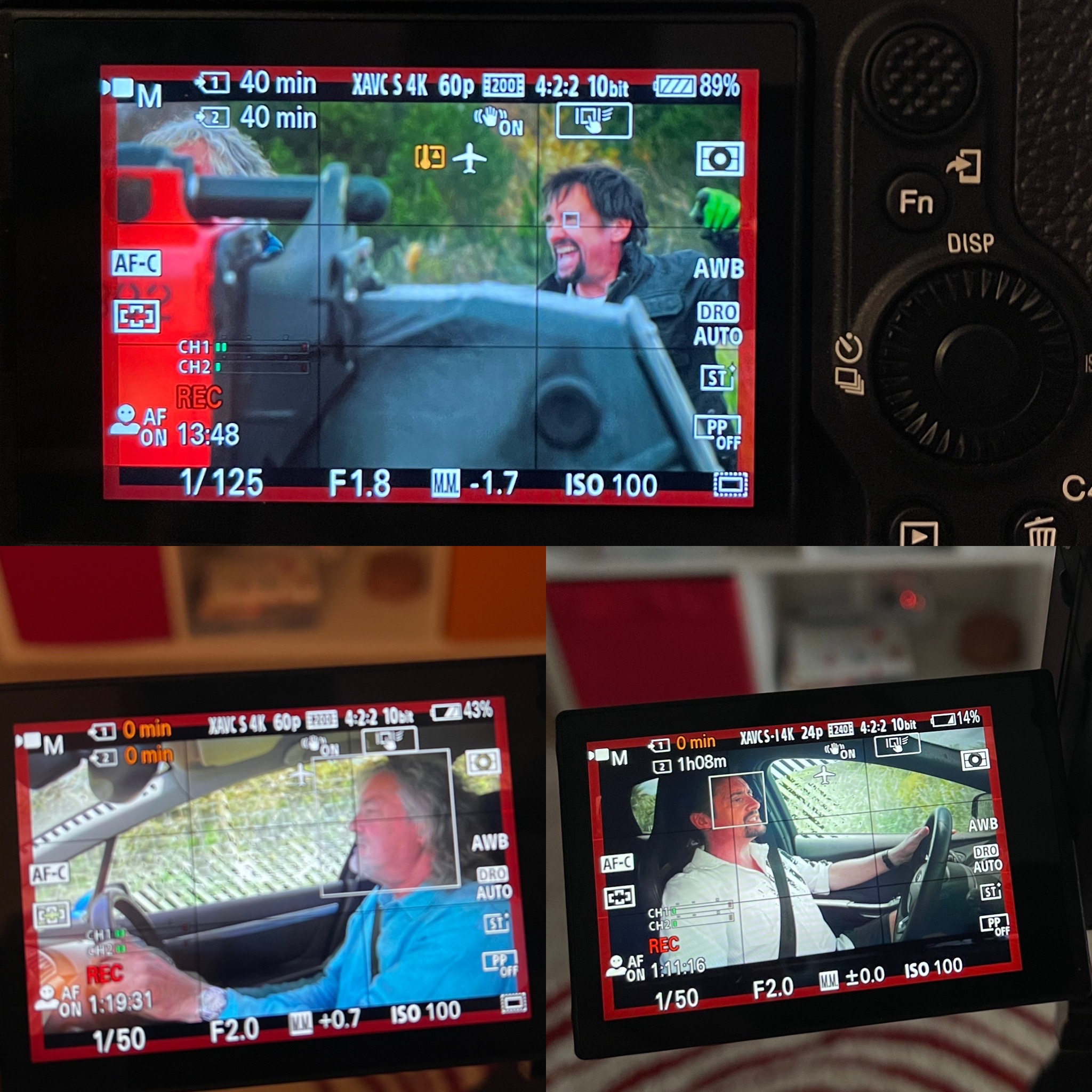
I started with the FE 85 just pointing at a static scene in my 77 degree apartment with the camera in front of the heater so it was blowing warm air on it. I hit tap to track on the flower as you can see in the image, so tracking was constantly engaged the whole time. I stopped it just before the card was full after almost 1hr 20min of recording. Then I moved to pointing it at the TV and swapped to the FE 35 to bootleg The Grand Tour (haven't seen the latest one, no spoilers !). This should generate more heat since the camera would be busy detecting faces/eyes and tracking them - which it did beautifully. No heat warnings at all. This is far better than my a7III and absolutely crushes the a6300. I've never done a test with my a7sIII because it doesn't need it, but these results are far beyond what I should ever use.
I'll try bumping to XAVC SI and the 600mbps bitrate, but I never shoot that because my 128gb cards only hold about 27 min of footage and after a year and a half with the a7sIII I don't see a difference with XAVC S. That said I have zero reservations about using the a7IV for my work as I've never recorded a 1hr 20min take - the longest for me is sunrises/sunsets at about 45 minutes from start to finish. I edit in 24p, a full 128gb card of 60p footage would be 3 hours slowed down. The photo shows the end of the three consecutive takes filling my cards and the switch to SI and its massive bitrate on the bottom right. Note the sweet eye AF !
Cheers
Chris
EDIT: quick update, ran through the 27 minutes at the SI's crazy bitrate, camera is warm, no overheat warnings. I'm switching to 24p to see if the 7k oversampling has more of an impact.
Ran some more tests. Took a lot but I finally got mine to overheat. I filled a 128gb card shooting SI at 4k60p which was 27 minutes, no issues. Then I switched to 24p which filled another card in 1hr 8 min, no issues. Then I did a simultaneous recording, 4k60p XAVC S - so it recorded 1hr 20 min to both cards, no issues. So my conclusion is after 7 straight hours of recording - only stopping to swap batteries and delete those long ass takes - my camera has zero issues with the screen out.
So then I put the screen into the body and did the simultaneous 4k60p recording again. It shut down after 27 minutes recording to both cards. I flipped the camera off and then right back on and hit record and got over 14 minutes more recording before it shut down - again recording to both cards. This was after all the previous recording and the camera was already pretty warm.
I never shoot with the screen flat against the body. I'm 6'2" and never have the camera at eye level, the screen is always flipped out so I can see it. Over 7 hours works for me, the a7IV is a keeper. A few more shots of the camera in action.
Is there a possibility to reduce the possibility of overheating if using a high speed sd card when recording, for example sd card v60, v90 or cfexpress instead of v30
my logic, if we use a higher speed sd card, then the throttle when writing high bitrate video does not occur so it reduces the possibility of overheating due to hard work on the sd card
is there any possibility like this?
I spoke directly with the rep from Sony who works in Florida and whose job is to personally reach out to Sony customers experiencing this issue and gather information and report back to the engineers in Japan.
Essentially they said that they have had customers reporting to Sony about the issue but right now Sony is gathering as much information about it as possible. The problem for Sony is the units Sony has in their offices are not overheating so they cannot re-create the issue themselves. Therefore they are relying on us users to provide them with everything we have
Right now Sony has asked me to do the following:
Please send me unedited copies of the clips that show the issue. Just upload these images to a drop box and reply to this email with the link containing the sample clips. Please send only “Unedited” Clips. And I will review these and get back to you with my findings.
Leonberger wrote:
I spoke directly with the rep from Sony who works in Florida and whose job is to personally reach out to Sony customers experiencing this issue and gather information and report back to the engineers in Japan.
Essentially they said that they have had customers reporting to Sony about the issue but right now Sony is gathering as much information about it as possible. The problem for Sony is the units Sony has in their offices are not overheating so they cannot re-create the issue themselves. Therefore they are relying on us users to provide them with everything we have
Right now Sony has asked me to do the following:
Please send me unedited copies of the clips that show the issue. Just upload these images to a drop box and reply to this email with the link containing the sample clips. Please send only “Unedited” Clips. And I will review these and get back to you with my findings.
I guess that’s a somewhat positive update on a crummy situation. I don’t seem to have the overheating issue, though I’ve not pushed it too hard yet. But that doesn’t take away from the those that are experiencing the issue. In that case, while it’s unfortunate it’s happening at all it’s good that there is someone responsible for outreach to gather the information necessary to resolve it.
I’m currently using the V90II 300mb cards and am experiencing overheating
v3suv1us wrote:
Is there a possibility to reduce the possibility of overheating if using a high speed sd card when recording, for example sd card v60, v90 or cfexpress instead of v30
my logic, if we use a higher speed sd card, then the throttle when writing high bitrate video does not occur so it reduces the possibility of overheating due to hard work on the sd card
is there any possibility like this?
It for sure is an interesting situation as the Sony rep said it would not make sense to send your camera to us for repair as we have no idea what we would be fixing yet.
wittyphrase wrote:
I guess that’s a somewhat positive update on a crummy situation. I don’t seem to have the overheating issue, though I’ve not pushed it too hard yet. But that doesn’t take away from the those that are experiencing the issue. In that case, while it’s unfortunate it’s happening at all it’s good that there is someone responsible for outreach to gather the information necessary to resolve it.
It is a bit curious that the A7IV was out in Europe and Asia for 2 weeks before North America, and no one was reporting overheating issues but it seems to be frequent in units coming to US and Canada. Could there be issues in a certain batch?
Regardless, I haven't stress-tested mine, it works fine in everyday use/the way I use it.
patotts wrote:
It is a bit curious that the A7IV was out in Europe and Asia for 2 weeks before North America, and no one was reporting overheating issues but it seems to be frequent in units coming to US and Canada. Could there be issues in a certain batch?
Regardless, I haven't stress-tested mine, it works fine in everyday use/the way I use it.
As long as the screen is out or even ajar, not going to be a big problem. This is something Sony users are accustomed to, pulling the screen out prevents most issues. It’s just something that you need to be aware of, it’s not a cinema camera, but with care, you can stretch it out a lot.
I left my Sony A7IV on my office table, screen out and recorded 4k24 for 35 min. Switched over immediately to 4k60 and the camera overheated in just over 2min. As previously mentioned this would be a disaster for me on something like a wedding shoot.
No hand holding whatsoever and it was done in a cool basement.
Charlie N wrote:
As long as the screen is out or even ajar, not going to be a big problem. This is something Sony users are accustomed to, pulling the screen out prevents most issues. It’s just something that you need to be aware of, it’s not a cinema camera, but with care, you can stretch it out a lot.
I left my Sony A7IV on my office table, screen out and recorded 4k24 for 35 min. Switched over immediately to 4k60 and the camera overheated in just over 2min. As previously mentioned this would be a disaster for me on something like a wedding shoot.
No hand holding whatsoever and it was done in a cool basement.
change your recording parameters till you find something that works, hint, highest bitrates not gonna cut it.
I am using SanDisk V30 extreme pro cards so I can’t do the high bitrates at the moment. I thought high compression h265 would need more processing rather than all intra. I did a bunch of short clips yesterday outdoors handheld in my typical usage (low 70s F temp) and camera was manually turned off between clips and no issues with overheating. Did not run a long test yet.
Leonberger wrote:
I spoke directly with the rep from Sony who works in Florida and whose job is to personally reach out to Sony customers experiencing this issue and gather information and report back to the engineers in Japan.
Essentially they said that they have had customers reporting to Sony about the issue but right now Sony is gathering as much information about it as possible. The problem for Sony is the units Sony has in their offices are not overheating so they cannot re-create the issue themselves. Therefore they are relying on us users to provide them with everything we have
Right now Sony has asked me to do the following:
Please send me unedited copies of the clips that show the issue. Just upload these images to a drop box and reply to this email with the link containing the sample clips. Please send only “Unedited” Clips. And I will review these and get back to you with my findings.
I had an a99 back in the day that would overheat after just a few minutes of being on and shut down. It was complete trash. I went through this over the course of a couple months with Sony's engineers. They had me ship them my camera and sent me a new one that I promptly sold and I've been in the E-mount since.
If you're still within the return window, I'd exchange your copy. It took a lot to get mine to overheat, even with a warm camera after 7 hours of 4k60p recording, I still got 27 minutes of dual recording when I put the LCD against the body - which generates the fastest overheat times. And like I said, I immediately restarted it and got another 14. As much as I tried, I couldn't get mine to even show the warning with the LCD out.
thanks I did drop my camera off at the store I purchased it at up here in Canada (Vistek) who is looking at it themselves and are very close with the Sony rep in the area apparently. I will see what they say.
joychris wrote:
I had an a99 back in the day that would overheat after just a few minutes of being on and shut down. It was complete trash. I went through this over the course of a couple months with Sony's engineers. They had me ship them my camera and sent me a new one that I promptly sold and I've been in the E-mount since.
If you're still within the return window, I'd exchange your copy. It took a lot to get mine to overheat, even with a warm camera after 7 hours of 4k60p recording, I still got 27 minutes of dual recording when I put the LCD against the body - which generates the fastest overheat times. And like I said, I immediately restarted it and got another 14. As much as I tried, I couldn't get mine to even show the warning with the LCD out.
Again it is most likely the cameras fault but I did not pay $3600 CDN after tax to not be able to use features of a camera that Sony included. That literally makes zero sense. It is 10bit 4:2:2 or bust.
Charlie N wrote:
change your recording parameters till you find something that works, hint, highest bitrates not gonna cut it.
It seems pretty clear your camera has a problem. I would exchange it, or if that is a problem return it.
We had a Dell laptop that was overheating. Dell decided it needed a new motherboard. The Dell tech came to the office and replaced the motherboard. The overheating problem continued. But watching the tech we learned how to open the laptop. We opened the laptop and discovered the gpu was not making good contact with the heat sink. We created a copper shim to fill the gap between the gpu and the heat sink. Problem solved.
Your camera sounds like it has a thermal management problem. This can’t be fixed via firmware. Realistically the only way Sony engineering will understand what is going on is to open camera and look inside. If they haven’t asked for the camera to do that, it won’t get fixed.
It sounds like it has capabilities well below what is expected. That would be from a manufacturer defect in the thermal management.
I definitely need to test mine out while I'm still in the return window. Haven't done video stress tests, just been taking it out for stills ever since I got mine in. If I encounter any issues I'll follow up on here
I posted my results on FB and some said they were getting much shorter record times and didn't have airplane mode on - which is the way I shoot. Gonna try more today with it off to see what kind of a difference that makes.


 !). This should generate more heat since the camera would be busy detecting faces/eyes and tracking them - which it did beautifully. No heat warnings at all. This is far better than my a7III and absolutely crushes the a6300. I've never done a test with my a7sIII because it doesn't need it, but these results are far beyond what I should ever use.