You’d understand the issue if you had the issue. For those that have the issue, you get bumped out randomly, sometimes constantly, from magnified view….even if you don’t change the aperture.
I’ve learned to live with it. It’s the worst on my Loxia 25, which is my favorite Loxia. Not quite as bad on my 21, and my 85 exhibits it the least.
I feel I'm going to jinx myself, but of all my Loxias, my fave which is the 25 was the worst offender for this problem. After the last update for the a7R V 3.01 firmware update, it doesn't seem to happen when focusing wide open. It still hops out often at other apertures, but not wide open. Same with my Loxia 21.
I'm sure now that I posted this, it's going to pop out of magnified view like a maniac all all apertures.
I have two A7RV bodys, bought with a year between them. They have the same settings copied via card over to the other. Both run FW3.01.
My Loxia 21/2.8 work well on both of them. I can run the apertures up and down and hit focus magnify every time and also adjust sharpness without it falling out of magnify.
My Voigtländer 15/4.5 works well on my oldest body but glitches (falls out of magnify or refuses to go into it) sometimes on the newer body. Just loosen it in the mount and reseat it fixes the problem until next time. It happens especially often at f8.
Bad contacts at times? But then why most often at f8?
tsdevine wrote:
I feel I'm going to jinx myself, but of all my Loxias, my fave which is the 25 was the worst offender for this problem. After the last update for the a7R V 3.01 firmware update, it doesn't seem to happen when focusing wide open. It still hops out often at other apertures, but not wide open. Same with my Loxia 21.
I'm sure now that I posted this, it's going to pop out of magnified view like a maniac all all apertures.
I used the 25 again today, didn't not pop out of magnified view when shot wide open.
I have an occasional problem with my CV 65, at about the same frequency as my Loxia 25.
No problems with my CV 35 or 110 (yet) although I don't use those as often.
chrisd999 wrote:
Does anybody have this issue with the fairly new Voigtlander APO-Lanther 35mm f2? I'm about to pick one up used (out of warranty), but I would think twice if this issue has been reported with that lens.
By the way, another datum point. No such issues with my Loxia 25mm on my A7RV or new A7CR 🤞
It recently start to jump out of magnification mode after about a second with a CV40f1.2 on a A7cii. Gently cleaning the lens contacts with lens cleaner on a cloth seems to have solved the problem.
My original copy of the Loxia 35 had the magnifying error with my A1... but only at f4. I sold that copy a while back and missed it, got a beautiful new copy and... it also has the magnifying error, but again only at f4 lol. So strange.
My Loxia 2/35 had the magnifying error only at f2 with my A9-2 and A6400.
I noticed that if I move the aperture ring back and forth several times, the problem becomes less. This could indicate that the electrical contacts are dirty or corroded. I decided to open the lens and take a look at the sliding electrical contacts. After cleaning the contacts the problem has become significantly less, but not gone.
I took some photos if anyone wants to try it too. For cleaning I used a very thin microfiber cloth and two "Kontakt Chemie" sprays KONTAKT 60 and KONTAKT WL.
Caution: Only perform this repair if you know what you're doing. If you damage the contacts, the lens will no longer work as expected.
First, the screws must be removed from the mount.
After all screws have been removed, the black sleeve can be removed with a little force.
The contacts must be carefully removed from the mount.
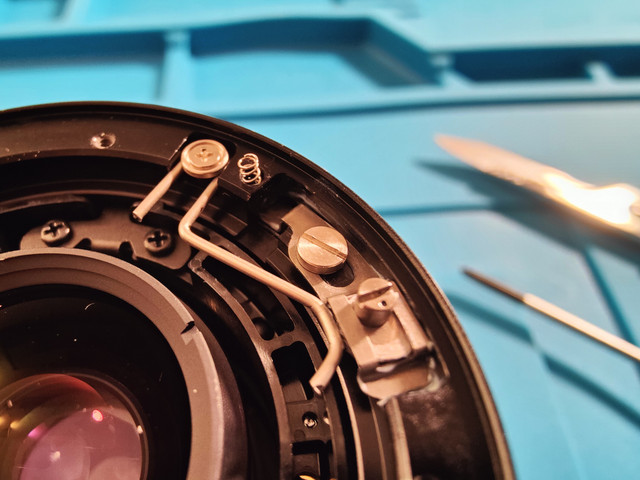
View of the lens after removing the mount.
Caution: The small spring will easily lost, put the spring aside.
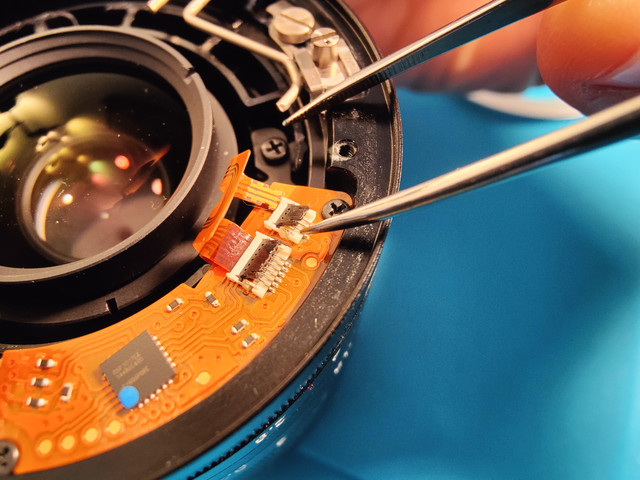
To separate the cables, the contacts must be carefully folded up.
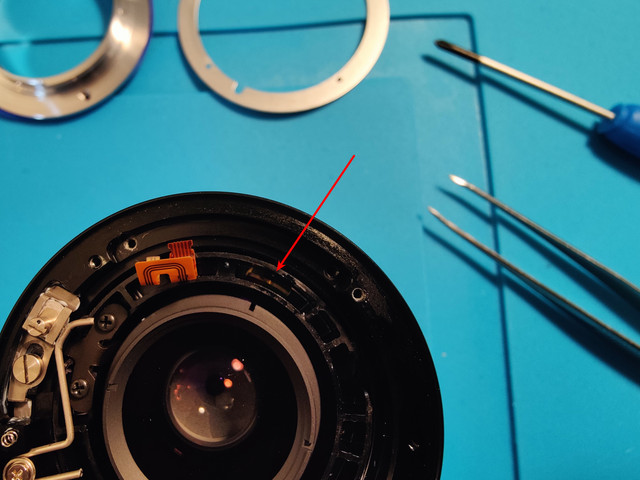
After removing the circuit board you can see the sliding contacts.
Here's a close-up of the sliding contacts. Only one contact is visible; the other is hidden next to it.
I moistened the cloth with the spray and carefully slid it under the contacts. Then I moved the focus ring to both ends. Caution: the contacts should not be bent under any circumstances!
Blitzlicht wrote:
My Loxia 2/35 had the magnifying error only at f2 with my A9-2 and A6400.
I noticed that if I move the aperture ring back and forth several times, the problem becomes less. This could indicate that the electrical contacts are dirty or corroded. I decided to open the lens and take a look at the sliding electrical contacts. After cleaning the contacts the problem has become significantly less, but not gone.
I took some photos if anyone wants to try it too. For cleaning I used a very thin microfiber cloth and two "Kontakt Chemie" sprays KONTAKT 60 and KONTAKT WL.
Caution: Only perform this repair if you know what you're doing. If you damage the contacts, the lens will no longer work as expected.
I moistened the cloth with the spray and carefully slid it under the contacts. Then I moved the focus ring to both ends. Caution: the contacts should not be bent under any circumstances!
Quite an achievement!
But it is not actually caused by dirty contacts (although that may enhance the problem), as my A7RIII works flawlessly with the Loxia lenses, while my A1 makes a mess of manual focussing with especially the Loxia 25.
I suspect there to be a communication error, either caused by the much faster processor in the A1, that the mechanical aperture coupling cannot keep up with, or simply a software incompatibility, that has Zeiss pointing at Sony and vica versa...
The fact that Zeiss has become irrelevant for Sony does not help.
mkuznicki wrote:
Keep in mind that it's not only the Loxia lenses that do this; the A1 has the same problem with some Voigtlander lenses.
My Voigtländer 15/4.5 works perfect on my oldest A7RV body, but on my one year newer A7RV body it has some problems at times and falls out of magnification or refuses to go into it. Both my A7RV bodys have the exact same settings.
I've had this problem with my Loxia 35mm at f2 as it would wildly switch between f2-f2.5 electronically. I don't know if I've become superstitious or it self-corrected, but this stopped when I started gently pulling the aperture collar towards the camera body while changing aperture. This problem was so bad before that I stopped using this lens for years until I figured this out.


 ...
...