I can't thank this lovely young lady enough for her patience with me while I fumbled around trying to figure out how to make everything work. She agreed to be my first "people" subject in 15 years....and I was a nervous wreck!
I had new strobes, light modifiers, and light stands that I had only tested a couple of times. I used a new camera I'm still getting used to, a lens I bought from a friend some 25 years ago (not sure why I never tried it until now, but me likey )...all while trying to make it happen in my over crowded garage and not look too much like an idiot.
"LB"..Fine job of a beautiful woman! My only nit is the eyeball reflections. I am sure we have all been in the situation of anxiety, is the fstop correct, iso?, focal length?...., in not "getting it correct".
These are fine! Deep breath and shoot!
Dan
DanielScott wrote:
These all came out REALLY well. Great set of portraits, and I'm sure she loves them. Since you mentioned it, what lens did you use?
Daniel, Thanks for taking the time to stop in and comment.
The lens is the Canon EF 85mm 1.8 (I'm guessing an early '90's model). It's been in the bottom of my camera bag for years and only recently discovered I even had it.
Danpbphoto wrote:
"LB"..Fine job of a beautiful woman! My only nit is the eyeball reflections. I am sure we have all been in the situation of anxiety in not "getting it correct".
These are fine! Deep breath and shoot!
Dan
Mr Dan...thanks for the kind words of encouragement. She is my neighbor's kid and just finished her freshman year of college. She plays a mean game of softball.
Very nice portrait photos. Not perfect, but that will come with more experience (I'm still working on it too). She is a very pretty girl.
The catchlights in her eyes are a bit distracting. Are you using 4 lights? Are you doing any retouching to the photos?
Her neck area could be lightened some. Her forehead and nose have a bit too much shine. Re-shooting with slightly different light placement could reduce this, as well as the forehead wrinkles. Some make-up powder to these areas would reduce it as well. I tend to like nose freckles, but those could also be reduced through make-up and lighting or retouching.
LarryBeemer wrote:
Daniel, Thanks for taking the time to stop in and comment.
The lens is the Canon EF 85mm 1.8 (I'm guessing an early '90's model). It's been in the bottom of my camera bag for years and only recently discovered I even had it.
Technically #2 is the best. There are some crazy catchlights in the ones that follow. Tell us more about your setup. There seems to be a combination of hard/soft light.
CharleyL wrote:
Very nice portrait photos. Not perfect, but that will come with more experience (I'm still working on it too). She is a very pretty girl.
The catchlights in her eyes are a bit distracting. Are you using 4 lights? Are you doing any retouching to the photos?
Her neck area could be lightened some. Her forehead and nose have a bit too much shine. Re-shooting with slightly different light placement could reduce this, as well as the forehead wrinkles. Some make-up powder to these areas would reduce it as well. I tend to like nose freckles, but those could also be reduced through make-up and lighting or retouching.
I used a total of 3 lights. 1 36" octabox with grid as a main light just above and to camera right and two 12x36 strip softboxes with grids for hair lights, one on either side. On the three images with the dark background, the garage door was open so that added a little bit of extra catch light in the eyes. Also, I did experiment (for the first time) with a little burning in on the pupils of her eyes....apparently too much.
I requested for her to get makeup done and gave her a list of suggestions for what I was wanting. She said she had a friend who could help her out with that. Unfortunately, VERY LITTLE of what I requested was done so we had to work with what we had. In her defense, I completely forgot it was prom weekend and this was kind of a last minute session so the people/person she was going to have do her makeup were too busy with other people to fit her in.
I am not now, nor have I ever been, very well versed in post production, particularly cosmetic/skin retouching (as demonstrated with the failed attempt at making her eyes pop). I guess I'll never be one of the cool kids in that regard . However, I will say that I am not a huge fan of the typically overdone post production retouching practices that have become increasingly popular. Unnatural, almost plastic looking skin and super-saturated colors are not my vibe. I'm fine with whatever magic can be accomplished with pre-production makeup. Beyond all that, you are correct...it's my job to get the lighting right. I will remove a zit or the occasional temporary scar or mark in post production, but that's about it.
LarryBeemer wrote:
I am not now, nor have I ever been, very well versed in post production, particularly cosmetic/skin retouching (as demonstrated with the failed attempt at making her eyes pop). I guess I'll never be one of the cool kids in that regard . However, I will say that I am not a huge fan of the typically overdone post production retouching practices that have become increasingly popular. Unnatural, almost plastic looking skin and super-saturated colors are not my vibe.
Larry, I hope you don't mind, but I thought I'd show you the possibility of what 5 minutes in Portrait Pro can do. I dialed back some settings and probably would dial back some more, but here is some cleanup that doesn't give plastic skin.
Maybe working distance needs to vary to dial in DOF a bit more, nose out of focus looks a bit odd. Looks like you might have been in tight and more DOF would help or more working distance?
And who am I to critique portrait work scares me but the results can be rewarding as you are off to a great re-start as I see it! And she has a very natural beauty, can't beat that
dmacmillan wrote:
Larry, I hope you don't mind, but I thought I'd show you the possibility of what 5 minutes in Portrait Pro can do. I dialed back some settings and probably would dial back some more, but here is some cleanup that doesn't give plastic skin.
dmac....I've never heard of PortraitPro. Interesting. I do have to admit that the adjustments you've made here appear to be the closest to "natural" that I've seen. I'm sure these adjustments CAN be made in Photoshop or LightRoom, but I may be too advanced in age to have the time and/or brain cells left to learn how to make them happen. If the learning curve isn't too steep, I may have to look in to PortraitPro. Thanks for the info!
Maybe working distance needs to vary to dial in DOF a bit more, nose out of focus looks a bit odd. Looks like you might have been in tight and more DOF would help or more working distance?
And who am I to critique portrait work scares me but the results can be rewarding as you are off to a great re-start as I see it! And she has a very natural beauty, can't beat that
Karl
Karl...thanks for stopping by and offering your comments. My preferred lens for headshots and sometimes even full body shots is the 70-200 f2.8 and I know exactly where I need to be with that lens. As stated, this was the first time I've shot with the 85 f1.8 and it took some getting used to. I had it set at f2.8 and while I generally liked how it performed, I found myself getting too close too often. I lost an entire series/outfit due to not paying attention and being too close to focus. At least now I know what to expect.
Robert Frank was once asked what the secret to a good picture is , he said " it has to be sharp and the eyes have to be in focus." You literally nailed this. The eyes absolutely draw viewer in. I can see elements of lighting but it adds pop. The black and white is my favorite because lighting is diffused and subtle but eyes still sparkle. nicely done.
You're off to a good start! Others mentioned the catchlights but the thing that I first saw was the way over the top iris retouching. My advice is to create it on an individual layer and then fade the opacity of that layer to the point where it's just a little noticeable in a closeup view. Toggle back and forth on/off to compare. If it jumps out at you - it's too much. Anyway, keep shooting these and having fun!
Larry,
You can download a trial version of Portrait Pro and try it for yourself. I used PP 17. They are up to PP 21 and made it even better.
It presents a default correction, then you can tweak it to suit your tastes. It does some facial sculpting and it usually goes too far for me. I backed off a little on this, but if you compare it to the original, you can see it slimmed her face and worked on her jaw line.
All adjustments are done with sliders, so you can easily see the changes. Here's an outdoor photo with some Portrait Pro help. I taught photography to adolescents in a group home for troubled youth. I was demonstrating environmental portraits with natural light. The subject was one of their caregivers. It was taken with a Fuji X-H1 and a Canon EF 135L.


 )...all while trying to make it happen in my over crowded garage and not look too much like an idiot.
 . However, I will say that I am not a huge fan of the typically overdone post production retouching practices that have become increasingly popular. Unnatural, almost plastic looking skin and super-saturated colors are not my vibe. I'm fine with whatever magic can be accomplished with pre-production makeup. Beyond all that, you are correct...it's my job to get the lighting right. I will remove a zit or the occasional temporary scar or mark in post production, but that's about it.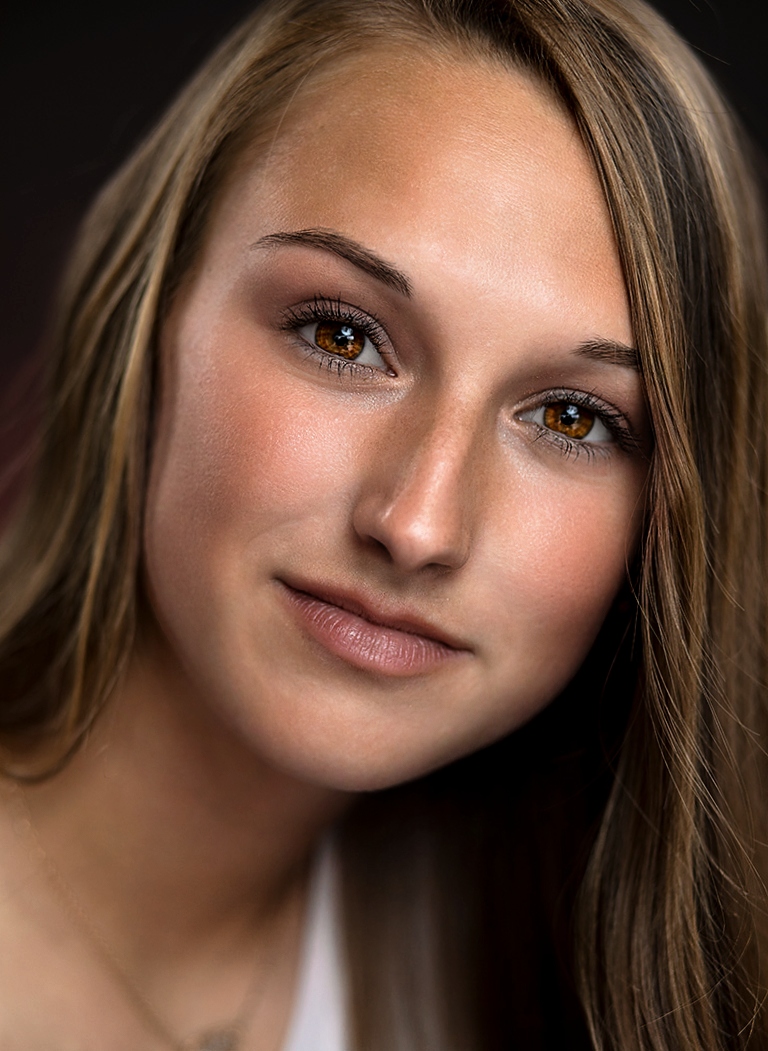
 portrait work scares me but the results can be rewarding as you are off to a great re-start as I see it! And she has a very natural beauty, can't beat that
 My advice is to create it on an individual layer and then fade the opacity of that layer to the point where it's just a little noticeable in a closeup view. Toggle back and forth on/off to compare. If it jumps out at you - it's too much. Anyway, keep shooting these and having fun!
