Just tested my replacement card. I'm getting only about 6 seconds of continuous/sequential shooting:
RAW: 65 frames before it stops or slows down ... and it takes a little over a minute to clear the buffer.
cRAW: 75 frames before it stops or slows down ... and it takes a little over a minute to clear the buffer.
This is nowhere near the 100 frames you are getting with your Transcend card!
arbitrage wrote:
The buffer on mine is about 100 shots to slow down and clears within a few seconds even if you hit the limit. Dud card I'd say.
100 frames before slowing down is about what I get with the ProGrade Gold.
bobbytan wrote:
Just tested my replacement card. I'm getting only about 6 seconds of continuous/sequential shooting:
RAW: 65 frames before it stops or slows down ... and it takes a little over a minute to clear the buffer.
cRAW: 75 frames before it stops or slows down ... and it takes a little over a minute to clear the buffer.
This is nowhere near the 100 frames you are getting with your Transcend card!
I am returning the 256GB Transcend CFExpress card will get a 128GB Delkin Devices CFExpress card. The ProGrade Gold is a little less expensive but I believe the Delkin card is a little faster with a claimed write speed of 1540 MB/s.
Sounds like a good plan. I was very close to returning my Transcend and getting the Delkin but so far my Transcend is working as well as I need it to.
I wonder if there is just some setting difference between our cameras that is limiting your bursts? I need to retest my card again to confirm my old results. I have every possible image processing setting turned off.
bobbytan wrote:
I am returning the 256GB Transcend CFExpress card will get a 128GB Delkin Devices CFExpress card. The ProGrade Gold is a little less expensive but I believe the Delkin card is a little faster with a claimed write speed of 1540 MB/s.
I wondered about the settings too. But then when I tested it with my Lexar 2000x V90 SD card (with the same settings and conditions, of course) it performed better than the Transcend card! That was the straw that broke the camel's back! The Transcend card may be the cheapest one in the market but if there is no speed advantage over an SD card, what's the point of the CFExpress card?
arbitrage wrote:
Sounds like a good plan. I was very close to returning my Transcend and getting the Delkin but so far my Transcend is working as well as I need it to.
I wonder if there is just some setting difference between our cameras that is limiting your bursts? I need to retest my card again to confirm my old results. I have every possible image processing setting turned off.
BobbyTan, whoever you are buying from, tell them you want a Delkin 128GB card(s) with a date (mm/yy) on the back of the package newer than 09/20. That will get you cards with the new firmware that is 1gb/sec sustained write speed, as per thessdreview.com review.
I have about 200GB of CF cards that are fading into obsolescence as my 7DM2 transitions into backup status. I am of the opinion that the CFexpress format will be around for quite a while and will probably have some period of downward compatibility beyond that, so I made my purchase based on a combination of current needs, price, performance and 'future-proofing' (I know there is no such thing - maybe 'future-prolonging' is a better if not more awkward term).
bobbytan wrote:
I wondered about the settings too. But then when I tested it with my Lexar 2000x V90 SD card (with the same settings and conditions, of course) it performed better than the Transcend card! That was the straw that broke the camel's back! The Transcend card may be the cheapest one in the market but if there is no speed advantage over an SD card, what's the point of the CFExpress card?
Motivated by your findings I ran a more controlled test than I'd done in the past. My results are actually fairly similar to yours. I was able to get up to 90 in a burst in CRAW but that was on one run and another run was only 75. In full RAW I was down around your 60 mark.
The only big difference is my card write light was out in under 20s (I didn't time exactly just counted in my head and sometimes was around 15s)...nowhere near a min. SD card was maybe a little longer but not a big difference to clear.
I then tried my Sony Tough 64GB SD UHS-II (fastest SD card you can buy) and it actually got 108 in CRAW!!
So yeah...I'm now not impressed at all with this Transcend card. Has it affected my daily shooting?..not yet...but it does sort of suck that it doesn't outperform my SD cards. Of course SD cards like the Sony Tough cost just as much as a CFExpress anyways. And the price I got my Transcend for was ridiculously cheap (mispriced) so I can live with it.
Please report what kind of numbers you get with your Delkin.
are you guys testing it in ES or H+ MS? if ES, when to know it's slowing down?
arbitrage wrote:
Motivated by your findings I ran a more controlled test than I'd done in the past. My results are actually fairly similar to yours. I was able to get up to 90 in a burst in CRAW but that was on one run and another run was only 75. In full RAW I was down around your 60 mark.
The only big difference is my card write light was out in under 20s (I didn't time exactly just counted in my head and sometimes was around 15s)...nowhere near a min. SD card was maybe a little longer but not a big difference to clear.
I then tried my Sony Tough 64GB SD UHS-II (fastest SD card you can buy) and it actually got 108 in CRAW!!
So yeah...I'm now not impressed at all with this Transcend card. Has it affected my daily shooting?..not yet...but it does sort of suck that it doesn't outperform my SD cards. Of course SD cards like the Sony Tough cost just as much as a CFExpress anyways. And the price I got my Transcend for was ridiculously cheap (mispriced) so I can live with it.
Please report what kind of numbers you get with your Delkin....Show more →
My e-Shutter option is grayed out, so I cannot even use it - not that I want to use it - as 20 fps is overkill. Spoke to Canon Tech Support and, believe it or not, after a lengthy phone call and run-through of the menu, etc. he could not solve the problem. Maybe I'll take it to the Canon Factory Service Center in Costa Mesa for them to have a look.
Thang wrote:
are you guys testing it in ES or H+ MS? if ES, when to know it's slowing down?
Thang wrote:
are you guys testing it in ES or H+ MS? if ES, when to know it's slowing down?
My test was in ES at 20FPS (as you can't change it). But now seeing Bobby's was in EFCS, I'll try that. I remember EFCS/MS being able to shoot in CRAW indefinitely but maybe I'm wrong.
I was just watching for the first stutter in the continuous flashing of the outer border while shooting. When I test EFCS I will just wait to hear a stutter in the frame rate.
Transcend CFExpress 256GB card:
EFCS MS at 12FPS with Green Icon H+:
CRAW: 440 shots till slow down, ~15s to stop writing
RAW: 154 shots till slow down, ~15s to stop writing
ES 20FPS
CRAW: 96 shots till slow down
RAW: 58 shots till slow down
Delkin 128GB Power SD UHS-II card:
EFCS MS at 12FPS Green Icon H+
CRAW: 325 shots till slowdown
RAW: 88 shots till slowdown
ES (20FPS):
CRAW: 99 shots till slow down
RAW: 59 shots till slow down
My conclusion...very little reason to buy this Transcend CFE card over a UHS-II top end SD card other than value if you get it at a low enough price from MemC.
440 shots in cRAW is freaking amazing ... as I could only get 75 shots before it starts to crawl. I have been shooting cRAW from Day One so those cRAW numbers are important to me.
And you say that you got 325 shots with the Delkin i.e. it's actually slower than Transcend I thought I am upgrading from the Transcend to the Delkin CFExpress card! Well, if I am not satisfied with the performance of the Delkin I will send it back to B&H.
bobbytan wrote:
440 shots in cRAW is freaking amazing ... as I could only get 75 shots before it starts to crawl. I have been shooting cRAW from Day One so those cRAW numbers are important to me.
And you say that you got 325 shots with the Delkin i.e. it's actually slower than Transcend I thought I am upgrading from the Transcend to the Delkin CFExpress card! Well, if I am not satisfied with the performance of the Delkin I will send it back to B&H.
My Delkin is the SD UHS-II card, not the CFExpress card.
15s to write 440 images in cRAW and 154 in full RAW is pretty good too - as it took over a minute to write 60-75 shots when I tested my Transcend card!
What is "green icon" H+?
arbitrage wrote:
My Delkin is the SD UHS-II card, not the CFExpress card.
Bobbytan, back in September the delkin 64 and 128 CFexpress had their firmware updated with the 256 up next. Can’t recall if the thessdreview.com review mentioned when that would actually happen. I would think its been done by now.
15s to write 440 images in cRAW and 154 in full RAW is pretty good too - as it took over a minute to write 60-75 shots when I tested my Transcend card!
What is "green icon" H+?
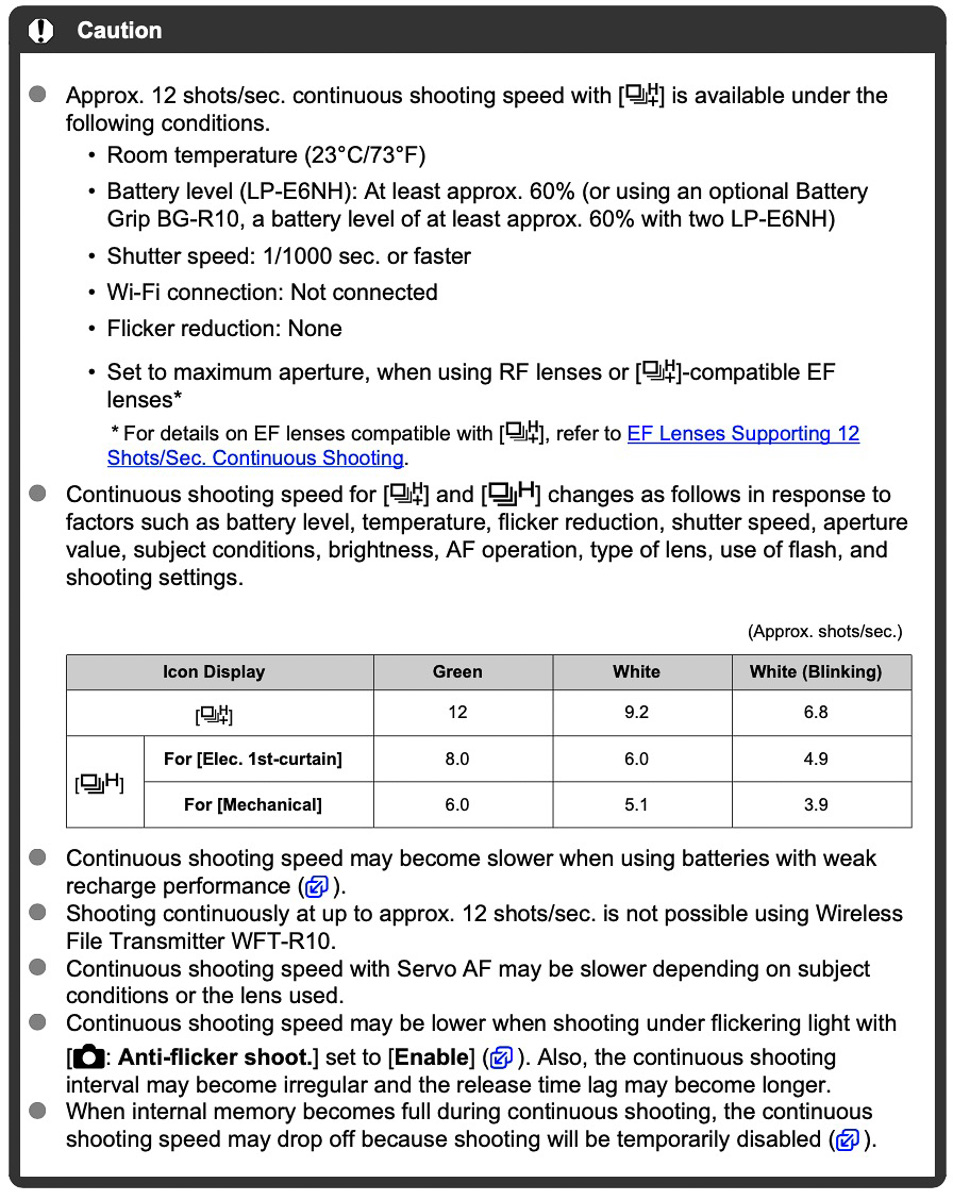
When you are in MS or MS/EFCS and put the camera into H or H+ the icon on the side Info display will show either a Green icon, White icon or flashing White icon.
The Green Icon means you are getting the full 12FPS (in H+). Solid White is 9.2FPS and usually it turns to White at around 40% remaining battery life. I only get flashing white (6.8FPS) when I use an older LP-E6 battery or an older clone battery.
I've attached the chart from the manual showing the confusing mess of FPS and the icons
The graphic Arbitrage denoted is on page 452 of the manual. It does not denote anything about electronic shutter... so the reader is mislead about green H+.
Then, on page 910, they denote the speed of electronic shutter as max of 20 fps and it shows only a white H+ icon... no green. Wha This manual is inconsistent. Why on page 452, Arbitrages graphic, does it leave out electronic shutter completely with no mention of H+ being white and the max
Also, fps with electronic shutter is always the same, 20 fps, regardless of H+, H, or Continuous selection. This is dopey, it should be only H+, and it should be green.
This crap drove me nuts as I was learning this camera. Was this thing rushed out?
Bruce n Philly wrote:
To add to the Canon confusion....
The graphic Arbitrage denoted is on page 452 of the manual. It does not denote anything about electronic shutter... so the reader is mislead about green H+.
Then, on page 910, they denote the speed of electronic shutter as max of 20 fps and it shows only a white H+ icon... no green. Wha This manual is inconsistent. Why on page 452, Arbitrages graphic, does it leave out electronic shutter completely with no mention of H+ being white and the max
Also, fps with electronic shutter is always the same, 20 fps, regardless of H+, H, or Continuous selection. This is dopey, it should be only H+, and it should be green.
This crap drove me nuts as I was learning this camera. Was this thing rushed out?
Yeah, I agree, having a White icon all the time in ES is just illogical when considering all the icons for MS/EFCS.
The good thing is nothing really drops the ES FPS other than really old lenses or shutter speeds slower than 1/20 I suppose?
The bad thing is we can't choose a slower FPS in ES. I'd love to go to around 15FPS or 10FPS at times.
15s to write 440 images in cRAW and 154 in full RAW is pretty good too - as it took over a minute to write 60-75 shots when I tested my Transcend card!
What is "green icon" H+?
I'm concerned that if two Transcend cards have had the problem that it may be a camera issue? I guess we shall see how your Delkin performs. I would think it should do as good or better than my Transcend if it isn't a camera issue. Of course it still could be some odd setting but I can't imagine what would drop writing so slow??


 I thought I am upgrading from the Transcend to the Delkin CFExpress card!