So, I'm trying to get this thing transferring photos. I have an XQD reader on the way from Amazon, and it was supposed to be delivered today, but it's also showing that it hasn't shipped yet, so I'm not optimistic. Of course, I have been shooting RAW+JPG with the JPG going to the SD card, so without the reader, I need to get the camera hooked up to my PC to actually offload them.
But therein lies the problem. I plug it in, and the computer sees the D500, but it appears to be in PTP mode, and it can't see the cards inside. If I take a picture while it's connected, the JPG opens up in Capture One, but the existing files aren't there. Nothing but Windows Explorer can even see that the D500 is connected (that includes NX-D and NX Viewer). Nikon Transfer can see it, but can't see that there are any files in it, and if I click start transfer with the D500 selected, it just sits there doing nothing.
The menu on the camera doesn't appear to have the USB option that past nikons have had to switch it over to mass storage mode. This is all on Windows 10. on my Mac, I can briefly see the photos in Apple's photo viewer, but I minimized that to go in to Finder and just grab the files, and of course, when I went back to Photos, there was nothing there.
I have tried 2 USB 3.0 cables, along with a micro USB (2.0) cable to no avail. Anyone know what the heck I am doing wrong here?
reggieb wrote:
So, I'm trying to get this thing transferring photos. I have an XQD reader on the way from Amazon, and it was supposed to be delivered today, but it's also showing that it hasn't shipped yet, so I'm not optimistic. Of course, I have been shooting RAW+JPG with the JPG going to the SD card, so without the reader, I need to get the camera hooked up to my PC to actually offload them.
But therein lies the problem. I plug it in, and the computer sees the D500, but it appears to be in PTP mode, and it can't see the cards inside. If I take a picture while it's connected, the JPG opens up in Capture One, but the existing files aren't there. Nothing but Windows Explorer can even see that the D500 is connected (that includes NX-D and NX Viewer). Nikon Transfer can see it, but can't see that there are any files in it, and if I click start transfer with the D500 selected, it just sits there doing nothing.
The menu on the camera doesn't appear to have the USB option that past nikons have had to switch it over to mass storage mode. This is all on Windows 10. on my Mac, I can briefly see the photos in Apple's photo viewer, but I minimized that to go in to Finder and just grab the files, and of course, when I went back to Photos, there was nothing there.
I have tried 2 USB 3.0 cables, along with a micro USB (2.0) cable to no avail. Anyone know what the heck I am doing wrong here?...Show more →
I'd guess it's a driver issue between the camera and Windows 10. Windows 10 is a pain in the butt, because it won't play well with older drivers. I can no longer see my phone, the illuminated keyboard is dark, sleep mode has become a coma, wireless connections come and go.
DGC1 wrote:
Thanks. I found it on the nikon site but I'm still wondering if there was supposed to be a hard copy in the box.
I've watched 3 or 4 unboxing videos on YouTube (don't ask why, I have a problem ) and none of them included this manual in the box, just the thick manual in two different languages.
davidnholtjr wrote:
Has anyone got any errors on the D500?
I got one the other day that said, cr err. I'm guess it's a card error? I turned the camera off and on and never happened again.
I got one with my first use. I was using an SD card only (need an XQD reader). Mine was a 32GB Lexar. I shut the camera off, pulled the card and tried again. Like you, this has not occurred again (yet ?).
henry albert wrote:
I'd guess it's a driver issue between the camera and Windows 10. Windows 10 is a pain in the butt, because it won't play well with older drivers. I can no longer see my phone, the illuminated keyboard is dark, sleep mode has become a coma, wireless connections come and go.
Just got mine.
Plugged it into my Windows 10 machine, recognized it and imported images into LR, no problem.
The 400m 2.8 fl is sharp!!! Im drooling and envious!!! Nice shots!!
Lance B wrote:
I have only had the D500 for a day and haven't had much opportunity to get out and really give it a proper go. These are just some quick snaps, one is out my front window of the Rainbow Lorikeet supping on out Banksia Tree nectar early in the morning. The other down at the park of a Purple Swamp Hen late in the day.
Both converted through Nikon NX-D and then tweaked in Photoshop where I used Noisware noise reduction to reduce noise. I haven't done any real comparisons with regards to noise compared to my D810 and it is too early to say whether it has better noise than the D810 when the D810 is cropped to match ie an apples to apples comparo. I am reserving judgement at this stage until Capture One Pro (my preferred RAW converter) releases their RAW algorithms for the D500 and I can then get a real feel for how it compares to the D810.
As for using the camera, gotta love that 10fps, that's good fun. All in all, works just like the D810 other than the frame rate. It's a solid, well built camera, the shutter/mirror is quite quiet and all those AF points are great. AF speed is quick and accurate. Overall, an excellent camera to use - so far as it's only early days.
sritri wrote:
I must be doing something stupid, which is possible, but mine does not work with SnapBridge or otherwise
Snapbridge registers successfully with BT/NFC via snapbridge and then when I try Remote operation or download, both of them report WiFi error
I have a cheap tablet that supports SnapBridge, it paired and worked fine (although the remote control seems to consists solely of shutter release, so not useful to me). The tethering worked fine.
But, I can confirm that WiFi only works with a SnapBridge-enabled device. Without it, the WiFi isn't even turned on. So, dslrDashboard etc. will not work with it directly - back to my existing setup instead.
Presumably dslrDashboard will be compatible with the D500, through the MR3040, soon enough.
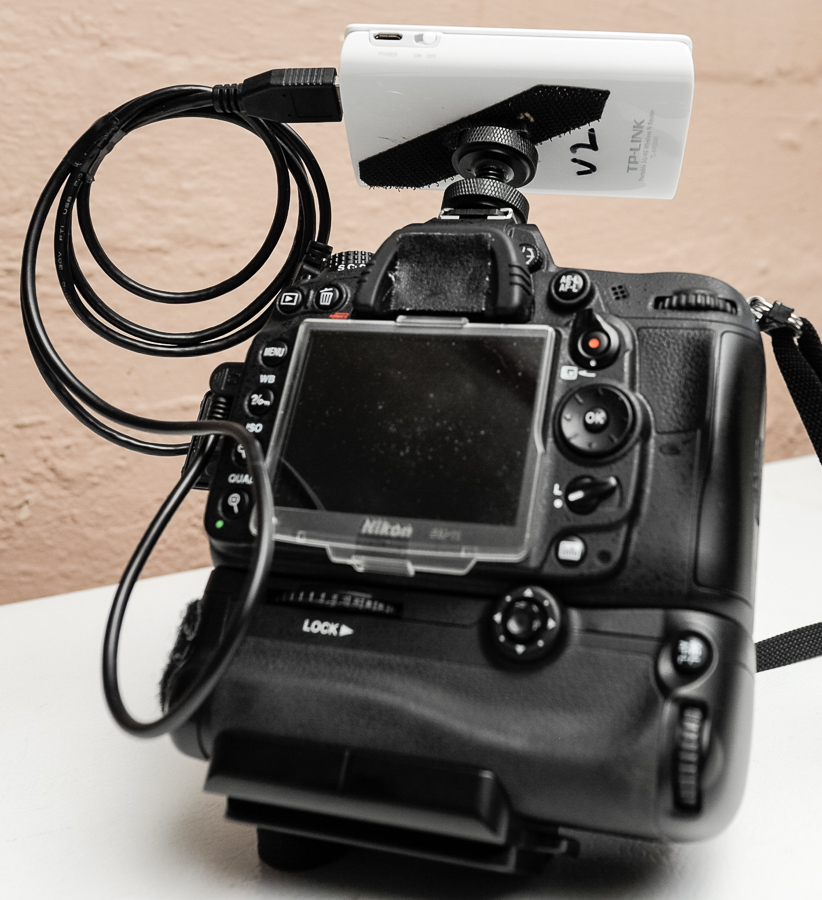
MR3040 velcro'd to the top of a D7000 for remote control via dslrDashboard
henry albert wrote:
I'd guess it's a driver issue between the camera and Windows 10. Windows 10 is a pain in the butt, because it won't play well with older drivers. I can no longer see my phone, the illuminated keyboard is dark, sleep mode has become a coma, wireless connections come and go.
Mr Albert
with all due respect, I strongly suggest you:
1- do a clean install of the OS
2- have someone who is proficient with computers take a good look at what you have and what is going wrong with it and why.


 ) and none of them included this manual in the box, just the thick manual in two different languages.