timballic
Offline
• • •
Upload & Sell: Off
|
 p.1 #1 · CZJ PRAKTICAR (Flektogon) 35mm F2.4 Dismantle/Adapt for 5DII p.1 #1 · CZJ PRAKTICAR (Flektogon) 35mm F2.4 Dismantle/Adapt for 5DII | |
This lens (any version of the Carl Zeiss Flektogon) has been on my want list for over a year, and I finally found one at a price I was willing to pay, listed as "Broken/for parts" with only a stuck diaphragm to sort. They are now going for up to £200, which I think is crazy, anyway I got this for under ¼ that.
I got the cheapest chromed brass adapter (£7), just to try with, which appears identical to the ones up to £20, however there is a black coated brass one by Primacy on Amazon, for a similar price to what I paid for the lens itself.
This is the PRAKTICAR version of the later Flektogon red-MC "electric", in the Praktica Bayonet (PB) fitting, which can be modified for use on Canon 5D/II/III, with a little work. Nothing too difficult. It's got a growing reputation as a very good lens, but it's the close focus of just 4" from the front element that is the great attraction, combined with smooth bokeh. That seems very close, but the M42 Flektogon focusses 30mm, 1 ⅛" closer, which might make a big difference. I wonder why the Prakticar designers didn't do that...perhaps they felt the quality drop off was too great?
However the information about adapting and dismantling these on the web seems to be completely lacking. So here goes. 
The Prakticar PB mount version is internally mechanically different from the M42 Flektogon, even though optically identical, though coatings may differ.
This site gives more details: http://www.pbase.com/kkawakami/prakticar_35mm_f24
(Brief info on the Flektogon disassembly is available here: http://www.kolumbus.fi/uusilehto/img/lenses/zeiss/disass/)
What's needed: A flathead jewellers screwdriver, either a lens spanner/wrench, or as I used, a steel vernier calliper will do the job. Also a mini vice to hold the lens, and rubber washing up gloves to give added purchase when screwing on/off the lens sections. Also plenty of Lighter fluid (naphtha) to dissolve and flush out the grease, a small receptacle to catch the dirty fluid, baby cotton buds and tissues. Finally some lens helicoid grease of you choice. I can recommend "Helimax-XP" available here:
http://www.ebay.co.uk/itm/Lens-Grease-1oz-28g-Helimax-xp-optical-Instr-Helicoid-white-Lithium-grease-1-/161238006105?pt=Camera_Lenses&hash=item258a88b959
Getting in is easy, putting it back together again without any instructions can be tricky,  Which is really why I made this post to help others avoid the mistakes I made. Which is really why I made this post to help others avoid the mistakes I made.  especially setting up the helicoid focus, which can be a pain, if yours like mine has come loose. especially setting up the helicoid focus, which can be a pain, if yours like mine has come loose.
However, I absolve myself of responsibility!  If you mess up, it's down to you...but do please let me know if I've made any errors. If you mess up, it's down to you...but do please let me know if I've made any errors.
 DPP_1 by Timothy Ball, on Flickr1. Lens in good cosmetic and optical condition, but with stuck diaphragm, as the grease on the focus helicoid and aperture ball-race, had separated into oil and gunge. The oil had gunked up all mechanics, but very thankfully none had reached the lenses. DPP_1 by Timothy Ball, on Flickr1. Lens in good cosmetic and optical condition, but with stuck diaphragm, as the grease on the focus helicoid and aperture ball-race, had separated into oil and gunge. The oil had gunked up all mechanics, but very thankfully none had reached the lenses.
I soon found the black finish marks VERY easily though!. Placing the lens on its nose on a piece of paper scratched the front lens surround!
These photos are of my second entry into the lens, as I'd failed to sufficiently secure the focus helicoid locking ring the first time, so some aspects had already been altered when I started making this photographic record.
 DPP_2 by Timothy Ball, on Flickr2. Here the plastic rear shroud is removed by unscrewing two screws and simply lifting off. (NB. Mine also had traces of dried out glue under it as well, so you may need to prise it gently up) Underneath two screws secure the diaphragm lever. DPP_2 by Timothy Ball, on Flickr2. Here the plastic rear shroud is removed by unscrewing two screws and simply lifting off. (NB. Mine also had traces of dried out glue under it as well, so you may need to prise it gently up) Underneath two screws secure the diaphragm lever.
The lever is removed and not replaced as it hits the mirror of the 5D.
Both the shroud and rear lens mount need about 2-3mm shaving from them. (The picture shows it after this has been done) Easy with the plastic shroud on a power sander, and the rear of the aluminium lens mount, after carefully taping over the lens, by hand filing, once the rear element holder is removed well away from the diaphragm and focus helicoid. You don't want any filings to get into the workings. 
Before removing the rear mount, check out your infinity focus on the camera with a PB - EOS adapter. The mirror will clear if you first go to near focus, flip up mirror, check ∞, Remember to return to close focus, or the mirror will hit the rear lens surround! If your ∞ setting is close, (ideally just a tad past the ∞ mark, you'll be saved trouble later.
Remove adapter.
 DPP_4 by Timothy Ball, on Flickr3. The rear mount after shroud and lever have been removed. (You can see the dried glue under where the shroud was.) Only 3 screws need to be removed for the mount to simply lift away from the lens. (See next pic to show which screws to remove...I haven't got any "annotate" software.) DPP_4 by Timothy Ball, on Flickr3. The rear mount after shroud and lever have been removed. (You can see the dried glue under where the shroud was.) Only 3 screws need to be removed for the mount to simply lift away from the lens. (See next pic to show which screws to remove...I haven't got any "annotate" software.)
 DPP_5 by Timothy Ball, on Flickr4. Rear mount separated from the lens, showing which screws have been removed. (The silver screw at 8 o'clock, next to the red dot is all that holds the two parts of the mount together. see No. 7) The two remaining silver screws at the top secure the plastic holder of the electric contacts and shouldn't need to be removed, (I don't know what the other black screw secures, but I didn't touch it.) DPP_5 by Timothy Ball, on Flickr4. Rear mount separated from the lens, showing which screws have been removed. (The silver screw at 8 o'clock, next to the red dot is all that holds the two parts of the mount together. see No. 7) The two remaining silver screws at the top secure the plastic holder of the electric contacts and shouldn't need to be removed, (I don't know what the other black screw secures, but I didn't touch it.)
 DPP_7 by Timothy Ball, on Flickr5. Underside of removed rear mount with the three long screws that hold it to the lens. DPP_7 by Timothy Ball, on Flickr5. Underside of removed rear mount with the three long screws that hold it to the lens.
 DPP_9 by Timothy Ball, on Flickr6. C/u of underside of rear mount showing the aperture return spring and the aperture set up screws on the right, (which only need adjusting if your aperture isn't set right.) DPP_9 by Timothy Ball, on Flickr6. C/u of underside of rear mount showing the aperture return spring and the aperture set up screws on the right, (which only need adjusting if your aperture isn't set right.)
 DPP_11 by Timothy Ball, on Flickr7. Two parts of mount separated , (be careful the little spring doesn't fly off, it just needs to be unhooked at one end.) I separated the mount to flush all the gungy grease from the ball race, using lighter fluid. It needs to run out with the dissolved grease, if left to evaporate the grease stays behind. The lever at 3 o'clock on the right, engages with the groove on the inner ring to limit the movement to the aperture range (F2.4-22) DPP_11 by Timothy Ball, on Flickr7. Two parts of mount separated , (be careful the little spring doesn't fly off, it just needs to be unhooked at one end.) I separated the mount to flush all the gungy grease from the ball race, using lighter fluid. It needs to run out with the dissolved grease, if left to evaporate the grease stays behind. The lever at 3 o'clock on the right, engages with the groove on the inner ring to limit the movement to the aperture range (F2.4-22)
 DPP_13 by Timothy Ball, on Flickr8. NB. If the black outer ring with the red dot falls off, it goes back with the writing towards the mount, as here. The inner part of the red dot fits in a groove in the mount, which can be seen at 12 o'clock on the right part of the mount in previous photo. DPP_13 by Timothy Ball, on Flickr8. NB. If the black outer ring with the red dot falls off, it goes back with the writing towards the mount, as here. The inner part of the red dot fits in a groove in the mount, which can be seen at 12 o'clock on the right part of the mount in previous photo.
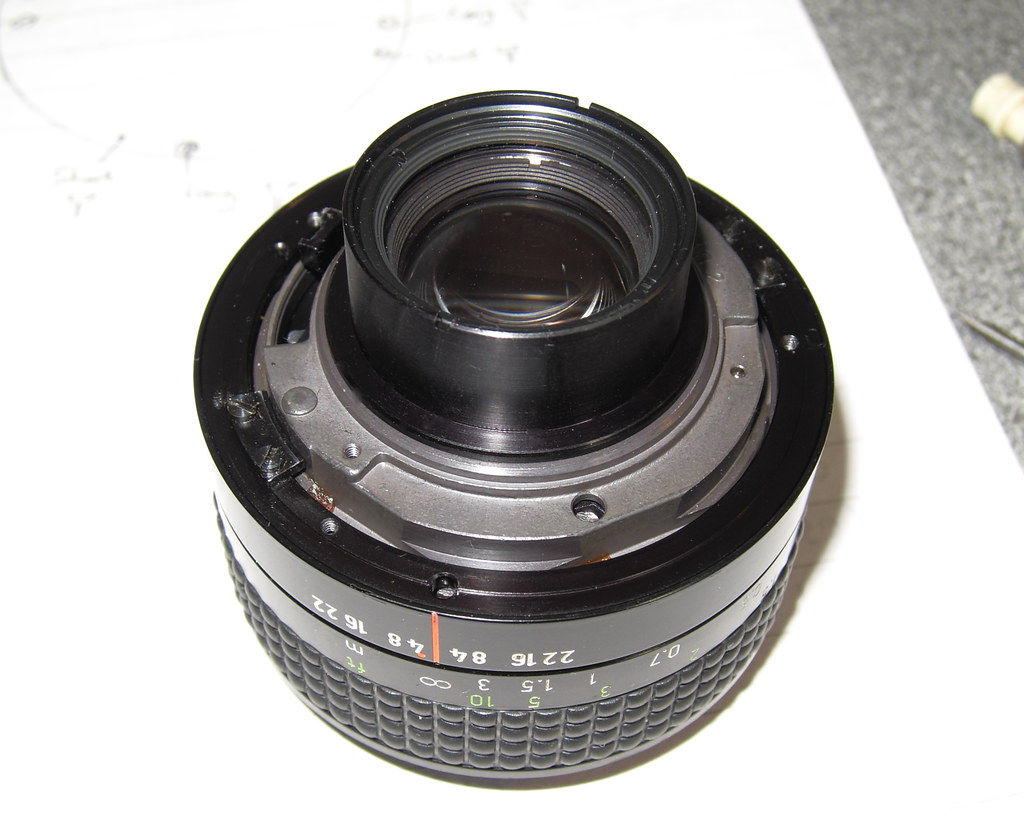 DPP_16 by Timothy Ball, on Flickr9. From rear, the most important picture I took. Am I glad I took it before dismantling further the first time in, as the positions of the aperture lever (10 o'clock here), red line and ∞ mark, the height of the screwed in grey section relative to the outer sleeve and the focus guides (at 8 o'clock and 2 o'clock here), are SO important. DPP_16 by Timothy Ball, on Flickr9. From rear, the most important picture I took. Am I glad I took it before dismantling further the first time in, as the positions of the aperture lever (10 o'clock here), red line and ∞ mark, the height of the screwed in grey section relative to the outer sleeve and the focus guides (at 8 o'clock and 2 o'clock here), are SO important.
(Here you can see the rear mount BEFORE I filed the 2.5mm from it. I went to just below the notch in the outer ring, to be level with the inner ring. I then sanded the plastic outer shroud to just below that)
 DPP_17 by Timothy Ball, on Flickr10. Remove the two guides that slide in the focus grooves, two screws per slide. I regreased these lightly before re-assembly. DPP_17 by Timothy Ball, on Flickr10. Remove the two guides that slide in the focus grooves, two screws per slide. I regreased these lightly before re-assembly.
 DPP_47 by Timothy Ball, on Flickr11 This is the picture I SO wish I'd taken just before I disengaged the inner helicoid from the outer. DPP_47 by Timothy Ball, on Flickr11 This is the picture I SO wish I'd taken just before I disengaged the inner helicoid from the outer.
IMPORTANT.  Before screwing the inner lens section fully out, you need to mark things! (The front section screws out of the focus ring clockwise.) Before screwing the inner lens section fully out, you need to mark things! (The front section screws out of the focus ring clockwise.)
DON"T screw any further / disengaging the focus threads without marking things. I did! 
(The helicoids have 8 (?) starting positions on both inner and outer ring, but beside that the inner ring can be infinitely positioned (ie. it rotates if not locked tight...mine wasn't!)
Put a mark on the outer sleeve (A little scratch under the edge, as pencil marks disappear) and record the positions of the two little notches (5 o'clock here, and one round the back, so differentiate the notches on each side.) relative to the red line on the outer sleeve (set focus to ∞ ) at JUST the point the helicoids separate.
If you have these positions marked relative to your scratch mark on the outer ring, it should take all the pain out of reassembly.
Note carefully where the Helicoids disengage (screwing clockwise). It's just about where the little notch comes level with the edge of the outer focus sleeve. If you excerpt a slight pull as you slowly unscrew the inner part you should be able to detect and mark (scratch) the exact point of detachment. (Easily said once you've done it a few times!)
(Then, if your lens is set for accurate infinity focus, all you need to do at re-assembly is to reposition the marks exactly as they were just at the point of disengaging the helicoids,
The photo shows just at the point of disengaging, the little notch just level with the outer focus sleeve.
However, if you're lens is not set up for infinity being where it should be, all this is academic and you'll have to do it by trial and error, (like I did), until you get close to the settings (height and positions) seen in No. 9.
(It is worth looking ahead to 28-31 to understand what is involved here, before unscrewing the lens assembly from the focus mount)
 DPP_37 by Timothy Ball, on Flickr12 Lens assembly (from front) and focus sleeve separated. DPP_37 by Timothy Ball, on Flickr12 Lens assembly (from front) and focus sleeve separated.
At this stage you can thoroughly clean the old grease from inside the focus ring. I found an clean old toothbrush + lighter fluid and lots of tissues helpful for this.
 DPP_38 by Timothy Ball, on Flickr13 For convenience, I positioned the lens assembly in a small vice, (with padded jaws!) by the grey cast aluminium body of the lens, which has "flats", so it is held securely' DPP_38 by Timothy Ball, on Flickr13 For convenience, I positioned the lens assembly in a small vice, (with padded jaws!) by the grey cast aluminium body of the lens, which has "flats", so it is held securely'
The name plate unscrews., but it's recessed so you can't use a normal "rubber" extractor, I used self-adhesive "velcro" (very strong stick) to unscrew the disc. It wasn't tight, but if it proves hard, another piece stuck opposite and both turned (anticlockwise) should start it.
 DPP_49 by Timothy Ball, on Flickr 14 Name disc removed, showing my "sef-adhesive" handle. (Can be used to screw it back in again.) DPP_49 by Timothy Ball, on Flickr 14 Name disc removed, showing my "sef-adhesive" handle. (Can be used to screw it back in again.)
 DPP_39 by Timothy Ball, on Flickr15.What I've tried to show here is the possible position for a locking screw between the outer "nose" and the front lens assembly. (7o'clock) There wasn't any screw in mine, but best to check before attempting to remove the nose! DPP_39 by Timothy Ball, on Flickr15.What I've tried to show here is the possible position for a locking screw between the outer "nose" and the front lens assembly. (7o'clock) There wasn't any screw in mine, but best to check before attempting to remove the nose!
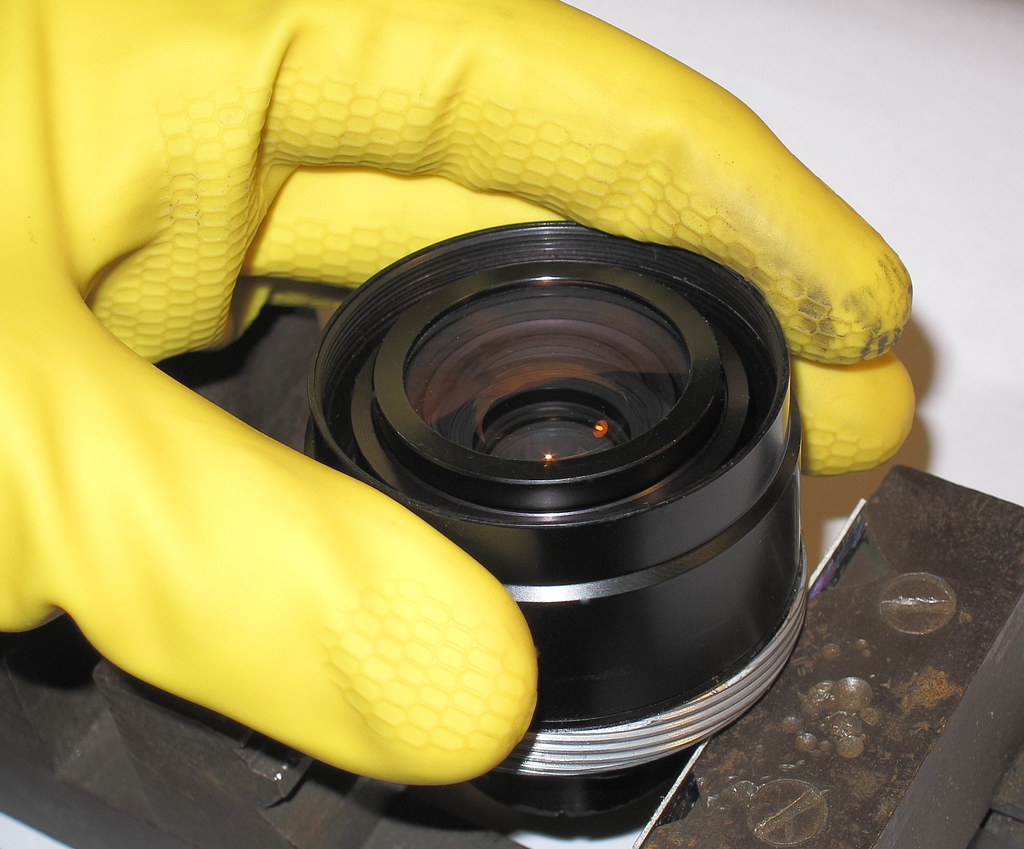 DPP_41 by Timothy Ball, on Flickr16 This is what the yellow w/u gloves are for, they give a better grip . The nose unscrews anticlockwise, as normal. DPP_41 by Timothy Ball, on Flickr16 This is what the yellow w/u gloves are for, they give a better grip . The nose unscrews anticlockwise, as normal.
 DPP_42 by Timothy Ball, on Flickr17 Nose removed, revealing front lens assembly. DPP_42 by Timothy Ball, on Flickr17 Nose removed, revealing front lens assembly.
 DPP_19 by Timothy Ball, on Flickr18 Turning to the rear lens ass. The lens assembly (from rear), and outer focus sleeve (also from rear) separated. The screw at the bottom of the focus sleeve sets the limits of focus movement. I didn't need to take this apart for regreasing. DPP_19 by Timothy Ball, on Flickr18 Turning to the rear lens ass. The lens assembly (from rear), and outer focus sleeve (also from rear) separated. The screw at the bottom of the focus sleeve sets the limits of focus movement. I didn't need to take this apart for regreasing.
NB. I considered extending the focus movement "stop" at the close end, but as the focus guides disengage from their grooves within about a further 7mm turn, I didn't feel the ~5mm gained would make it worth all the effort.
 DPP_25 by Timothy Ball, on Flickr19. Lens ass. from rear DPP_25 by Timothy Ball, on Flickr19. Lens ass. from rear
 DPP_20 by Timothy Ball, on Flickr20. (photo'd out of sequence, may as well remove the front lens ass. whilst there, 20-24 then this step)) Screw off the rear lens assembly from the grey body, (rubber gloves and/or the groove atop the lens ass.), revealing the diaphragm from rear. It looked very different from this when I first saw it. Golden-brown with thick gunk! DPP_20 by Timothy Ball, on Flickr20. (photo'd out of sequence, may as well remove the front lens ass. whilst there, 20-24 then this step)) Screw off the rear lens assembly from the grey body, (rubber gloves and/or the groove atop the lens ass.), revealing the diaphragm from rear. It looked very different from this when I first saw it. Golden-brown with thick gunk!
 DPP_43 by Timothy Ball, on Flickr21. Back to the front lens ass. DPP_43 by Timothy Ball, on Flickr21. Back to the front lens ass.
The three equidistant screws holding the front lens are loosened to release the lens section.
 DPP_44 by Timothy Ball, on Flickr22. 3x screws used to locate and centre the front lens ass. DPP_44 by Timothy Ball, on Flickr22. 3x screws used to locate and centre the front lens ass.
 DPP_21 by Timothy Ball, on Flickr23. Front lens ass. removed from aperture housing. DPP_21 by Timothy Ball, on Flickr23. Front lens ass. removed from aperture housing.
 DPP_45 by Timothy Ball, on Flickr24. Front lens section beside lens body, revealing diaphragm from the front. Note how clean it all is. DPP_45 by Timothy Ball, on Flickr24. Front lens section beside lens body, revealing diaphragm from the front. Note how clean it all is.  It wasn't like that at first! It wasn't like that at first!
The three lens securing/centring screws can be seen (a bit out of focus)
 DPP_22 by Timothy Ball, on Flickr25. No idea how to get the blades dismantled, I didn't need to, but there are 3 screws on this side and 2 on the back that must release it somehow. I held this over a saucer and repeatedly squirted lighter fluid on, exercised the blades with the grooved lever to the rear., letting the naphtha + dissolved grease drip out, wiped them gently with cotton buds, and continued till all the grease was gone. Let the blades dry thoroughly! The blades are thin and fragile so take care. DPP_22 by Timothy Ball, on Flickr25. No idea how to get the blades dismantled, I didn't need to, but there are 3 screws on this side and 2 on the back that must release it somehow. I held this over a saucer and repeatedly squirted lighter fluid on, exercised the blades with the grooved lever to the rear., letting the naphtha + dissolved grease drip out, wiped them gently with cotton buds, and continued till all the grease was gone. Let the blades dry thoroughly! The blades are thin and fragile so take care.
 DPP_24 by Timothy Ball, on Flickr26 Both front and rear lens sections can now be reassembled to the thoroughly dry aperture ass. NB. Clean lenses as necessary and check they are securely assembled, The rear element holder on the front ass. was loose with mine. Just needed the holder screwing tight. DPP_24 by Timothy Ball, on Flickr26 Both front and rear lens sections can now be reassembled to the thoroughly dry aperture ass. NB. Clean lenses as necessary and check they are securely assembled, The rear element holder on the front ass. was loose with mine. Just needed the holder screwing tight.
 DPP_23 by Timothy Ball, on Flickr27. Here are all the components at this stage. (NB. the spare springs in the lid weren't used.) DPP_23 by Timothy Ball, on Flickr27. Here are all the components at this stage. (NB. the spare springs in the lid weren't used.)
DPP_24 by Timothy Ball, on Flickr28. Rpt lens Ass. from front to show the helicoid. Trouble is, it can rotate, mine did, especially with all the oil that had crept under it.
If yours isn't loose,and ∞ setting was OK, don't mend it! Instead jump to Step 31 (Note relative positions of all notches relative to the focus groves and make marks, in case it loosens later!
 DPP_30 by Timothy Ball, on Flickr29. Back in the vice, (oops I forgot to pad the jaws this time The retaining locking ring needs to be removed (normal anticlockwise thread) DPP_30 by Timothy Ball, on Flickr29. Back in the vice, (oops I forgot to pad the jaws this time The retaining locking ring needs to be removed (normal anticlockwise thread)
A special lens tool can be used, but I find my vernier calliper does it equally well. The helicoid freely rotates under the ring, the notches in it are for setting its position when reassembling.
If only the helicoid had fine teeth that fitted other teeth or even a notch in the seating groove of the aperture housing body, then movement could be made incrementally and there wouldn't be the problem of it slipping.
 DPP_27 by Timothy Ball, on Flickr30. Retaining ring and Helicoid removed. Clean off all the old grease from these, and under them on the grey aperture housing. Once the helicoid is reset, you DON"T want it to move again! DPP_27 by Timothy Ball, on Flickr30. Retaining ring and Helicoid removed. Clean off all the old grease from these, and under them on the grey aperture housing. Once the helicoid is reset, you DON"T want it to move again!
DPP_30 by Timothy Ball, on Flickrrpt.29. The problem with positioning the helicoid, then screwing down the retaining ring, is that as it gets tighter, both rings rotate together! I had to set the helicoid a bit back from where I wanted it to finish up because of this. You want the retaining ring really tight, because when the helicoids are back together, the drag from the grease during normal focussing, will try to move things. If that happens, you can't get close to infinity focus. (I know, mine did, the first time!)
 DPP_28 by Timothy Ball, on Flickr31. If you have all the positions noted and marked relative to your scratch mark on the outer ring it should take all the pain out of reassembly, to get back to where you were at No11 in reverse, (minus the nose). DPP_28 by Timothy Ball, on Flickr31. If you have all the positions noted and marked relative to your scratch mark on the outer ring it should take all the pain out of reassembly, to get back to where you were at No11 in reverse, (minus the nose).
put just a few small dabs of new grease on the cleaned helicoids Re-engage and screw the lens assembly back in. If not, it's a trial and error process. I got it right after about 10 tries! (Sadly the grooves in the retaining ring had suffered a bit by then!)
 DPP_35 by Timothy Ball, on Flickr 32.Refer again to this pic, to show where you want the end positions. When you've got it right, replace the lightly greased focus guides. DPP_35 by Timothy Ball, on Flickr 32.Refer again to this pic, to show where you want the end positions. When you've got it right, replace the lightly greased focus guides.
 DPP_34 by Timothy Ball, on Flickr 33. Lens from rear with PB-EOS adapter, and mat black painted where I'd filed the rear lens housing. When I sanded the plastic lens shroud I stopped short of removing the serial number (9793) and other information. DPP_34 by Timothy Ball, on Flickr 33. Lens from rear with PB-EOS adapter, and mat black painted where I'd filed the rear lens housing. When I sanded the plastic lens shroud I stopped short of removing the serial number (9793) and other information.
 DPP_31 by Timothy Ball, on Flickr34. Lens on camera without nose section, to fine tune the lens centring. The focus on this one is fairly stiff, despite my using light NLGI #1 grease. DPP_31 by Timothy Ball, on Flickr34. Lens on camera without nose section, to fine tune the lens centring. The focus on this one is fairly stiff, despite my using light NLGI #1 grease.
 DPP_32 by Timothy Ball, on Flickr35. All ready for testing. 5dII with Delkin "Snug-it" Neoprene body armour. DPP_32 by Timothy Ball, on Flickr35. All ready for testing. 5dII with Delkin "Snug-it" Neoprene body armour.
Edited on Feb 27, 2018 at 02:54 PM · View previous versions
|


