rhutch wrote:
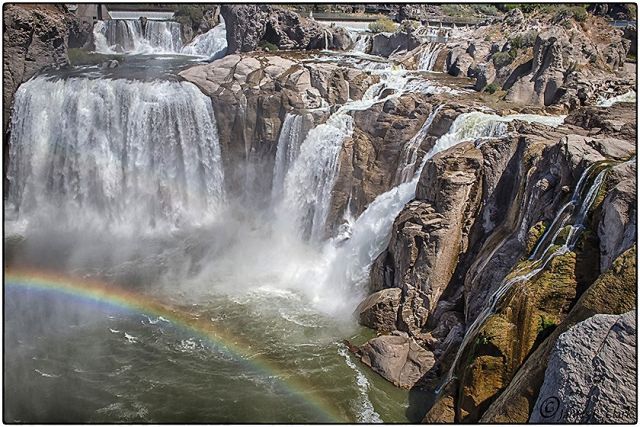
Yeah the rainbow is an added bonus. I was there 5 or 6 years ago and it was very hot out.
Randy
We were not going to stop as it was so late in the morning but decided to take a shot. It had been raining earlier and the temp. was about 60... I was as surprised as everybody else that I got the rainbow. Thank you, Jim
traveler wrote:
That is a tough place to shoot as later on when the light is supposed to be sweeter it gets full of shadows as well, so you did the best you could. I would have loved to have seen a bit more of the rainbow (wider) but it is a magical place to be for sure. The area over (South) of the Hwy 93 bridge shooting West is pretty sweet as well. Don't mean to hijack your thread but wanted you to see what you may have missed (or anyone that visits this spot). http://www.pbase.com/traveler/image/103553322/large.jpg
The light is harsh and shadows were not to bad but I can tell they get a lot worse as the sun drops. Glad I shot it when I did... Thanks for the image post... Jim
Fred Miranda wrote:
I like that you included the rainbow on the shot. It adds interest and helps balance your comp.
I have struggled with my own 'rainbow' shots. Usually against waterfalls, it stars appearing at a harsher light and polarizers will lessen its effect. It's definitely something we have to compromise.
Fred
Thanks Fred... I tried a polarizer, ND filter and about 10 different camera setting before I got this. It is my first waterfall rainbow, but hopefully not my last... Again, thank you.
Charlie Shugart wrote:
I really like the scene and basic image, Jim.
It looks a bit murky to me, though. PM me if you'd like me to post the quick fix I did.
Charlie
Thanks Charlie, Sorry, I always wanted to say that... I look forward to any help you have. Never too old to learn... Jim
May 16, 2013 at 05:09 PM
Charlie Shugart Offline • • • • • • • Upload & Sell: Off
Not sure this will help, Jim- but it's meant in the spirit of offering possible help .
And this is based on what I see on my monitor- which may well be different than what you see on your monitor.
My normal way of reducing murkiness (aka color cast) is using the auto color slider. It did nothing here, so all I could do was the following:
About +10 on the brightness slider.
About +15 on the contrast slider.
35% noise reduction.
About 50% on the sharpness slider.
About 50% on the edge sharpness slider.
There's a modest-but-noticeable difference to me.
Is there to you, Jim?
Charlie
Charlie Shugart wrote:
Not sure this will help, Jim- but it's meant in the spirit of offering possible help .
And this is based on what I see on my monitor- which may well be different than what you see on your monitor.
My normal way of reducing murkiness (aka color cast) is using the auto color slider. It did nothing here, so all I could do was the following:
About +10 on the brightness slider.
About +15 on the contrast slider.
35% noise reduction.
About 50% on the sharpness slider.
About 50% on the edge sharpness slider.
There's a modest-but-noticeable difference to me.
Is there to you, Jim?
Charlie
Thank you... My eyes are old so I'm having difficulty seeing subtle changes. I have copy / pasted your steps into my processing guide... Jim


 .
.