p.1 #1 · NEC P272W Monitor, w/XRite Calibrator & Calibration Software, LOST Serial Number
My Desktop photo ocomputer's hard drive was running out of space, so a long time ago I bought a new 1TB SSD drive and tried to get my son to install it for me, but he was always busy. Finally when we were away and he was watching our cats, he said he would install the new hard drive and put the latest version of windows 10 on it for me (I have Windows 10 on it, but an older version). When I got home, I can't figure out how to get access to the original HD which has all of my software on it, including the NEC calibration software with the serial number, and my son is too busy to come back and give me access to the old Windows. Everything I read says if I access the old Windows account, I could screw up the new window so I'm concerned about trying to change the root order of which Windows gets priority upon starting the computer. I contacted NEC an they just laughed at me even after I gave them the serial number of the Xrite (which is THEIR SPECAIL xrite) and the serial number of THE NEC monitor. They told me to look uup the software, but I have no idea beacue I bought the software from them years ago Online!!!
Any ideas short of tossing the NEC (which is a great monitor) and buying a new monitor?
Thanks.
p.1 #3 · NEC P272W Monitor, w/XRite Calibrator & Calibration Software, LOST Serial Number
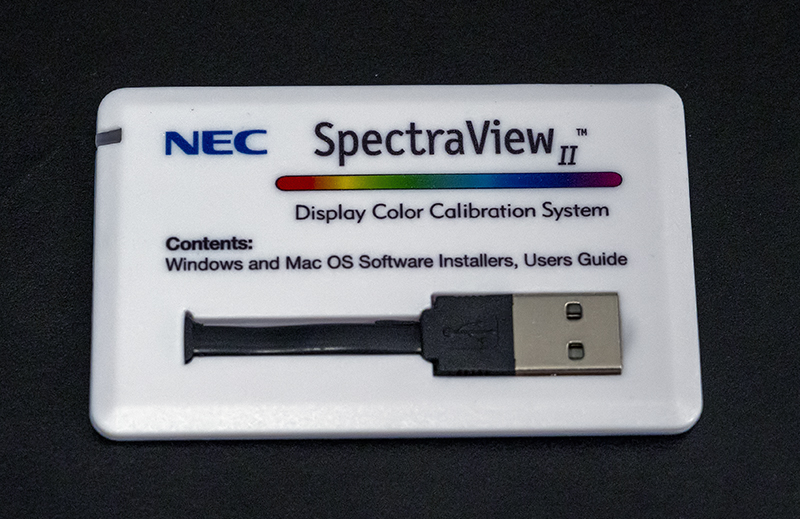
the NEC software has always come on a USB based card and has a code on the back of said card. this came with your monitor and is a proprietary as it loads the color data to the monitor using the computer. so, you need to find that card that looks like this below.
you will most likely need to copy and paste this below to access. without the original card and code you are pretty much stopped from starting over.
p.1 #4 · NEC P272W Monitor, w/XRite Calibrator & Calibration Software, LOST Serial Number
I assume the 1T is your new boot drive. Besides doing a fresh windows install, he should have copied over all your data/programs on to the new drive. Have you asked him if he copied over all the data?
Maybe even reinstall the old ssd to get back to where you started and then pay someone to redo your ssd upgrade by cloning the old ssd data to the new ssd to preserve everything.
I'm guessing the nec monitor will continue to use the last calibrated icc profile stored in it's memory so it should be good for many months if not longer. Longer term, you keep the nec monitor but buy a new monitor calibration device which saves/applies the cal in the pc. Buying a monitor cal device would be cheaper than buying a new monitor. You could also buy a used Spectraview II cal device/license on ebay if you still want to use nec calibration method.
p.1 #5 · NEC P272W Monitor, w/XRite Calibrator & Calibration Software, LOST Serial Number
sjms wrote:
the NEC software has always come on a USB based card and has a code on the back of said card. this came with your monitor and is a proprietary as it loads the color data to the monitor using the computer. so, you need to find that card that looks like this below.
you will most likely need to copy and paste this below to access. without the original card and code you are pretty much stopped from starting over.
I don't ever remember seeing that. I bought my NEC back in 2015 or so and I don't know if they used it back then, but that doesn't look the slightest familiar. I have the box the calibrator and supposedly the software came in and the owner's manual with directions, but it says simply plug your Xrite in and it will work, but I tried this and it didn't. It asks for a serial number, but the Xrite didn't add the serial number and then I tried to write in some of the numbers from the box, which didn't work, and also tried the serial number on the Xrite, and that didn't work. But I don't ever remember seeing what you sent in the photo. I'll try to look again, but it doesn't look familiar at all.
It just shouldn't be this damned hard, especially when I have the NEC Monitor, the Xrite, the box, the owner's manual with NEC written all over it, not to mention that the software and the Xrite was a total rip-off. RIght before I bought the monitor, I bought an Xrite and its software for 1/10 the price, but because NEC keeps their customers hostage, they sell the same Xrite with their software for hundreds more! I would have never bought an NEC if I knew this ahead of time, no matter how good.
p.1 #6 · NEC P272W Monitor, w/XRite Calibrator & Calibration Software, LOST Serial Number
mike650 wrote:
I assume the 1T is your new boot drive. Besides doing a fresh windows install, he should have copied over all your data/programs on to the new drive. Have you asked him if he copied over all the data?
Maybe even reinstall the old ssd to get back to where you started and then pay someone to redo your ssd upgrade by cloning the old ssd data to the new ssd to preserve everything.
I'm guessing the nec monitor will continue to use the last calibrated icc profile stored in it's memory so it should be good for many months if not longer. Longer term, you keep the nec monitor but buy a new monitor calibration device which saves/applies the cal in the pc. Buying a monitor cal device would be cheaper than buying a new monitor. You could also buy a used Spectraview II cal device/license on ebay if you still want to use nec calibration method....Show more →
Hey thanks. I'm going to try to get my son back to see if he can figure this out for me. I haven't touched the HD that has all of this information on it so it's not getting written over. The biggest problem is that there are tons of files under Spectrum II and when I've clicked on it, it's reloading a new program and asking for the serial number. It won't rewrite a new program w/o the serial number, so I think that's safe, but if I can get him to reload the old version of Windows 10, it will open the original version of the program which has the serial number on it and then I can download the latest version of the software and enter the serial number.
p.1 #7 · NEC P272W Monitor, w/XRite Calibrator & Calibration Software, LOST Serial Number
billsamuels wrote:
I don't ever remember seeing that. I bought my NEC back in 2015 or so and I don't know if they used it back then, but that doesn't look the slightest familiar. I have the box the calibrator and supposedly the software came in and the owner's manual with directions, but it says simply plug your Xrite in and it will work, but I tried this and it didn't. It asks for a serial number, but the Xrite didn't add the serial number and then I tried to write in some of the numbers from the box, which didn't work, and also tried the serial number on the Xrite, and that didn't work. But I don't ever remember seeing what you sent in the photo. I'll try to look again, but it doesn't look familiar at all.
It just shouldn't be this damned hard, especially when I have the NEC Monitor, the Xrite, the box, the owner's manual with NEC written all over it, not to mention that the software and the Xrite was a total rip-off. RIght before I bought the monitor, I bought an Xrite and its software for 1/10 the price, but because NEC keeps their customers hostage, they sell the same Xrite with their software for hundreds more! I would have never bought an NEC if I knew this ahead of time, no matter how good. ...Show more →
i am getting a little confused here.
did you purchase the calibration unit from NEC (branded as such) and does it look like this? OR is it just an XRite branded unit?
when you open the app it does it look like this?
p.1 #8 · NEC P272W Monitor, w/XRite Calibrator & Calibration Software, LOST Serial Number
billsamuels wrote:
I don't ever remember seeing that.
sjms is correct, that credit card size card came in the box with the NEC spectraview II. I have one as well for my NEC monitor. The license number is written on the 'blue' side of that card. The card is white on one side with the usb plug and blue on the other side.
Like all purchase software, you only need to enter the license number once during installation where a special file is written to the boot/C drive. The Spectraview software checks this file every time it starts up. In your case, it's likely this was not copied over on to the new ssd drive so Spectraview will ask for the license as it's not on the boot/C drive.
This is true for all other software that you've bought so you likely need to find license number/key for all those software as well.
Do you have the license number/key for all the other software you've installed since you got the computer? If not, you'll run into the same problem.
As I mentioned before, to avoid all of this, one solution is to start over and do a 'clone' of the original ssd data to the new ssd. It makes an exact copy including all the license keys file information. Cloning also copies over all the extra 'junk' accumulated up over time which is why many people prefer a fresh install. The new ssd will be your boot/C drive.
Another temporary solution is to reinstall the old ssd as the boot/C drive and create more space by cleaning up and moving data off on to an external drive. This will get you back running again.
BTW, the Spectraview has two parts, the software and the cal sensor device. NEC bought a customized cal sensor from xrite and bundled it in their Spectraview package. You're paying for the nec software which makes use of the nec monitor internal calibration plus the custom cal device so saying xrite version of the cal device is less than nec version is not a fair comparison. You had and still have a choice of not using Spectraview. Since you bought a xrite device earlier, just use that to calibrate the nec monitor. Reset monitor to factory defaults and calibrate with xrite device and xrite software (not nec version of cal device). I've tried both cal methods myself and I can't visually tell the difference. I use the nec method as it came with the monitor when I bought it second hand.
p.1 #9 · NEC P272W Monitor, w/XRite Calibrator & Calibration Software, LOST Serial Number
I actually had a similar experience, not with a hard drive swap, but I just lost the serial number card during a move. All I could prove was that I purchased the monitor ~12 years ago or whatever it was. After some polite back & forth, NEC *very* reluctantly gave me a new key, and told me they would make note of it and not give me any more in the future. Fair enough, as it was my mistake, but they did help me out to which I was very grateful.
NEC doesn't make monitors like that anymore unfortunately, the high-end color accurate monitors with LUTs are few and far between, mostly dominated by Eizo. Really a shame as they were some of the best and they were good value.
If you can prove you purchased the monitor, NEC should either give you a new serial number or tell you exactly where to find the file that the program checks every time for the serial number (if possible).
Here is a reply from their support staff:
The SpectraView serial number would have come with the software when it was originally purchased. Usually on the USB card or disk sleeve, depending on how long ago it was bought. We do not have record of your original serial number you received. The serial does start with the letters SV. If you still are unable to locate this we will need the serial number of your monitor and a copy of the receipt showing the purchase date for the software.
p.1 #10 · NEC P272W Monitor, w/XRite Calibrator & Calibration Software, LOST Serial Number
CanadaMark wrote:
I actually had a similar experience, not with a hard drive swap, but I just lost the serial number card during a move. All I could prove was that I purchased the monitor ~12 years ago or whatever it was. After some polite back & forth, NEC *very* reluctantly gave me a new key, and told me they would make note of it and not give me any more in the future. Fair enough, as it was my mistake, but they did help me out to which I was very grateful.
NEC doesn't make monitors like that anymore unfortunately, the high-end color accurate monitors with LUTs are few and far between, mostly dominated by Eizo. Really a shame as they were some of the best and they were good value.
If you can prove you purchased the monitor, NEC should either give you a new serial number or tell you exactly where to find the file that the program checks every time for the serial number (if possible).
Here is a reply from their support staff:
The SpectraView serial number would have come with the software when it was originally purchased. Usually on the USB card or disk sleeve, depending on how long ago it was bought. We do not have record of your original serial number you received. The serial does start with the letters SV. If you still are unable to locate this we will need the serial number of your monitor and a copy of the receipt showing the purchase date for the software.
I've never seen the USB card that others were referring to in the comments above. I thought that I was going a bit crazy, but I'm glad to see that NEC said the serial number for SpectraView was on the disk sleeve. I think I tossed that disk years ago after making a note of my SpectraView serial number in a doc on my computer and on the back of the display. ...Show more →
p.1 #11 · NEC P272W Monitor, w/XRite Calibrator & Calibration Software, LOST Serial Number
I somehow got my Spectraview software on a CD-ROM (remember those?!) when I bought my PA272W and the serial number is on a sticker inside of the box. Tells you how long ago I bought it Although TBH I think perhaps my spectraview software came with an NEC monitor I had before this one. I honestly can't remember. Nevertheless, the serial still works with the latest software that I downloaded from the NEC website.
Since the "spectraview" version of monitors cost extra and the hardware is otherwise identical to the non-spectraview models (and the NEC-branded X-Rite colorimeters can be bought on Ebay) I'm not surprised NEC is unhelpful about giving out new keys, although one would think that considering NEC no longer makes such monitors they might not care anymore.
CanadaMark wrote:
NEC doesn't make monitors like that anymore unfortunately, the high-end color accurate monitors with LUTs are few and far between, mostly dominated by Eizo. Really a shame as they were some of the best and they were good value.
Indeed. NEC gave Eizo a run for their money, as did Lacie in their day. IIRC some of the high-end BenQ monitors do also have hardware LUTs, but other than that I know of no other manufacturer that offers hardware-calibrated monitors.
p.1 #12 · NEC P272W Monitor, w/XRite Calibrator & Calibration Software, LOST Serial Number
wordfool wrote:
I somehow got my Spectraview software on a CD-ROM (remember those?!) when I bought my PA272W and the serial number is on a sticker inside of the box. Tells you how long ago I bought it Although TBH I think perhaps my spectraview software came with an NEC monitor I had before this one. I honestly can't remember. Nevertheless, the serial still works with the latest software that I downloaded from the NEC website.
Since the "spectraview" version of monitors cost extra and the hardware is otherwise identical to the non-spectraview models (and the NEC-branded X-Rite colorimeters can be bought on Ebay) I'm not surprised NEC is unhelpful about giving out new keys, although one would think that considering NEC no longer makes such monitors they might not care anymore.
Indeed. NEC gave Eizo a run for their money, as did Lacie in their day. IIRC some of the high-end BenQ monitors do also have hardware LUTs, but other than that I know of no other manufacturer that offers hardware-calibrated monitors. ...Show more →
Asus ProArt is another. Dell and BenQ have monitors with hardware LUTs as well but they never seem to be as good as Eizo/NEC. Frustrating for sure!




 Although TBH I think perhaps my spectraview software came with an NEC monitor I had before this one. I honestly can't remember. Nevertheless, the serial still works with the latest software that I downloaded from the NEC website.