p.1 #1 · iPad Pro for Trips : Photo dumping and basic editing.
All in the title.
I have a long trip coming up to Guizhou (3 weeks) and then to Iceland (6 weeks) in the Summer. Would an iPad Pro work well as a photo dump (with an attached Sandisk 2TB SSD) and for editing ? Which version (I do have a 'variable' budget) !
Which editing program would you recommend (I use ON1 Photo Raw 2023 at home)?
p.1 #4 · iPad Pro for Trips : Photo dumping and basic editing.
yes it can be done but it also will be relatively slow.
ipads including the pro 256GB which i have are limited in functionality. so compared to a full computer they are more awkward to use
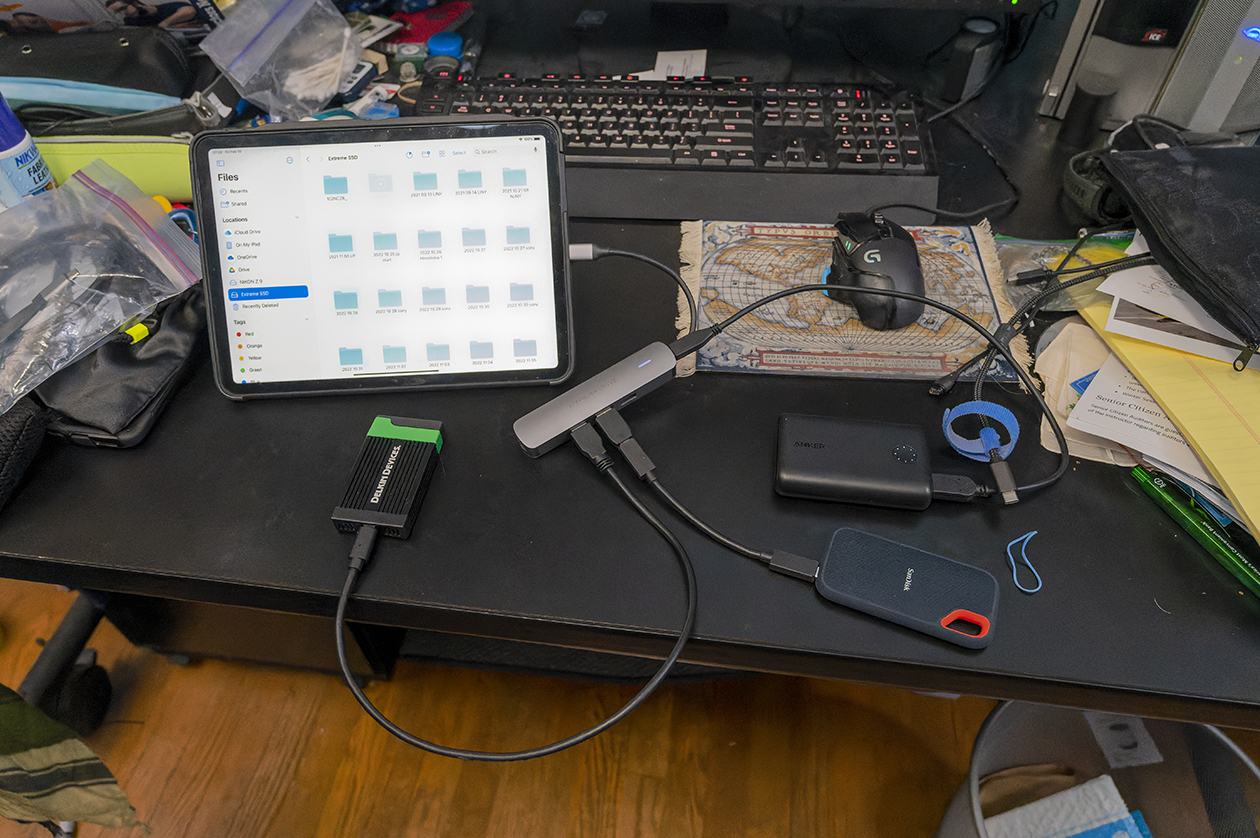
the best way to transfer lage amounts of data to the SSD is to move the folder to the ipad and then after thats finished to the SSD. it is faster that way. i just did 289 71MB pics in approx 4 minutes to the ipad and then another 4 minutes to the SSD from the ipad. trying to do a passthrough does not work well at all and can fail.
keeping it on the ipad for the time to work on images is faster too but it is somewhat plodding as the workflow just ain't the same as on a computer and again limited.
Hyperdrive makes some nifty products that will help things work relatively well connectivity wise
too many things going on at once can make an ipad finnicky. it is NOT a laptop. its so called multitasking capability is very limited.
NIKON Z 6NIKKOR Z 24-70mm f/4 S lens24mmf/5.61/320s25600 ISO0.0 EV
NIKON Z 6NIKKOR Z 24-70mm f/4 S lens62mmf/5.61/500s4500 ISO0.0 EV
p.1 #5 · iPad Pro for Trips : Photo dumping and basic editing.
sjms wrote:
yes it can be done but it also will be relatively slow.
ipads including the pro 256GB which i have are limited in functionality. so compared to a full computer they are more awkward to use
the best way to transfer lage amounts of data to the SSD is to move the folder to the ipad and then after thats finished to the SSD. it is faster that way. i just did 289 71MB pics in approx 4 minutes to the ipad and then another 4 minutes to the SSD. trying to do a passthrough does not work well at all and can fail.
keeping it on the ipad for the time to work on images is faster too but it is somewhat plodding as the workflow just ain't the same as on a computer and again limited.
Hyperdrive makes some nifty products that will help things work relatively well connectivity wise
too many things going on at once can make an ipad finnicky. it is NOT a laptop...Show more →
Awesome thanks. That timeline will work fine for me in a tent with nothing else to do !
p.1 #6 · iPad Pro for Trips : Photo dumping and basic editing.
I tried Capture One for iPad on my iPad Air (not iPad Pro) and the experience was better than I expected; they did a very good job in terms of editing tools, easy import, even tethering capability, but in the end I decided to cancel my subscription (quite affordable at $5/month) and just use my laptop. On the iPad Pro you can turn on reference mode, which disables the iPad's adaptive brightness; I don't think I can do that on my iPad Air and it really degraded the experience for me as it's hard to do contrast and brightness adjustments when the brightness of the screen is changing at the same time.
Import was very fast; my iPad Air uses USB-C and I have a fast card reader; images were imported very quickly. I used Airdrop to my Mac for export but there are lots of export options.
Editing on iPad in Capture One is well thought out ergonomically and I was pleasantly surprised at how easy it was to use the rotary dials and switch between editing tools. You can even apply styles and presets, and they will be adding layers to the iPad app in the future. Exporting features are good as well. I might consider it again, but since I have a lightweight laptop it's easier for me to work that way and the screen on my laptop is a bit larger.
The main advantage of using a laptop is that you can use the same app that you use at home, so everything's where you expect it to be, you can migrate/copy your settings, and be efficient in the field.
I also tried Affinity Photo for iPad but found it hard to use and too easy to mess things up without being able to figure out how to fix them; it's less intuitive and if I decide to use it in future I'd invest 8-10 hours in tutorials first.
Can't advise on the iPad Pro - I take my Macbook Air M1 13". weighs 1lb more then the iPad Pro but I don't like rubbing my fingers all over the screen of an ipad. Also I don't need a hub and only take one 6" cable. I use the Apple USB-C to SD Card Reader to transfer images from the SD card to the Macbook Air 1TB SSD. I also back up to a SanDisk Extreme 1TB SSD using a 6" USB-C to USB-C cable (Macbook Air powers it) so I have duplicate files on the Macbook and Sandisk.
I really try to manage weight when traveling (carryover from UL backpacking) and I found the extra weight of the Macbook Air justifiable for my use.
I use C1 at home and C1 allows an additional computer to be licensed but I found I prefer to do other things while traveling then PP images
You always seem to be traveling to some neat destinations ... looking forward to some images.
p.1 #9 · iPad Pro for Trips : Photo dumping and basic editing.
I do all my editing on an M2 iPad Pro, and use Lightroom on it to handle most of the backups. Works great, end of day just plug the camera directly into the iPad via USB-C, and copy everything from that day over to the the iPad. Cull and edit in Lightroom Mobile, and then upload when I get a chance on wifi.
I usually bring a Samsung T7 external drive with and put all the keepers on there regularly as a safety backup as well. Also, using a CF Express card instead of SD made the transfer from camera to iPad a god bit faster too. Apple Pencil 2 is a must if you go with Lightroom IMVHO, but I actually enjoy using it anyway.
I like this set up too because if I ever want to do slightly more detailed editing, I can hop over to my desktop when I get home and everything is already cloud synced there.
p.1 #10 · iPad Pro for Trips : Photo dumping and basic editing.
sjms wrote:
yes it can be done but it also will be relatively slow.
ipads including the pro 256GB which i have are limited in functionality. so compared to a full computer they are more awkward to use
the best way to transfer lage amounts of data to the SSD is to move the folder to the ipad and then after thats finished to the SSD. it is faster that way. i just did 289 71MB pics in approx 4 minutes to the ipad and then another 4 minutes to the SSD from the ipad. trying to do a passthrough does not work well at all and can fail.
keeping it on the ipad for the time to work on images is faster too but it is somewhat plodding as the workflow just ain't the same as on a computer and again limited.
Hyperdrive makes some nifty products that will help things work relatively well connectivity wise
too many things going on at once can make an ipad finnicky. it is NOT a laptop...Show more →
I am not so sure if is so good to under power SanDisk SSD just running with iPad battery ( with so many things connected at once ) I am not so technical to know exactly if all this items receive enough power at the same time during copy process. I never like run my SSD with important photos relaying only on laptop battery
p.1 #11 · iPad Pro for Trips : Photo dumping and basic editing.
bjhurley wrote:
I tried Capture One for iPad on my iPad Air (not iPad Pro) and the experience was better than I expected; they did a very good job in terms of editing tools, easy import, even tethering capability, but in the end I decided to cancel my subscription (quite affordable at $5/month) and just use my laptop. On the iPad Pro you can turn on reference mode, which disables the iPad's adaptive brightness; I don't think I can do that on my iPad Air and it really degraded the experience for me as it's hard to do contrast and brightness adjustments when the brightness of the screen is changing at the same time.
Import was very fast; my iPad Air uses USB-C and I have a fast card reader; images were imported very quickly. I used Airdrop to my Mac for export but there are lots of export options.
Editing on iPad in Capture One is well thought out ergonomically and I was pleasantly surprised at how easy it was to use the rotary dials and switch between editing tools. You can even apply styles and presets, and they will be adding layers to the iPad app in the future. Exporting features are good as well. I might consider it again, but since I have a lightweight laptop it's easier for me to work that way and the screen on my laptop is a bit larger.
The main advantage of using a laptop is that you can use the same app that you use at home, so everything's where you expect it to be, you can migrate/copy your settings, and be efficient in the field.
I also tried Affinity Photo for iPad but found it hard to use and too easy to mess things up without being able to figure out how to fix them; it's less intuitive and if I decide to use it in future I'd invest 8-10 hours in tutorials first....Show more →
Thank you ! I appreciate you writing down your experiences. I'm also doing a head-to-head comparison with the iPad Air but for the price difference ($150 or so) the iPad Pro will likely win out as it offers a wider range of functional software. Though both ow using the Apple Pencil makes the Air tempting.
p.1 #12 · iPad Pro for Trips : Photo dumping and basic editing.
Flowernut wrote:
check out size and weight. It is more in a small laptop class than an ipod air class
Thanks FN. Actually there's a huge weight difference. The MB Air M2 weighs 1.24 kg and M1 1.29 kg. The iPad Pro around 468g (WiFi and Cellular). I will use the pencil not the keyboard when hiking (keyboard is too heavy).
Can't advise on the iPad Pro - I take my Macbook Air M1 13". weighs 1lb more then the iPad Pro but I don't like rubbing my fingers all over the screen of an ipad. Also I don't need a hub and only take one 6" cable. I use the Apple USB-C to SD Card Reader to transfer images from the SD card to the Macbook Air 1TB SSD. I also back up to a SanDisk Extreme 1TB SSD using a 6" USB-C to USB-C cable (Macbook Air powers it) so I have duplicate files on the Macbook and Sandisk.
I really try to manage weight when traveling (carryover from UL backpacking) and I found the extra weight of the Macbook Air justifiable for my use.
I use C1 at home and C1 allows an additional computer to be licensed but I found I prefer to do other things while traveling then PP images
You always seem to be traveling to some neat destinations ... looking forward to some images....Show more →
Thank you ! I can get around the fingers on the screen with the use of the Apple Pencil (assuming it works in colder temps, though that's not an issue for these trips). I'll fork out for the cables you suggested - mine are pretty old but I'll see what comes in the box first.
My pack is already over 20kgs (3-6 weeks trips means more gear of course) so although I pour over UL backpacking sites it's rare I find anything applicable to my uses. As photographers we always have way too much weight (even though I've done my best to lower it by using lighter lenses, tripod, bag etc)!
I've been working on my website (Shanghai's Watertowns the newest page) but anyway the drop down menu will give you a list of the many image pages if you wish to waste a few minutes ! Copy/paste thedragonsfather.com into a new tab or hit the WWW link below. I don't post many images here now because I've stopped using Smugmug (when I set up my own website) and it's not as easy to link to images on the website.
p.1 #14 · iPad Pro for Trips : Photo dumping and basic editing.
Tarekith wrote:
I do all my editing on an M2 iPad Pro, and use Lightroom on it to handle most of the backups. Works great, end of day just plug the camera directly into the iPad via USB-C, and copy everything from that day over to the the iPad. Cull and edit in Lightroom Mobile, and then upload when I get a chance on wifi.
I usually bring a Samsung T7 external drive with and put all the keepers on there regularly as a safety backup as well. Also, using a CF Express card instead of SD made the transfer from camera to iPad a god bit faster too. Apple Pencil 2 is a must if you go with Lightroom IMVHO, but I actually enjoy using it anyway.
I like this set up too because if I ever want to do slightly more detailed editing, I can hop over to my desktop when I get home and everything is already cloud synced there....Show more →
Thank you! I love to hear of real world experiences and this sounds near perfect for me (I don't use LR so I'll have to look into alternatives that work with my PP software). Cheers !
p.1 #15 · iPad Pro for Trips : Photo dumping and basic editing.
PIOK wrote:
I am not so sure if is so good to under power SanDisk SSD just running with iPad battery ( with so many things connected at once ) I am not so technical to know exactly if all this items receive enough power at the same time during copy process. I never like run my SSD with important photos relaying only on laptop battery
I'll look into this but usually Sjms knows what he's doing so at this point (unless told otherwise) I'll assume it consumes very low power (no moving parts in the SSD of course).
p.1 #16 · iPad Pro for Trips : Photo dumping and basic editing.
Like tarekith, I think an iPad Pro is great for travel.
I’ve been traveling with an 11 or 12.9 iPad Pro now for a couple years and I vastly prefer it to a MacBook Air or Pro.
I’ve got the 12.9 with 2TB now and don’t bother with an external drive for redundancy. Internet connection is usually good enough to back up overnight. I have Lightroom with a few TB of Adobe’s expensive cloud storage for a super simple (and to date foolproof) workflow when traveling. When back at my Mac mini desktop or MacBook, everything is there!
p.1 #17 · iPad Pro for Trips : Photo dumping and basic editing.
My 256Mb Android phone with the memory card attached by a cable to the USB C connection, copied all the previous days jpg to the phones memory at breakfast, My Back up when a Computer/Tablet is not practical for a Trip.
Need a decent App, I use Files.
Down side Memory card gets some Android Noise, I clean up this at home.
p.1 #18 · iPad Pro for Trips : Photo dumping and basic editing.
PIOK wrote:
I am not so sure if is so good to under power SanDisk SSD just running with iPad battery ( with so many things connected at once ) I am not so technical to know exactly if all this items receive enough power at the same time during copy process. I never like run my SSD with important photos relaying only on laptop battery
If I am moving data from a card via reader to the internal memory of of the the iPad Pro that is a single point to point transfer. If I then wish to move the data from the internal memory point to point to an ssd again it is a single operation. You do not want to try going from memory card reader through the iPad into an ssd at once aka multi point transfer as it has limited processing and multifunctional capabilities. It can fail. I have tried it. A friend has the latest iPad Pro and I will try this in a few days
Now, as to an honest laptop, I have done the direct 291 71MB raw images multi point to my external ssd and in the computers balanced power mode took 20 minutes started at at 100% battery and dropped to 90%.
This all comes down to needs at the time as if one is on a scheduled situation.
Things can be done just not without thought and somewhat short on style and grace
p.1 #19 · iPad Pro for Trips : Photo dumping and basic editing.
darrellc wrote:
Like tarekith, I think an iPad Pro is great for travel.
I’ve been traveling with an 11 or 12.9 iPad Pro now for a couple years and I vastly prefer it to a MacBook Air or Pro.
I’ve got the 12.9 with 2TB now and don’t bother with an external drive for redundancy. Internet connection is usually good enough to back up overnight. I have Lightroom with a few TB of Adobe’s expensive cloud storage for a super simple (and to date foolproof) workflow when traveling. When back at my Mac mini desktop or MacBook, everything is there!
Thanks Darrell ! I think my mind is made up (though still considering the iPad Air 5).
p.1 #20 · iPad Pro for Trips : Photo dumping and basic editing.
This discussion reminds me how stupidly hard it apparently is to have a decent on-road backup system without either jerry-rigging something (with potential for failure), investing in defunct tech like a Gnarbox or Lacie Boss, or spending an absurd amount on an iPad or Android phone with decent amount of storage (a 1TB iPad Pro is $1.5K, which is definitely absurd for a tablet IMO).
The demand for a decent memory card backup system (500GB or 1TB) that's not a full laptop or silly money seems to be there so I'm puzzled why so few options exist. Then again, if Gnarbox went away and Lacie stopped making its Boss SSDs perhaps the demand actually isn't there.