p.1 #1 · How to upload pictures directly from computer when you reply to the thread?
How to upload pictures directly from computer when you reply to the existing thread? For years I used to post links,but now I got upload and sell on so I suppose I should be able to upload pictures directly,not just links.Could anyone help?
p.1 #2 · How to upload pictures directly from computer when you reply to the thread?
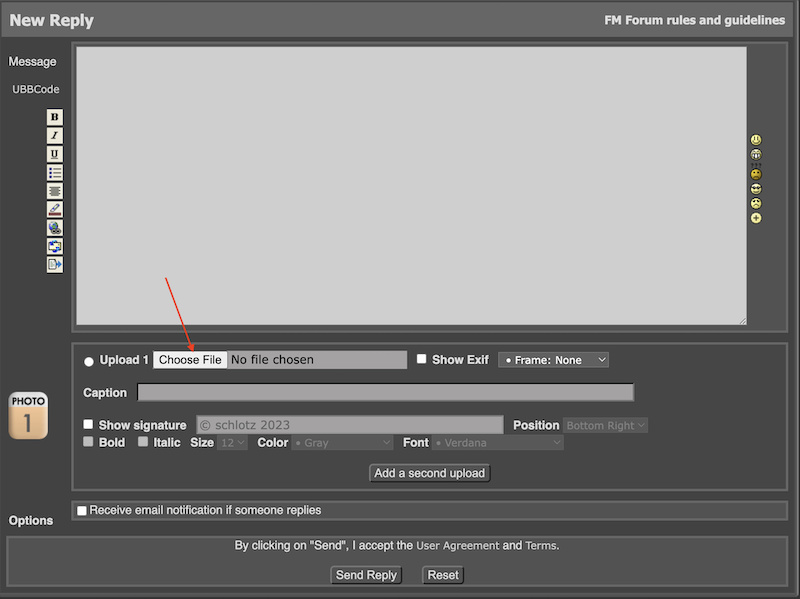
The easiest way is to hit the REPLY button on the far right. At the bottom of the reply window there is a section where you can add photos from your computer.
p.1 #3 · How to upload pictures directly from computer when you reply to the thread?
Peire wrote:
How to upload pictures directly from computer when you reply to the existing thread? For years I used to post links,but now I got upload and sell on so I suppose I should be able to upload pictures directly,not just links.Could anyone help?
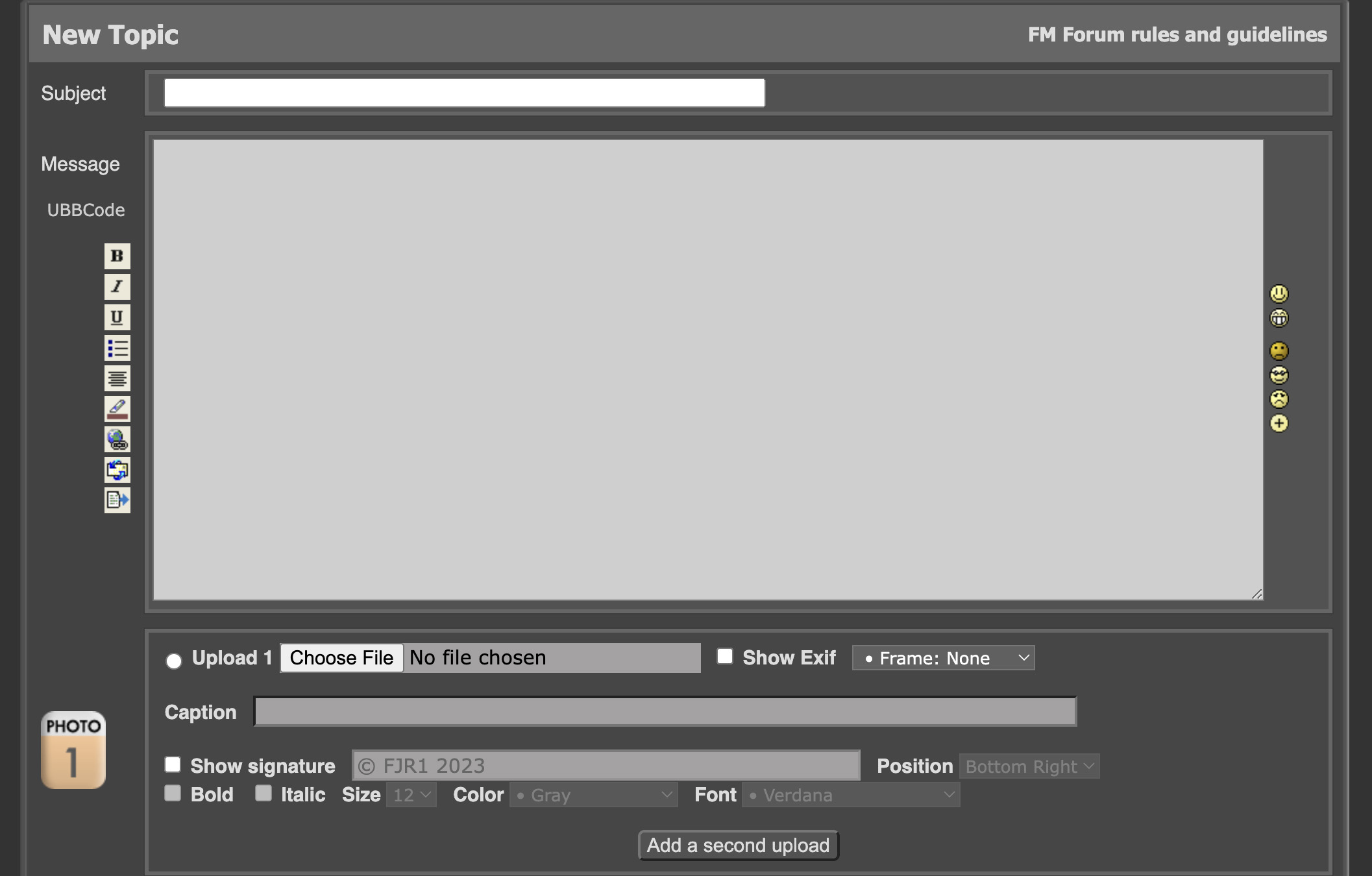
Once you start a new topic or reply to another's post, you will see a "window' as pictured below. Just under the large message window, you will see "Upload 1." Click "Choose File" and you can access files on your computer to upload. You can opt to show the exif of the photo, frame it with a variety of framing options, and provide a caption if you wish, all available in that series of options under the "message window." If you want to add more photos to your post, just click the "Add a second upload" button at the very bottom and utilize the same process that you used when uploading your first photo. Good luck!
p.1 #4 · How to upload pictures directly from computer when you reply to the thread?
FJR1 wrote:
Once you start a new topic or reply to another's post, you will see a "window' as pictured below. Just under the large message window, you will see "Upload 1." Click "Choose file" and you can access files on your computer to upload. You can opt to show the exif of the photo, frame it with a variety of framing options, and provide a caption if you wish, all available in that series of options under the "message window." If you want to add more photos to your post, just click the "Add a second upload" button at the very bottom. Good luck!
Thank you very much FJR1.This I figured out already.But my problem refers to the situation when I want to add up new pictures to the thread created by myself,which was initiated before I got upload&sell on.When I want to answer last post of my thread,the quick response window opens,where the only option is to upload image's link.No ways to upload a picture from computer directly are showing up then.Or maybe they are,but I don't know where?
p.1 #5 · How to upload pictures directly from computer when you reply to the thread?
schlotz wrote:
The easiest way is to hit the REPLY button on the far right. At the bottom of the reply window there is a section where you can add photos from your computer.
Thanks a lot scholtz.My problem with direct upload is slightly different and refers to the threads created by myself before I got upload&sell on.When I want to answer last post of my thread,the quick response window opens,where the only option is to upload image's link.No ways to upload a picture from computer directly are showing up then.
p.1 #6 · How to upload pictures directly from computer when you reply to the thread?
Peire wrote:
Thank you very much FJR1.This I figured out already.But my problem refers to the situation when I want to add up new pictures to the thread created by myself,which was initiated before I got upload&sell on.When I want to answer last post of my thread,the quick response window opens,where the only option is to upload image's link.No ways to upload a picture from computer directly are showing up then.Or maybe they are,but I don't know where?
The Quick Reply box does not provide an option for uploads. However, if you click the "Reply" or "Quote" button at the bottom right of an existing thread, you should see the upload option.
p.1 #7 · How to upload pictures directly from computer when you reply to the thread?
FJR1 wrote:
The Quick Reply box does not provide an option for uploads. However, if you click the "Reply" or "Quote" button at the bottom right of an existing thread, you should see the upload option.