p.1 #1 · Calibrating monitor at D65 or D55 for printing
I just took a deep dive in trying to better understand color management for printing. Apparantly, real experts who make lots of prints have many different profiles for their monitor, changing K value (white point) depending on the paper and printer they are using. I don’t do enough printing and am not bored enough to actually want to do that. My monitor profile has been set to D65, but even with soft proofing I have to usually make many prints before I get the color right . The “my prints are too dark” is not the issue (fixed that by lowering the brightness of my monitor to 80 cd/m2). Quite a few people recommend two monitor profiles: one at D65 for web use, and one at D55 for printing. Do any of you have experience printing at D55 rather than D65 (or anything lower than 6500K)? Do you find that the soft proofed prints better approximate the colors on the monitor when the monitor profile is set to something warmer than D65, such as D 55?
p.1 #2 · Calibrating monitor at D65 or D55 for printing
At the risk of stepping into a Ford vs Chevy debate...
Daylight temperature is 5200-5300 depending on who you listen to. Since I have my camera permanently set to daylight (Nikon 5200?), colors should be most realistic with the monitor at D55.
I also have both my monitors at 80 cd/m2. To me colors look better all around whether on the web or doiing PP.
Possibly the "standard" D65 that a lot of monitors ship at are for the benefit of employers who want their busy minions to stay awake and therefore throw a lot of blue light at them....
p.1 #3 · Calibrating monitor at D65 or D55 for printing
I calibrate my NEC monitor using their Spectraview II software with an i1Pro colorimeter at D65 with a brightness level of 115 cd/m2. No issues with my prints.
I tried D55, but it was a little too warm for my liking whereas D65 was more cooler white where D55 was more like a warm soft white.
As for brightness, I'm also a gamer multimedia user so I found even 100 cd/m2 to be too dark for my liking so I settled on 115 and am still about to get excellent prints that match my monitor.
In the end this is really a personal choice and I've seen recommendations from D55 to D65 with brightness levels ranging from 80-120 cd/m2. In the end it's a personal choice and how dark or bright you want your monitor.
p.1 #5 · Calibrating monitor at D65 or D55 for printing
EB-1 wrote:
I use 5500K. 6500K is far too blue for my tastes.
EBH
5500K/6500K is not the same as D55/D65 - What is the difference between 5000K/6500K and D50/D65?. Specifically the 5 post down by Andrew_Rodney. Basically D55, D65 is a specific point, whereas 5500K and 600K is a range. That said they are similar (but scientifically not).
Anyway, I find D55 a tad too warm for my tastes so as said, to each his own.
p.1 #6 · Calibrating monitor at D65 or D55 for printing
The exact color temperature for your monitor will be dependent on luminance, ambient light, the make and model and type of screen you have as well and just as important, the type of calibrator you're using - and then, not to be left out - the type of light you're viewing your prints with. Because we humans do white point adaptation so well, it doesn't make nearly as much difference as you might think.
Very low luminance numbers, like the 80cd/m2 mentioned are often too low for modern screens to perform and calibrate properly. Plus you have to have vey low ambient light for those numbers to be effective. It's likely better to calibrate to 90-110 cd/m2 and then adjust your ambient light accordingly. I calibrate the laptops to 120 because they're used in brighter environments while the CG277 is at 90-95 cd/m2 because it's in a darker, more controlled environment. That's what works for me and my level of ambient light. Yours will be different, just as the color temperature will be different running the built-in Eizo hardware than if I use and i1Pro. The old Radius PressView's only gave you D50 and 80 cd/m2. Moving to the Barco's and the Sony Artisans, you could calibrate to any color temp but you didn't want to go much above 85 cd/m2 to avoid burning out the tube too soon. It was only when we migrated to modern screens that we found that in order to match the perception of D50 on the Barco's and Artisan's, you actually had to bump it up a bit, which is something I first saw mentioned in some of those early Real World Photoshop and Real World Color Management Books from twenty something years ago.
And having used hardware calibrated monitors for over a quarter century now, I've never found a need to make different calibrations for different outputs, specifically for web. When you get it right, one is all you need, despite what some so-called experts might claim.
p.1 #7 · Calibrating monitor at D65 or D55 for printing
Thanks for the reply. I have a NEC monitor and use its proprietary Spectraview II calibration system and it is quite capable of profiling to 80 cd/m2. For my go to Epson Luster paper I set the contrast to 300:1, so it is the K value that I am interested in experimenting with. Indeed, so many different opinions. It’s almost like you have to have a discerning mind...
p.1 #8 · Calibrating monitor at D65 or D55 for printing
Just because you CAN calibrate your NEC to 80cd/m2 doesn't mean you should. And I'll be willing to bet that it's not really "quite capable". More like it'll do it but with a lot of compromises to the quality of the calibration.
Just as important as the white point color and luminance, is the black point. I have no idea if you're able to actually set a hard number for the black point in the NEC software, but a lot of software packages incorrectly default to whatever the minimum black the monitor and provide, and while that often sounds like it might be a great idea - to have the blackest blacks possible, it's really not. This number will change a bit depending on the hardware and the colorimeter but I've found that a hard setting of .4-.5 cd/m2 give a much more realistic black level and doesn't crush those last few levels at the bottom.
And once again, no mention of your viewing conditions and how you're lighting the print to view it. And it's also possible to generate output print profiles with different lighting targets in mind - when you're at the profile generating stage. I never found the differences to be worth the effort but you might, particularly if you have non standard lighting for your prints.
So, try a few different calibrations and see what works best. Set up your viewing box at a ninety degree angle from your monitor and far enough away to not spill light from one to the other. Make sure you're using a calibrated light source or all bets are off.
p.1 #9 · Calibrating monitor at D65 or D55 for printing
EB-1 wrote:
I use 5500K. 6500K is far too blue for my tastes.
EBH
Andrew2 wrote:
5500K/6500K is not the same as D55/D65 - What is the difference between 5000K/6500K and D50/D65?. Specifically the 5 post down by Andrew_Rodney. Basically D55, D65 is a specific point, whereas 5500K and 600K is a range. That said they are similar (but scientifically not).
Anyway, I find D55 a tad too warm for my tastes so as said, to each his own.
I use whichever option the system has. Does your calibrator and monitor have both D52 and 5200K settings for example? I don't recall that being an option.
Years ago I used 5000K and have been going cooler over time to 5200 or 5500K. Maybe it is the aging process.
p.1 #10 · Calibrating monitor at D65 or D55 for printing
EB-1 wrote:
I use whichever option the system has. Does your calibrator and monitor have both D52 and 5200K settings for example? I don't recall that being an option.
Years ago I used 5000K and have been going cooler over time to 5200 or 5500K. Maybe it is the aging process.
EBH
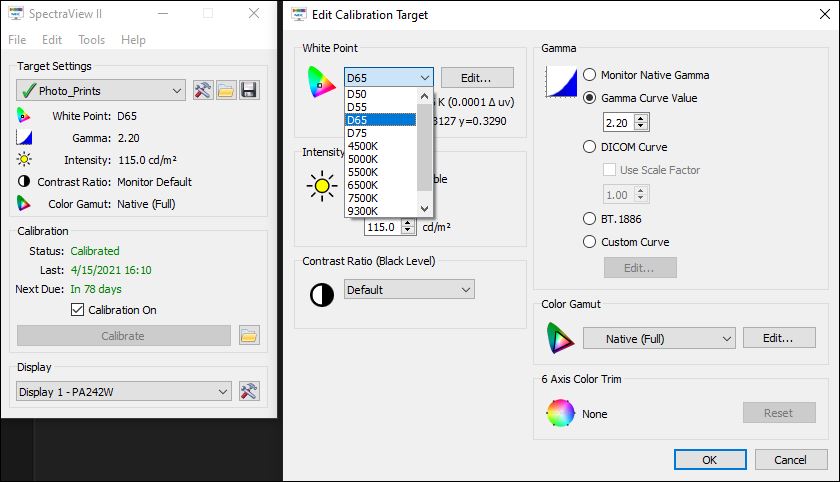
I can't get D52 (can get D50), but I can set a custom white point setting of 5200K. Anyway, here's a dropdown list of preconfigured white point settings using the SpectraView II software for my 24 inch PA242W NEC monitor ...
p.1 #11 · Calibrating monitor at D65 or D55 for printing
My Eizo CG319X is calibrated to 6500K at 75Cd/m2 and I view in a dim room.
I find this closely replicates a printed paper under my proofing light (which is also 6500K)
However, not all monitors work well at low Cd/m2 so it is important that the monitor has very low IPS glow characteristics and excellent tonal responses in shadow areas.
p.1 #12 · Calibrating monitor at D65 or D55 for printing
Peter Figen wrote:
Very low luminance numbers, like the 80cd/m2 mentioned are often too low for modern screens to perform and calibrate properly. Plus you have to have vey low ambient light for those numbers to be effective.
But let's not forget that for video (and many of us use the same monitor for video grading as for photography - albeit hopefully with a Rec709 colourspace and 2.2 or 2.4 gamma), the BBC here in the UK recommends 80 cd/m2 for grading.
You are very right in that any monitors simply can't deliver accurately at lower brightness levels, and it certainly does matter what the viewing circumstances are.
On my Eizo CG319X I use 75 cd/m2 for photography and 80 cd/m2 for TV grading, but I wouldn't be so trusting with something like an i-Mac display or cheap monitor. Low IPS glow and excellent tonal responses are essential for low cd/m2 figures.
p.1 #13 · Calibrating monitor at D65 or D55 for printing
My Eizo will work fine at 80 cd/m2, but then I have to keep the room too dark like 15-20 years ago. That's not practical being at home all the time due to virus.
p.1 #14 · Calibrating monitor at D65 or D55 for printing
leethecam wrote:
But let's not forget that for video (and many of us use the same monitor for video grading as for photography - albeit hopefully with a Rec709 colourspace and 2.2 or 2.4 gamma), the BBC here in the UK recommends 80 cd/m2 for grading.
You are very right in that any monitors simply can't deliver accurately at lower brightness levels, and it certainly does matter what the viewing circumstances are.
On my Eizo CG319X I use 75 cd/m2 for photography and 80 cd/m2 for TV grading, but I wouldn't be so trusting with something like an i-Mac display or cheap monitor. Low IPS glow and excellent tonal responses are essential for low cd/m2 figures. ...Show more →
Not sure where the BBC came up with 80cd/m2 for video editing as there's not a single commercial television I've ever seen that's that dim. Whatever the recommended screen luminance is, the number means nothing without a corresponding level for ambient light, but even more importantly, you should only use REC-709 if you're grading for actual broadcast video. How many of us are actually doing that? Most of us are grading for people to look at videos on Vimeo or Youtube, which could mean just about anything because it's always dependent on whatever monitor is being viewed at the time. Usually better go for sRGB as an average but don't fail to note that the ONLY difference between sRGB and REC709 is the gamma - a modified 2.2 for the former and 2.4 for the latter. Color coordinates are identical.
That being said, even though the Eizo's have hardware presets for a bunch of different reference color space with sRGB and REC709 being among them, it's always better to recalibrate to the specific color space as the presets are horrible and simply not good enough to actually use in real life. Great idea that just never worked well. On the other hand, if you use DaVinci ReSolve, it has the unique ability among video editing apps to be fully color managed, but only if you dig into the preferences and figure out how to set it up properly. Not a very intuitive process but doable still.
Even though the Eizo's will work at 75 or 80 cd/m2, they work better at 90-95 as a minimum. Again, better to run them there and slightly adjust your ambient to match.
p.1 #15 · Calibrating monitor at D65 or D55 for printing
BBC has been recommending 80 cd/m2 for many many years. It recommends this level in a dimmed environment and is the staple measurement for graders all over the place. (I recently did a grade for a major high budget BBC documentary and not a single grade was changed after I submitted it to the director and QC, so something in my workflow must be right).
But I've also been lighting supervisor for TV studios and I look after the camera calibrations and monitoring calibrations for the "racks." (Remote adjustment of cameras for output during broadcast for those not up to speed with TV). The main monitors are set to 80 cd/m2 in a dimmed environment, together with the usual additional broadcast calibration requirements.
Now of course our TVs are not likely to be set that low because few of us watch in dimmed out rooms, (although this is my preference with my lounge - but it does make for harder viewing when the sun is screaming in... I have a beautiful plasma TV which has performance rivalled by only the better OLED screens, and it means the blacks are very very black and I don't have to crank up the contrasts to get good viewing. But most people don't watch this way - hence they have their TVs set to brighter. As you say, cd/m2 is also related to viewing conditions. But a dimmed room can be more controllable and more predictable - hence why it is the choice for grading suites. (And with 25 years involved in TV post production, I've spend a few minutes sitting in them wondering what the sun would be doing if I ever saw it...)
As you say, if we're not grading to the correct colourspace, (usually Rec709 for most of us), for TV work, then we're doing it all wrong. Whether or not people entirely understand how to output that correctly is another whole thread - and alas many don't quite get it. Actually Rec709 is gamma independent. I deliver as 2.2 or 2.4 with Rec709 depending on my client. And this is where confusion kicks in with video output - not helped by issues of whether some video players are colour managed or respect colour tags. A newer version of Rec709-A helps with this, but again - often misunderstood by many video producers. Industry recommendation amongst experienced graders is to stick with Rec709 rather than sRGB. Indeed many of us grade to Rec709 gamma 2.4, then create a node or conversion to change the whole output to gamma 2.2 for web delivery or PC use. This gives us both workable masters for both markets - broadcast and web. (And up until recently, hating what Quicktime did to us until DaVinci came up with a decent tagging solution. Not sure if other NLEs offer something similar).
I do love Eizo's multi-preset options and that I can calibrate to different colourspaces and store them. And because of the way Eizo handle the calibration settings, it makes for much better playing when using the GUI's of things like DaVinci.
I'll admit, even Eizo get a little nervous when I tell them I work as low as 75 cd/m2. But having used this for oodles of years and getting solid results every time, I stick with it. I did try the heady heights of 80 cd/m2 but found discrepancies in my output so I reverted back. Even when I changed my viewing conditions to slightly brighter, (but only a hint), I still found the 75 cd/m2 worked best. I have compared the light output of my screen to my semi-gloss and matte papers under a proofing light and found that the paper reads approx equivalent to 80 cd/m2 - so go figure...
Eizos do have an enviable smoothness and predictable response in the dark shadows. Well - their newer range with an "X" prefix from the CG range do. Some of the older Eizo CG range were also excellent and their IPS glow performances are stunning on the newer screens. Often overlooked as an important thing - but often not a big issue unless everything is turned don low in a dimmed room, so that's probably why.
Somewhere I had a set of recommended cd/m2 for different viewing environments. I wish I could find it again because it was very useful. Alas it is one of those things that, the more we search for decent info on google, the more duff info we find. You'd think there would be a stricter set of correlations between cd/m2 and room ambience readings.
Certainly, unless we can be very confident in how our monitors perform, slightly higher than 75 - 80 cd/m2 could be better for many users - but then that room ambience needs to be higher, and stable, and carefully controlled lighting colour, and the need for grey walls needs to be more.
As with many of these things, if we find a workflow that works reliably - we stick to it. (Heck you should have seen the public outcry and gnashing of teeth when I once suggested that my 2014 MacBook Pro 15" Retina screen better replicated my calibrated Eizo when I set the gamma on my Retina screen to 2.0)
p.1 #16 · Calibrating monitor at D65 or D55 for printing
EB-1 wrote:
My Eizo will work fine at 80 cd/m2, but then I have to keep the room too dark like 15-20 years ago. That's not practical being at home all the time due to virus.
EBH
Yes I can imagine... I sometimes think I spend too much time in a room with little light - considering my profession is to work with light.
Fortunately I'm blessed with a dedicated room with blackouts for doors and windows, and just a small daylight bulb somewhere behind me to keep me company. Just as well I can play my music loud or I'd go stir crazy...
That ability to get reliable blacks and smooth shadow tones, even with very low cd/m2 is why we love our Eizos so much.
p.1 #17 · Calibrating monitor at D65 or D55 for printing
I'm a photographer not a computer guy, so my goal is to get my prints to match my monitor where I spend considerable time getting them to look like what I want. I don't fret over numbers, I leave that to the computer folks. I just use a color checker passport in my shots, calibrate my monitor with an I One studio, and most important edit with my blinds drawn and had it set brightness for that consistent room ambient. Then used it to create custom profiles for 5 papers and 2 printers including 2 for b&w. Now, I just hit print and the prints match. Period. On over 11x14 prints might do an 8x10 test print with 2 5x7's one for tone color and the one I want, a crop of the print size for sharpening. The Ione studio is about $450 but the savings in paper and ink not to mention wasted hours and frustration is priceless. It just works for me. I think critical was getting the monitor brightness set so I didn't spend hours and a dozen test prints chasing my tail. That and the custom profiles changed printing for me from an execise in frustration to just as easy as turning on a tv.




 That's not practical being at home all the time due to virus.