UPDATED FEB 11, 2020 - Lightroom and ACR now officially support this lens, so there's no further need for my custom profile for current versions. I'll leave it available in case any users of older software might want it.
__________________
Lightroom profile for the Sigma 24-70mm ƒ2.8 done. I set it up to do geometry and vignette correction, but not CA (since the lens has a built-in profile for CA).
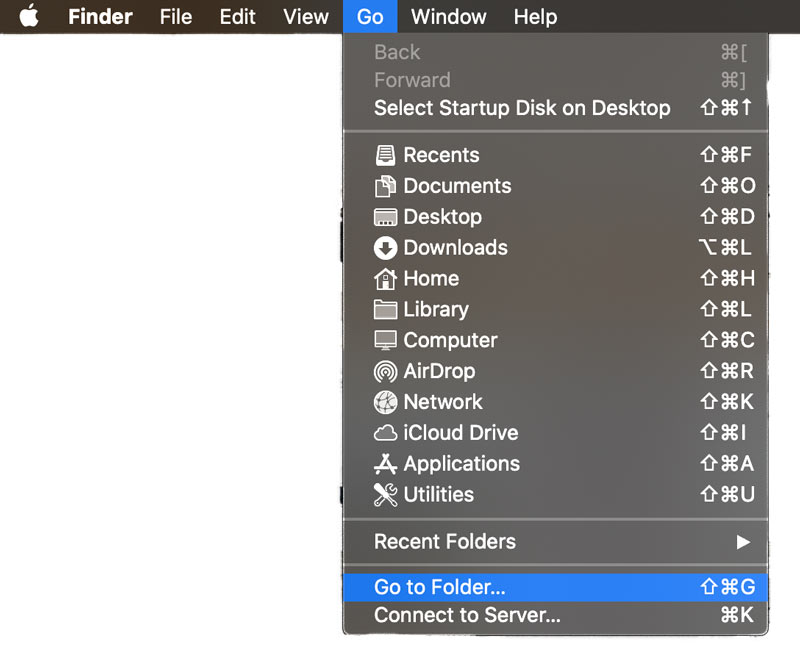
Here's a screenshot showing where it needs to be placed (after you un-zip it) to work properly (this is on my Mac, but the Windows path should be similar).
I just updated the profile, improving the distortion correction at the wide end a bit more. The link in the original post has been edited to point to the new version.
Hello everyone. 1st post. I have been reading this forum for 6-8 weeks now since I first went looking for information on this new Sigma FE mount 24-70mm 2.8 lens. I have Sony A7r III and A7s II camera bodies (first the A7r II) and have been using the Sony Zeiss 24-70mm SSM ZA lens with the LA-EA3 adaptor for last 4 years and have always loved the imaging off of that A mount lens and these sensors. But I have also read that the Sony 24-70mm FE 2.8 GM native lens performs considerably better in terms of sharpness and focussing performance. But the steep price and the depreciation on my like mint condition A mount lens to sell now was always prohibitive. Then I saw this review here first.
And especially this comparative performance grid contained within that review plus of course the price. And was blown away with the sharpness of the photos taken with the A7r IV and me pixel peeping deeply into them.
1. Have always been thrilled with the rendering and contrast and colors of the ZA lens and it looks from all the photos I'm seeing that nothing discernible to my eyes is being lost, plus even nicer bokeh and a step up in corner to corner sharpness, since it seems better in some of the squares above or at least the equal of the anecdotally better GM Sony 24-70 vs my A mount version. Is this pretty much the case I should expect? Not setting myself up for any disappointment here?
2. And please also ..... this profile for LR that Mike kindly shared with the community ...... is there a way to apply it to Photoshop CC 2018 and save it? I shoot RAW + jpeg and this is where I do all my RAW processing and save the images as jpegs back to my respective drives. Any links on line to walk me through how to do that? Have never done before. I'm on a Mac Pro.
Thanks very much for any feedback and am happy to be a member now.
ronfab1 wrote:
this profile for LR that Mike kindly shared with the community ...... is there a way to apply it to Photoshop CC 2018 and save it? I shoot RAW + jpeg and this is where I do all my RAW processing and save the images as jpegs back to my respective drives.
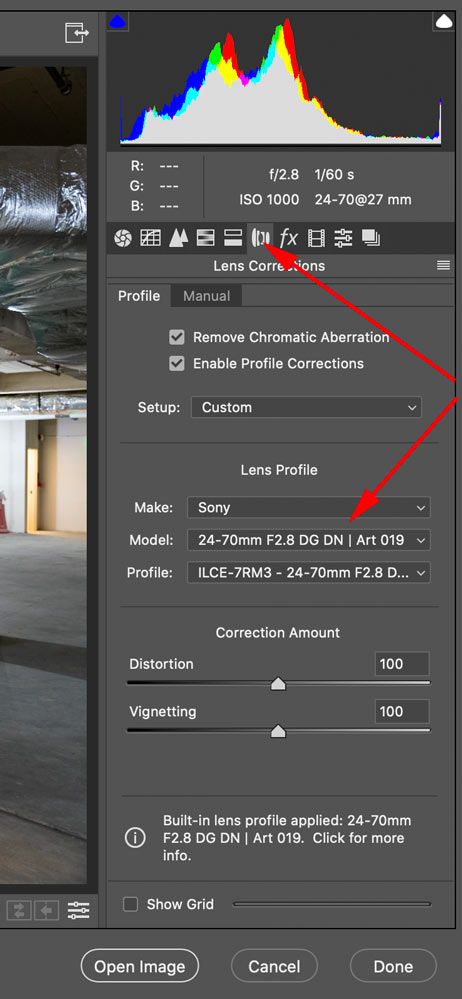
If you put the profile file in the proper path, as described in the original post, it will work within Photoshop as well. When you open a RAW file, Photoshop will display the RAW editor, and should automatically select a lens profile. If not, you can select one manually (see attached screenshot).
Welcome to the forum, btw!
Selecting a lens profile in the Adobe Camera Raw editor window
MikeEvangelist wrote:
Lightroom profile for the Sigma 24-70mm ƒ2.8 done. I set it up to do geometry and vignette correction, but not CA (since the lens has a built-in profile for CA).
Here's a screenshot showing where it needs to be placed (after you un-zip it) to work properly (this is on my Mac, but the Windows path should be similar).
PS
Link was wrong. Corrected now.
PPS
Link updated to link to the revised profile
Thanks Mike. I'm still confused since I have never done this. What are the steps I take with the download once I have it on my Mac to unzip it and then I'm supposed to put it in in the path in place of (where it says Eye Rez HD)? How?
Anyway could sure use some handholding from a patient and kind soul here to get your correction profile into Adobe Camera RAW. Just got word my Sigma has shipped from Adorama today after ordering on Dec 15. Seems like they caught up with their production and shipping as sites are starting to say when inventory is expected in.
ronfab1 wrote:
What are the steps I take with the download once I have it on my Mac to unzip it and then I'm supposed to put it in in the path in place of (where it says Eye Rez HD)? How?
Try this - With the Finder in front (it should say Finder on the menubar, just to the the right of the apple), then choose the 'Go to Folder' command from the 'Go' menu. Then type (or paste) the following text into the dialog that appears:
OK thanks Mike I will try that. First, what do I do with the download sitting in my download folder? You mentioned "unzipping". I tried left clicking on it and got the message, "There is no application set to open the document "the name you gave it". With option boxes of Cancel, Choose Application and Search App Store. Would I go into Choose Application and click on Photoshop CC 2018? Or do something else at that point? Before I do what you're saying with the Finder instruction?
ronfab1 wrote:
You mentioned "unzipping". I tried left clicking on it and got the message, "There is no application set to open the document "the name you gave it".
Not sure why your Mac can't unzip the file, but in any case I sent you a PM with a link to the non-zipped version of the profile. See if that works for you.
Looks like a Lightroom (and Camera Raw) update out now, including an official profile for this lens. If you happen to be using my custom profile, you'll probably want to remove it once you update to the official version.