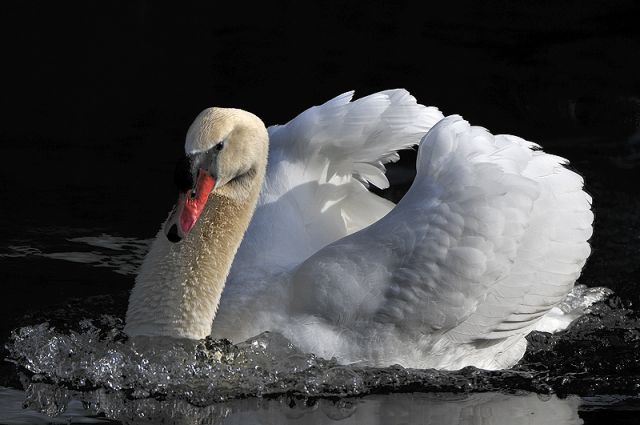
I took the attached photo recently - one snap, full frame, JPEG only (jpeg fine). Taken with a Nikon D300 & Nikkor 200-400 AFS VR zoom on a tripod. I like the photo - opinions will differ but that's not what this post is about. On both my uncalibrated Dell 20 inch extra sharp flat panel and on a friends calibrated monitor the whites in the Swans wing (expecially the right wing/viewers perspective) retain the detail throughout the whole wing. I sent the file - the very large JPEG file and not a file reduced in size, to a professional printing service for an 8 X 12 print. The print was made on Kodak Endura Metallic paper. In the print most of the white feathers in the right wing (left for the Swan - right for the viewers perspective) have lost all detail and appear "blown". Is this likely: 1 the printers fault, 2 it's hard to get the whites right on paper vs on a monitor, 3 something else that I don't understand? Thanks for your opinion or help on this question. Bill
PS - I don't own a printer so I could not print it myself to see if I could keep the detail in the whites in the problem area!
I downloaded your image, and I see that it's in Adobe RGB color space. Be aware that many printing services want/expect the image to be in sRGB color space. Treating an Adobe RGB image as though it was sRGB makes the image appear to have less contrast and color saturation. You can view the difference by opening the image in Photoshop selecting "Use Embedded Profile", and then pretend to assign the sRGB profile to the image. If you have Preview turned on, as you toggle the assigned profile between Adobe RGB and sRGB (before pressing OK), you'll see the image change, showing the effect of a mismatched color space profile.
As to your original question, I'm guessing that the printer isn't quite properly calibrated in the highlights. It's very tricky to get a photographic printer properly calibrated in the highlights. If the highlight contrast is too low, you lose highlight detail, if it's too high, it accentuates any noise (primarily shows in blue sky/clouds looking blotchy).
Great image any mid priced printers from Canon, HP or Epson would do a good job with your image just use good paper and inks from the printer manufacture
That should not be difficult to print correctly as long as profile conversions are being done right. My Canon Pro9500 is capable of reproducing that fine of tonal differences in the whites (I've tried it).