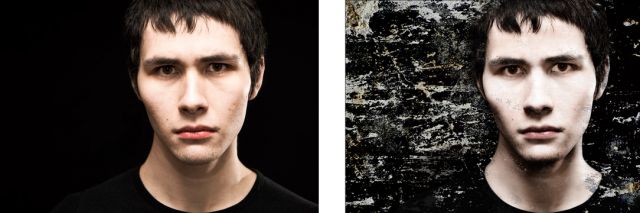
What do you guys think of the tone of this shot? It's a style I haven't done before and would like feedback specifically on it. I'd also (naturally) appreciate wider/more general feedback.
For those who like to see the process, here's the greatest effect of the changes I made next to the Apple Preview RAW conversion:
EDIT: I achieved the look via a separate layer so it's easy to bring up or down and mask out if it's too much in areas or globally
Edit 2: Is there a green cast on this? I've heard that but def. don't see it and I'm wondering if my monitor might be really off
I just calibrated my monitor - actually after looking at your post (it just went out of date). There may be the slightest of green cast but I would never think that unless someone said it first (I am color-cast challenged).
It is intriguing because each time I look at the image I see more - especially some details in his facial features in the vicinity of his cheekbones as well as the forehead - the area above his eyebrows and bridge of nose carry no detail - perhaps that is what you intend. I think the image is a good compromise between the original and the mask.
I prefer the lips on the original.
Ken Neimann, ePaperPress.com has a paint-with-light plugin for PS that, I believe, would allow you to obtain similar results with much less pp-ing.
Only general comment - I'd prefer the entire head shot first and then crop if desired.
I too generally shoot wider than this but I recently got a 135L and I was shooting with one reflector and two speedlites, one of which was on my camera... and we were in a basement suite so I was having trouble getting physically further away. FOr all the constraints, I was actually quite pleased with the shoot as a whole.
After letting the image sit for a while, and taking your advice, I'll probably try to pull back the effect a little, esp. in the highlight areas to preserve detail. In the past I haven't liked plugins for stuff like this but if you suggest that one is worth checking out, I'll demo it.
P.S. I was playing with a channel mix (for b&w) and changed the blending mode to soft light for the image on the right. I then pulled it back a fair bit (55-60% in the most intense areas) and masked even more of it out. Do you think that I over-sharpened? I tend to have poor discretion with under- or over- sharpening.
I don't really see the green cast, you could be seeing his natural base skin tone. My skin color has a green base tone that throws people off. I'm viewing on a calibrated display.
If anything I'd selectively bring down the highlight along the bridge of the nose just a hair, if there's anything there from the original to bring back that is.
Guys hate this, but oil on a face in areas like the nose is a killer for blown highlights, a little light powder clears it right up.
I'm definitely digging the overall look, but I agree with the previous poster that it would be a good idea to reduce the effect on the nose and, perhaps (to a lesser extent), on the part of the forehead that's a little blown out. Did you try applying the same effect to his neck? I have no experience shooting people, though. So please take it with a grain of salt (or opacity of 5% )
I like the bleach bypass look and there are many different ways to get there. One thing I will caution when doing this is watch the shadowing in areas that shouldn't be dreary.
For Example, if you are grunging up a picture like this, but not wanting to go evil, use some sort of fill flash action (Kubotta) or dodge under eyes and whiten the eyes so you don't lose the details. If you are going for a dark, evil look then you are spot on. However, if you are going for more urban / alternative then I would really watch how you introduce the bypass to your images.
Some things to consider... create several layes and bypass your top layer. Erase the bypass on areas that shouldn't be dark with significant shadowing from the treatment. Then on the next visible layer, whiten the eyes using your tablet (if you are not using one shame on you) with a paint brush and adjust the opacity to blend. Merge the layers once it is to your liking and depending on the backroung, vingette and burn as needed.
You can also add things like shooting inside of a dumpster from a paint factory, high voltage boxes, etc as opaque backdrops to images like this. I'm all for adding a grung look to photographs like this, but you need to remember it is art, so don't just blanket the treatment, do it in layers and with finess to produce stellar quality.
Of course I did what I could (I didn't spend time on the eyes) but to just give you an idea of what I like to do when using bypass. It probably doesn't fit with what you were going for but I like getting a little out there with this stuff.


 )
)