I think you're making it to complicated. I haven't read all the posts but try a simple three light set up. Main thru a softbox or umbrella, fill thru an umbrella and hair light.
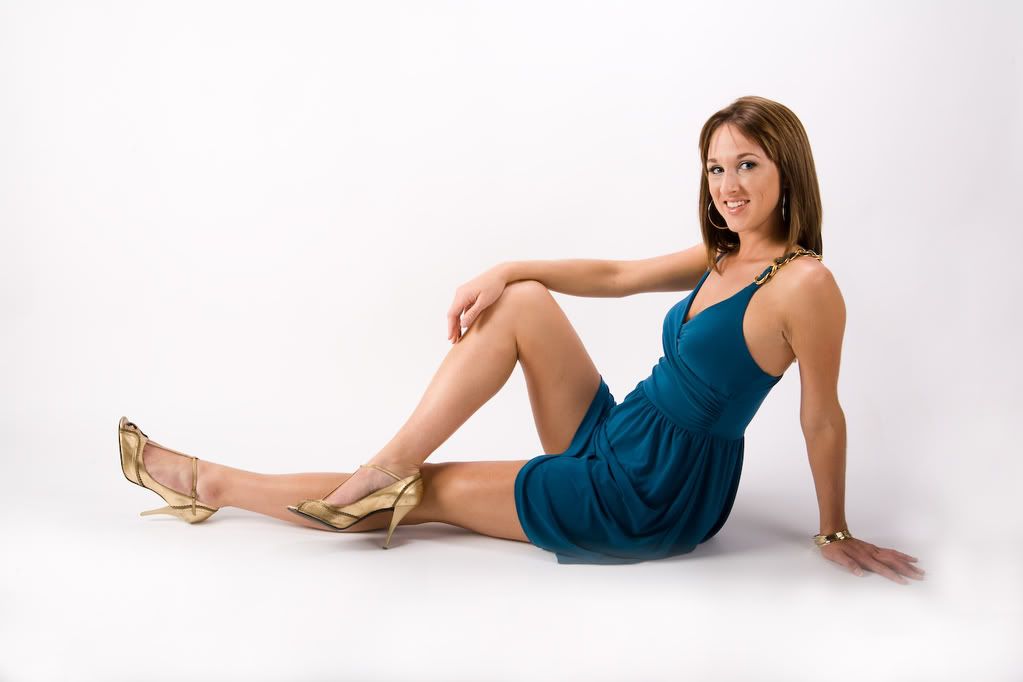
This shot was done with a 48" softbox on the far left. Shoot thru umbrella on the right, next to the camera, and a hair light above the model.
jcolman wrote:
I think you're making it to complicated. I haven't read all the posts but try a simple three light set up. Main thru a softbox or umbrella, fill thru an umbrella and hair light.
This shot was done with a 48" softbox on the far left. Shoot thru umbrella on the right, next to the camera, and a hair light above the model.
[
Interesting thread. I've also tried the ZA white seamless and have the same general problem as Beverly. I even went to using a 30" x 60" giant softbox as my key, oriented in a vertical position to try and get nice even lighting across the model and the foreground, but still, to get the foreground nice and white, I blow the skin tones of the model. This was my basic setup before I bought the 30x60.
I'll keep an eye on this thread and hope that you solve it for both of us Beverly!
jcolman wrote:
I think you're making it to complicated. I haven't read all the posts but try a simple three light set up. Main thru a softbox or umbrella, fill thru an umbrella and hair light.
This shot was done with a 48" softbox on the far left. Shoot thru umbrella on the right, next to the camera, and a hair light above the model.
Looks nice. I guess my question is how would you shoot a 5' 11' model standing upright + get it right in-camera and not have to fix it in processing?
I think you are getting all crossed-up with crossed lighting in too small a space to pull off a evenly lit white background shot. Try a centered lighting strategy with both key centered and high above camera and fill centered and low. Feather the fill up/down as needed. That is flattering effective lighting on a white background and both lights will be pointing at the background contributing its lighting requiring less background light and making it easier to get it even.
For exposure I think it is better to capture just below clipping in the camera and tweek Photoshop rather than nuke it in the camera and risk loss of detail and loss of contrast due to flare. Use the overexposure warning to check how even the lighting is. Get everything clipping at the same time, then close the aperture 1/3 stop and you'll have optimal even exposure.
I first set the lights the foreground first without the background lights on
then I raise the background until it is white perceptually, but there is still separation between the foreground rim lighting and the background. Perceptually the darker the background is the brighter the whites in the foreground will have and the more snap and 3D modeling there will be, especially in white / light objects.
But all things considered you probably don't have enough space to get really even lighting on a white background for a full length shot. Neither do I so I don't even try, except with kids.
The masking controls in CS4 do a pretty good job for simple masking tasks. If you need knock out white background for catalog type work its relatively easy to just light for good edge contrast with the background and mask.
cgardner wrote:
But all things considered you probably don't have enough space to get really even lighting on a white background for a full length shot. Neither do I so I don't even try, except with kids.
Thanks, Chuck! You're probably right about the space. I don't have any trouble lighting for 3/4 shots but it's around the feet of a very tall person that is the problem. I might have to settle for fixing it in processing.
Beverly Guhl wrote:
Looks nice. I guess my question is how would you shoot a 5' 11' model standing upright + get it right in-camera and not have to fix it in processing?
Thanks!
Pretty much use the same setup as above. One key light fired thru a large softbox, fill light fired thru an umbrella and a hair light.
Another set up with the same lights (minus the hair light) but instead of firing one of my strobes thru an umbrella as my fill light, I bounced it off a white 3x3 foamcore on the models right side. I also moved the model farther from the seamless so there is a bit less light hitting the background.
And by simply increasing the power of my fill light to match the power of my key light, and using a couple of flags to block most of the light from hitting the background, I get this result
I gave it another go today. I think I've exhausted my possiblities....
Two lights : beauty dish camera left and 45" shoot-thru umbrella, right. A 3rd light didn't turn the background white either. Model is 3ft. from background. ((jcolman: how far were your lights from the model and how far was the model from the background, etc?? thanks))
Four lights: 24x32 softbox left, 45" umbrella right (aimed at floor, spill provides fill on model); 2 lights on background. Model is 4 ft. from background.
Looks like you've pretty much nailed it Bev. To answer your question, my lights were about 4' from my subject. If you look at your background vs mine, you'll see that you've done a better job of making the white almost pure white, whereas mine, the background is probably around 90% white on the first pic and 85% on the second.
I realized in this process that getting the lighting right is a very customized thing. What works for me may not work for someone else. There's so many variables to contend with. I took hundreds of shots, evaluating the results and finessing the variables. Too much of one thing or another and there was flare, wrap, overexposure, underexposure. I wrote everything down and made a diagram, so I hope I can recreate my solution fairly easily.
btw: my AB800 with the beauty dish on the stainless steel C-stand fell over from a height of 7 ft., hitting another light (and knocking the receiver off it). To my astonishment nothing broke, the lights and receiver still worked. The BD got a ding in it where it was smashed against the light casing, but it's fine, too! A big kudo for the Bees products!! I now use sandbags religiously.
This is one of the best threads that I've read here in a while. Thanks to y'all for this kind of detail and the work that went into posting the images of these setups! Great stuff you guys!
looks good, glad to see you figured this all out. I like the foamcore cutters/flags, I need to get some. I did my high key test shoots without cutters and still got good results, but I do like the ability to control where the light goes.
Since my subjects (mostly guitars) are smaller than people, I was able to make cutter/flags from 24" X 36" pieces of foam core. I hot glued 1/2" dowels to the back to make handles that can be held in standard grip heads. My local art supply has foam core that's white on one side and black, gray, silver, and gold on the other side.
Beverly, you have definitely got it figured out. It takes a bit of practice but it's easy once you get it.
The thing about using white reflective material like you're using is that any light you hit it with from the front just bounces off towards the backdrop, so even when cranking up your key/fill lights you're not likely going to see much difference in the foreground floor. You could try just using the white paper instead of plastic. Or...
Try replacing the white plexi with a mirror and see what it's reflecting into your lens. My bet would be that it's showing some ceiling or other area that's not white or not well lit.
If it's reflecting the ceiling you could a) light the ceiling (can cause more headaches because it's another light to deal with), or b) use a longer lens from a lower angle so you see the reflection of the backdrop in the plastic.
I see you've got things working much better now, but I'd still suggest trying out what I wrote above. Hitting a reflective floor from the front doesn't do as much to blow it out as hitting it from the proper angle of reflectance to send the light bouncing into your lens. To make something highly reflective look white you need to work with the specular highlights (which are direct reflections of your light source(s)) instead of the diffuse highlights.
Cheers,
Kyle
P.S. I'm loving my Dean Collins DVDs, they make me sound like I know so much more Before digital the thought "I'll just fix it in post" was very rare. There's no reason you shouldn't be able to get stuff like this to look the way you want without resorting to Photoshop.
Thanks everyone! I'll continue to refine my process based on all the generous input! I'm sure the size of the studio, ceiling height, etc. all plays a role, too, so we each have to find what ultimately works best for us. I've tried by-the-book setups with miserable results.
If you reduce your fill and main so that the subject is a a bit darker, but leave your background lights the same, you might be surprised to see what happens when you adjust the files exposure in post. ;o)
It kind of looks like you may have incandescent light contamination there in the foreground. Two possibilities to check. An incandescent light off camera in the foreground, or the strobe turned way down with the modeling lamp on full. The second, if the flash is turned way down, is a color shift from the flash tube.
You might just try turning every incandescent light in the studio off and pop a flash exposure to see if that gets rid of the color cast.
TomRittenhous wrote:
It kind of looks like you may have incandescent light contamination there in the foreground. Two possibilities to check. An incandescent light off camera in the foreground, or the strobe turned way down with the modeling lamp on full. The second, if the flash is turned way down, is a color shift from the flash tube.
You might just try turning every incandescent light in the studio off and pop a flash exposure to see if that gets rid of the color cast.
It turned out to be a WB issue actually. I did tests with every light off except the modeling lights and still had the cast on the floor. Once I realized my camera shoots warm and started using a gray card I don't have the problem anymore. Thanks!!
the BEST setup that works for me on location and in the studio is lastolite hilite
its fairly portable and only takes 2 lights. i used to use it with great success with one ranger and 2 sb800 flashes




 Before digital the thought "I'll just fix it in post" was very rare. There's no reason you shouldn't be able to get stuff like this to look the way you want without resorting to Photoshop.