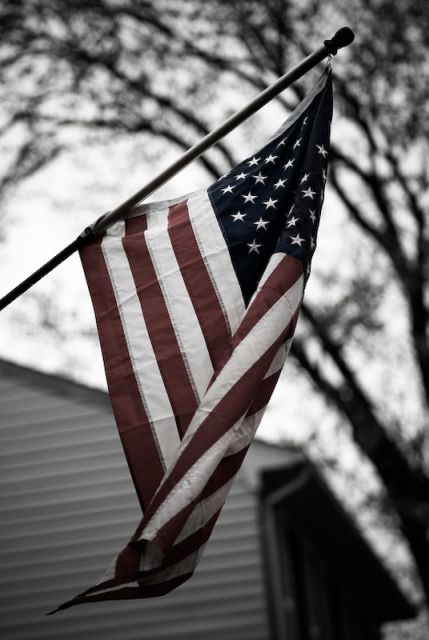
I normally use PS for touch ups b&w conversions and small adjustments. This is the first time I tried anything like this and I know its not too great. Any ideas on how I can improve or what I did wrong?
I wanted the picture to give the viewer the feeling of depression while viewing such a patriotic symbol.
Want to post the original?
Quick thoughts:
Vignetting idea good, but overdone.
House in the backgroud is a problem and doesnt belong. The flag against the almost empty sky and OOF branches can work for you.
Should the flag be at half mast?
Scott G
The vignetting wasn' ...lol.t that dark when I did it at first but I actualy darkend the whole picture and that made it darker around the edges. I actually like how dark it is ...lol.
I actually wanted the house in the background. It goes with the story I posted in my blog. (There isnt an angle that I could shoot the flag without a house in the BG anyway)
I didnt just want a flag, I wanted it tied to a home, a family, and to the old American ideals. I wanted it to make the viewer remember what the American dream used to be.
And I dont think the flag should be at half mast today.
Jason,
Very helpful to have you clarify your intent.
Couple more thoughts, after playing with it a bit in LR.
First, why not crop out the extreme left, getting rid of the flag holder or gutter, or whatever that is at one end of the pole? Not sure what that adds, other than an anchor to a structure. You could also crop a bit from the bottom, eliminating the dark lower left object (gutter?).
Second, I wonder about desaturating the house quite a bit, and even desaturating the flag a fair bit.
Finally, I like the vignetting, but perhaps going a bit lighter?
As always, with PS there are several ways. And a quick way in LR.
One method which is similar in both, is to select Color Range, click on the house, adjust the fuzziness slider to capture the house, then use an adjustment layer for saturation and reduce saturation to taste. You could also approximate the colors you want to reduce by selecting a hue/saturation layer, clicking on greens, adjust the color range sliders beneath, then adjusting saturation (and lightness). In LR, you go to HSL, use the target tool wth Saturation selected, click on the house side, and drag down.
Or, in PS, duplicate the background, in the dup layer use your selction tool of choice, add an adjustment layer or adjust image, and again work with Hue/Saturation.
Jason,
Glad it worked for you. Of course, its your image, your vision that is interpreted. Again, your explanation of your intent and context is key. In addition to adjusting saturation, I did a bit of curves work to keep the image fairly dark, a bit of the vignetting, and cropping as described above.
Jason,
Glad it worked for you. Of course, its your image, your vision that is interpreted. Again, your explanation of your intent and context is key. In addition to adjusting saturation, I did a bit of curves work to keep the image fairly dark, a bit of the vignetting, and cropping as described above.


 ...lol.