Register · Software · Search · Image Upload · Buy & Sell · Reviews · Hosting

Moderated by: Carl Auer, guardian
Username   Password

Visit the FM Store · Image Upload · Buy & Sell
FM Forum Rules
Sports Corner Resource
FM Forums | Sports Corner | Join Image Upload
1
2
3 end
Go to previous topic Go to next topic
James Broome
Offline
Buy and Sell: On
p.2 #1 · Green screen doesn't always work


The parents love them. I haven't had a single negative comment about them yet.

I'm thinking you guys are looking at them from a photographer/technical standpoint - which is expected here. Parents are looking at faces and the overall image.

Mar 26, 2008 at 11:59 AM
dmwierz
Offline
Image Upload: On
p.2 #2 · Green screen doesn't always work


James,

This is cool stuff. I can see how this would be easier than wrangling 15 kids and two adults into an acceptable group shot, then trying to get the lighting to be even across the group, and get everybody in a good pose, with both eyes open, etc.

So you take an individual pose then another one you use for the group collage?

I also find the "floating body" to be a little distracting. Couldn't you just fill in the background that peeks out between the individuals with a less obvious color, or shoot the players/coaches closer to full-body?

Thanks for sharing your creative and very effective technique.

Mar 26, 2008 at 12:35 PM
James Broome
Offline
Buy and Sell: On
p.2 #3 · Green screen doesn't always work


The gaps usually only become noticeable on smaller group shots. When the kids are either older or the team shot has more people in it, the gaps dissapear.

Mar 26, 2008 at 03:35 PM
James Broome
Offline
Buy and Sell: On
p.2 #4 · Green screen doesn't always work


Here's a shot where the kids overlap more.

This image is copyrighted by the owner

Thanks for the feedback, folks. I agree that the second image (above) is better than the first one I posted. I'll definitely try to avoid that problem in the future.

Edited on Mar 26, 2008 at 03:40 PM


Mar 26, 2008 at 03:38 PM
minatophase3
Offline
Buy and Sell: On
p.2 #5 · Green screen doesn't always work


James,

I really like what you have done and would like to thank you for posting these! I am going to have my first T&I shots in September and I think I am going to try this along with the traditional team shots to see which I like better.

Thanks again!

Tim

Mar 26, 2008 at 04:00 PM
dmwierz
Offline
Image Upload: On
p.2 #6 · Green screen doesn't always work


James,

Thank for clarifying. It almost looks like there is a shadow from each player, falling on the player behind them. Is this something you added in post, or did I miss where you described how you do this? Or is this just a case of my eyes "seeing" a shadow where it thinks one should be?

Edited on Mar 26, 2008 at 04:22 PM


Mar 26, 2008 at 04:22 PM
James Broome
Offline
Buy and Sell: On
p.2 #7 · Green screen doesn't always work


I add the shadow after positioning the individual pictures into the 5x7. Once I place them all appropriately - then scale them to look right - I go in and add shadows to create some depth. It helps the image quite a bit, I think.

Mar 26, 2008 at 04:35 PM
PShizzy
Offline
Image Upload: Off
p.2 #8 · Green screen doesn't always work


James, A quick trick to view holes in your comps is to do a sat/hue adjustment layer on the background, then move the hue back and forth a lot. the distracting colors will pop through any holes in your comp.

Another idea is to add in a new layer right above the bg but nothing else and make it bright red.

Max


Mar 26, 2008 at 05:35 PM
ICQ
Rob Scriva
Offline
Image Upload: Off
p.2 #9 · Green screen doesn't always work


dmwierz wrote:

I also find the "floating body" to be a little distracting.


I also wondered about the missing legs for the kiddies in the 2nd row and the coaches then realised it was a composite.

Actually that composite is awesome, great job lighting all of them individually. It doesn't look like one at all (apart from the missing legs).

Mar 27, 2008 at 01:38 PM
NickyD
Offline
Image Upload: Off
p.2 #10 · Green screen doesn't always work


lol, my wife walked by, and yelled "that kid doesn't have any arms". It took her a few seconds to figure out what it was. The arms were of course behind his back, but she knew there was something odd about the composite though it took her a little effort to identify it.

Mar 27, 2008 at 07:32 PM
James Broome
Offline
Buy and Sell: On
p.2 #11 · Green screen doesn't always work


The missing arm thing is hard to deal with. It was especially problematic on a few of the individual shots, actually. Once the little kids grabbed the bat with one hand, then place the other one behind their back, all you saw was a kid that had an unfortunate accident with a wood chipper. When we caught it we'd tell them to 'hide their hand, not their arm'. The littler kids had completely ginormous shirts which exacerbated this problem quite a bit.

With the team pic, the missing arms would be a problem whether the shot was composited or not. All in all, that first team shot I posted has too much free space in it. I agree that it was done poorly and would benefit from being recomposed. The second shot is a much better example of my work (hopefully).

Mar 27, 2008 at 08:33 PM
James Broome
Offline
Buy and Sell: On
p.2 #12 · Green screen doesn't always work


Rob Scriva wrote:Actually that composite is awesome, great job lighting all of them individually. It doesn't look like one at all (apart from the missing legs).

Thanks (mostly)!


Mar 27, 2008 at 08:34 PM
sportsdad
Offline
Image Upload: Off
p.2 #13 · Green screen doesn't always work


Still learning PS.. but when you use the magic wand to take out the background, how do you or what do you do to clean up the edges of the photo that is left...(the player)

Thanks

Edited on Mar 28, 2008 at 04:07 AM


Mar 28, 2008 at 04:07 AM
PShizzy
Offline
Image Upload: Off
p.2 #14 · Green screen doesn't always work


sportsdad,

James uses Primatte. It's a program specifically aimed at pulling keys (a key is the term for a single color background that can easily be extracted or "pulled")

The program analyzes the color selected (in most cases green or blue) and will extract that color from the image, even so much as feathering or neutralizing the edges that get a little bit of spill.


If a really good key is done, it is possible to work with something like magic wand, but when it comes to things like hair, it's difficult. Translucence in general (veils, sheer clothing, etc) can cause headaches, which is why programs like Primatte are around.

Max

Edited on Mar 28, 2008 at 04:51 AM


Mar 28, 2008 at 04:51 AM
ICQ
P Alesse
Offline
Image Upload: On
p.2 #15 · Green screen doesn't always work


Okay, I'll admit after following this thread and James' workflow, I decided to give this a whirl with my first T and I last weekend. Although I haven't quite mastered the lighting as of yet, I think this is a good first attempt. I must say that the players were very cooperative and did exactly what was asked. I told them to keep all appendages tight to their bodies when I did their individuals. Below is the end result. CC welcome...


Mar 28, 2008 at 05:09 AM
sportsdad
Offline
Image Upload: Off
p.2 #16 · Green screen doesn't always work


Max
Thanks
I have one more question.. if you don't mind... When I took a copy of the photo of the boy on the first page and used the magic wand on it to take out the green background I got a image (using PS) I got the checkered background and was able to move it into another photo no problem... but when I opened up a photo I took of my boy playing hockey and did the same thing I got a black background and when I moved it.... the black stayed when i tried to move it to the new photo... anyone mind telling me what I did different..

Thanks

Edited on Mar 28, 2008 at 06:33 AM


Mar 28, 2008 at 06:33 AM
Russ Isabella
Offline
Buy and Sell: On
p.2 #17 · Green screen doesn't always work


Paul: Perfect but for the red-eye!

Edited on Mar 28, 2008 at 06:36 AM


Mar 28, 2008 at 06:36 AM
John P Mulgrew
Offline
Image Upload: On
p.2 #18 · Green screen doesn't always work


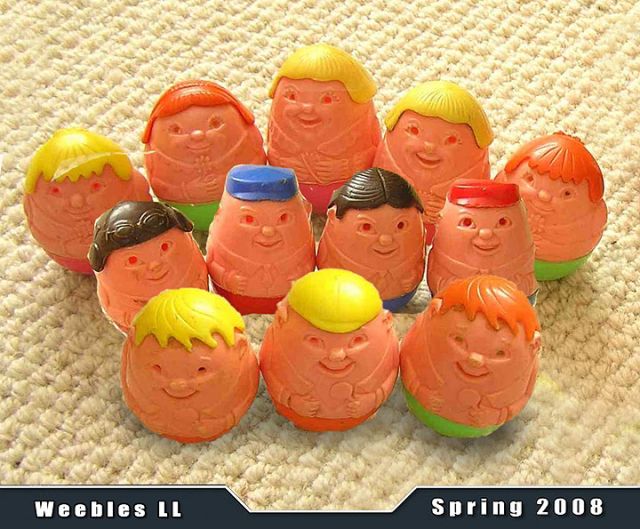
Weebles? But they don't fall down, do they? hahahahahaha

Edited on Mar 28, 2008 at 09:33 AM


Mar 28, 2008 at 09:33 AM
PShizzy
Offline
Image Upload: Off
p.2 #19 · Green screen doesn't always work


sportsdad,

Photoshop has layers, and a "background" (which is also a layer, but is special since its the backplate). Layers, because they are meant to be stacked on top of a background, can be transparent. Hence you can cut out pieces as needed.

Backgrounds, because they should maintain some color throughout an image, cannot inherently have transparent areas. Any attempt to "cut" something out will result in that area being filled with the background color in your color pallete (you probably had white as your foreground, black as your background).

So, the question is, can you have layers without a background? Yes. Next, what if you ONLY have a background and want to make it a layer? Simple

Have the layers pallete open. Hold down Alt, then double click on the background layer. In fact, it's name should change from background to layer 0 or something similiar, depending on your version of photoshop.

You should now be able to easily "cut" pieces out of your image.

BTW, not to jump ahead too much, but rather than cut, why not consider layer masks? they are like editable cuts. You can paint in and out pieces, and even make areas semi-transparent. Best part is if you overcut (say take a chunk out of somebody) you can paint it back in.

There's also history brush, and snapshots, which are a roundabout way of doing a layer mask.

But I digress. There are various ways to do any one task in Photoshop.

I have a feeling that this will be a topic of interest that I will need to do a write up on. After I do my write up on Noise Ninja. (someday, I swear)

Max

Mar 28, 2008 at 02:59 PM
ICQ
sportsdad
Offline
Image Upload: Off
p.2 #20 · Green screen doesn't always work


Max

Again thanks for the info.. I will make sure I switch it to a layer first.. As for the other way you mentioned, I will try that too. All of this is new to me so I am learning with every new thing I try.


Mar 28, 2008 at 04:39 PM
Nill Toulme
Offline
Buy and Sell: On
p.2 #21 · Green screen doesn't always work


PShizzy wrote:
...I have a feeling that this will be a topic of interest that I will need to do a write up on. After I do my write up on Noise Ninja. (someday, I swear)

Yes! Write it up! And do it before you do the one on NN...

Nill
~~
www.toulme.net

Mar 29, 2008 at 06:29 PM
vidoprof
Offline
Image Upload: Off
p.2 #22 · Green screen doesn't always work


I disagree I want the NN write up first.

Nill how is that Mark III dilemma going?
ryan


Mar 31, 2008 at 04:05 AM
PShizzy
Offline
Image Upload: Off
p.2 #23 · Green screen doesn't always work


Glad to see theres interest in both topics. Worry not, I will make time for both.

Max

Mar 31, 2008 at 04:34 AM
ICQ
Dean Gillette
Offline
Image Upload: Off
p.2 #24 · Green screen doesn't always work


Paul, your background is from Denny's, isn't it? Do you use the twist flex or regular? What size? Just curious, I'm ordering one soon and am on the fence what to get- this one of yours looks really nice.

P Alesse wrote:
James... love your nice even lighting on the subject. Now, from here, will this player put down the bat and face front for the team composite?

Your example has me wanting to change to this pose. I don't like the standard stance shot and I had been going with the pose shown below to some success. But, I think I Iike yours better... more team name showing.


Edited by P Alesse on Mar 25, 2008 at 05:30 PM GMT


Apr 02, 2008 at 03:06 AM
Gatorboy
Offline
Image Upload: Off
p.2 #25 · Green screen doesn't always work


I have recently bought chroma key green paper and will be doing a shoot on Friday for a local HS wrestling team that I will then create a Poster/Schedule for next years team.

I purchased Primatte and have been playing with it. Interesting, that some of the comments in this thread were about making the background brighter -- like +1 stop brighter than the subject.

According to the Primatte Information, they recommend 1-stop darker than the subject. I think James has it just about right.

I'm anxious to see if I can do half as good as James does.

Jun 04, 2008 at 11:11 AM
ICQ

FM Forums | Sports Corner | Join Image Upload
1
2
3 end
  Go to previous topic Go to next topic

You are not logged in. Login or Register

  Username   Password  
Lost password?