I knew it would eventually happen, my first external hard drive is about full. I have a second ready to go, but would like some advice on how to arrange.
I use LR pretty extensively in addition to CS3/Bridge. I would like to maintain contact with my full HDD as I move forward.
Should I simply add the second external drive as a stand-alone or get more yet and create some sort of RAID system? Advantages/disadvantages? I'm running Vista. If RAID is the way to go, how?
Raid isn't the answer it appears to be. if the lead disk goes nuts,jt copies that to the other disk......
One strategy: two externals: save to one this week, the other next week. In between your weekly "save everything" you leave the externals unplugged and unconnected.....
If you need what RAID provides, then by all means do it, but RAID is not the best way to simply add storage space. Depending upon the RAID configuration you select you may get about half the space you would with a JBOD (Just a Bunch of Disks) configuration.
Depending upon the configuration, RAID can provide redundancy or protection against the failure of any one disk, but it does so by making copies of things on different disks. Obviously, that takes up more room.
It is more expensive in the long run to maintain RAID. If you absolutely can't affort to lose a single image, then RAID, plus a backup system will protect you. Remember RAID is not the same as a back up.
Like others have mentioned, RAID sounds good, but often can be troublesome to maintain. I prefer the JBOD system with nightly automated backup or as needed manually following a heavy volume work session.
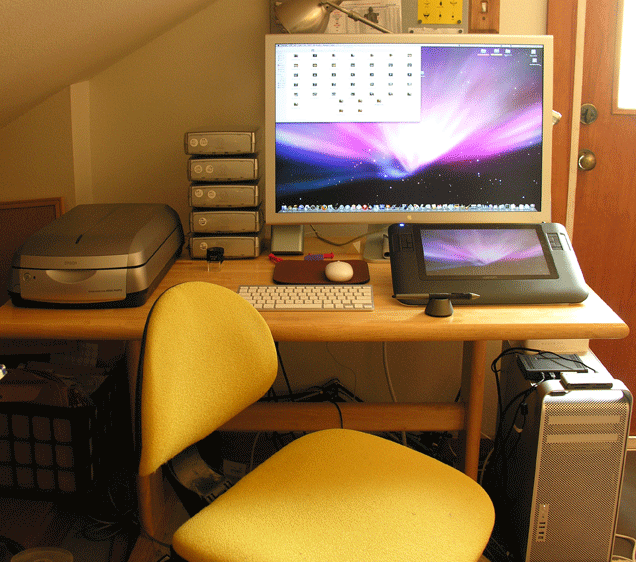
If you do it long enough, then you end up with a stack of disks like to the left of the monitor; that is in addition to the 4 HD's in the tower. But I have been at it a long time.
Michael R
I purchased a 1.5 TB nas that has a usb port (you can find them with either one or two usb ports), for expansion by adding another hard drive.
Not to change the subject MRoach how are you liking your cintiq. I have the 21ux and find it cumbersome. I was thinking of getting one like yours and selling the 21UX.
BeckyC:
I like the 12" Cintiq quite a bit; it is small enough to rest in my lap and it has a bump in the center of the back that allows it to rotate when placed flat on the table. There is the usual cable clutter; as much as with your 21" though. So there is no relief on the cable end. But I am enjoying it very much. I have a client with the 21" and I set it up for her, and it is awkward it seemed to me. I, too, like the smaller one better.
Michael R
I run a 5 disk RAID 5 array in a Thecus box. I have 2.5Tb of storage. One HD is given up for "Parity" so I have 2.0Tb of, protected (against any one HD failure) storage capacity. It has always been transparent and simple to use. It has a window that cycles thru various dialogues including "Raid Healthy." It, and the occasional separate HD backup, has been a real source of tranquility for me.
I have about 700GB of files right now. My main data "drive" is a RAID-5 array (4 x 500GB) that provides 1.36TB of formatted capacity. I currently have two WD MyBook 1TB "drives" (actually RAID-0 arrays of 2 x 500GB each) for backup. The FireWire 800 and RAID-0 configuration on the MyBooks ensure that I get 30-40 MBps transfers from and to any disk, just as though all the drives were internal.
One WD MyBook stays in the fire-resistant safe with a full backup. The other WD MyBook is connected to the main computers, and every 12 hours (6am and 6pm) the main RAID array is synchronized to the MyBook. Once or twice a week (at least, and sometimes more often if there's a special event), the MyBooks are switched: the one with the most recent backup goes into the safe, and the other gets brought up to date at the next sync. SyncBack SE (by 2BrightSparks) is my software of choice and I love it.
An advantage to all of this is occasional portability. If we're going somewhere for the weekend and I want to edit data, I sync both MyBooks (so the one in the safe has an up-to-the-minute backup of everything), then take the other MyBook with me. I'm happy knowing that I left two full copies of everything at home, so even if I drop my bag in a lake and my house burns down, I shouldn't lose any data.
Increasing data capacity is no sweat. First, when I get close to exceeding the capacity of the MyBooks (say, 900GB of data), I'll sell them and get two 2TB external drives for backup. Then, when I get to 1.2GB of data, I'll add another 500GB drive to the internal RAID (making it 5 x 500GB with 1.81TB formatted usable), reformat the internal RAID array and restore the data from the external drive.
Even getting close to maxing out that configuration will take me a couple of years. My best guess is that I will then sell my current computer along with all its storage, and just build myself a new one with a simple backup system like I have now: a main RAID array for speed and fault-tolerance in daily work, with two external-drive backups for redundancy with speed.
I went through this several months ago. I went from thinking a needed an expandable 5 disk array box to buying a single box that would hold two 750 GB drives in JBOD format. My question to you would be, how large is the drive you filled up? How long did it take you to fill it up? This in many ways determines what you should buy today. You want to avoid buying something that you think will last 3-5 years. The technology will be changing and will get cheaper :-)
I have three G-Tech external drives that are connected to each other. I turn them on only when needed and connected to the computer with one firewire. Two drives mirror each other and the third is used for Apples Time Machine application. At this point, the two mirrored drives are about 1/3 filled.
IMO mirrored drives come with some risk. If drive A becomes corrupted, drive B becomes corrupted immediately. I run manual back ups to the second drive using SuperDuper's smart update approach.
Not a fan or mirroring either... for fault-tolerance, I go to a third disk and RAID-5. But data corruption for reasons other than drive failure must be dealt with by backups.