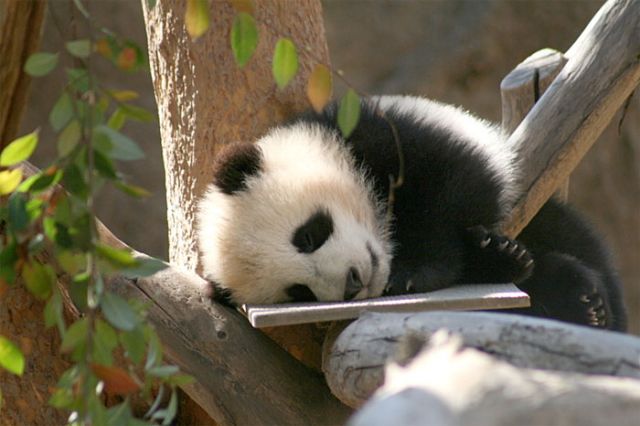
I would suggest lightening it up a bit to gain more detail in the face.
Attached is a suggested treatment. (simple Levels adjustment.) Hope you don't mind... See what you think.
Nice shot!
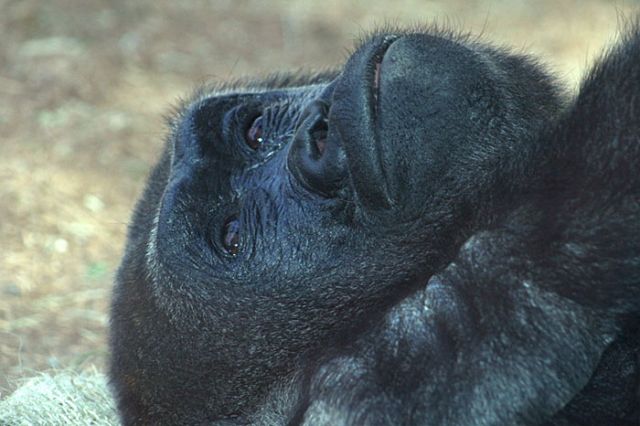
Oh, you added a gorilla pic, too! Same here... It seems underexposed, and a bit flat.
I just lightened and added more contrast. Oh, also.. the color balance seems off on this one. (?) Seems a bit green.
See what you think:
Regards!
yea about the green thing...it was through some glass, so maybe that had to do with it...someone else said it was green too...well none of these images have been played with in a photo processor. I dont have one lol. Also, these are shot w/ a Rebl XTi, and it usually underexposes a bit. How about sharpness? how sharp are these two, cuz i tok em with an ef 75-300mm II an di heard that this lens is VERY soft. I am not a pro or anything and i may not have the "eye" but they dont look soft to me..., also maybe its my screen, but the one u fixed up seems a tad bit overexposed now. Can u ake it a tad bit less exposed, yet more than the original
Speaking of softness, I also sharpened the 2 revisions as well.
If your XTi tends to UNDER expose, you can set your Exposure Compensation up a bit in your camera.
Take several shots with the default settings, then set your Exp. Comp. to over-expose a bit and take the same shots and see which results you like better. Good luck!
You must have photo editing software - or you are wasting your time using digital if yu are serious about this hobby.
Although I agree about getting Elements there is also Picasa and even Irfanview (both free) which will help you make a start.
You also need to calibrate your screen - search this forum or Google for information - otherwise how do you know if the colors are correct - or even the exposure. All you have to do is go and look at the way a shop has set up a whole collection of TVs to give different pictures to realize that you just can't trust what you see on a screen to be accurate
Regarding the gorilla photo, I think it will look much better in B&W (after proper levels and/or curves adjustment), and cropped just to the left of his head. I like the Panda shot though.
I think they look a little flat, need more contrast.
Another software suggestion, take a serious look at Adobe Lightroom. Especially if you are a student, its only $100 which is a steal. Its a phenomenal program that not only allows you to learn a lot about post processing (VERY easy to use program), but also gives you a stellar library management system. I still jump to PSCS3 every once in a while for some very specific uses, but I do 95% of my post processing work in Lightroom.
EDIT::
here are my quick little edits. I added a tiny bit of lens vignetting, I like using it once in a while as it seems to direct attention to the subject a little more.
The panda shot seemed a bit soft but maybe that was due to your processing or conversion for posting. Beware too much sharpening (especially on low resolution posted images) because it creates a lot of small halos that brighten things up artificially or unnaturally.