p.1 #1 · sRGB vs Adobe RGB...I thought I had it right!
Ok so I've been shooting using Adobe RGB for years now. I was told it was the best colour space for prints and as I prioritise what I get on print over what I post on the web.
Today I stumbled onto Ken Rockwell's article on sRGB vs Adobe RGB, and he suggests, rather strongly, that we should all be using sRGB.
p.1 #2 · sRGB vs Adobe RGB...I thought I had it right!
I did tests with my lab and I can see no difference between sRGB and adobeRGB, so I use sRGB because it is more convienient. Anything that goes on the web or is given to a client(for portrait/wedding work) needs to be sRGB, so I don't want to be converting all the time, and keeping track of what is what.
p.1 #4 · sRGB vs Adobe RGB...I thought I had it right!
The linked article assumes that your printer will not reproduce the wider gamut of AdobeRGB. Today's professional inkjet and Digital Press printer can reproduce gamut beyond AdobeRGB which renders the Rockwell article null and void.
Images posted to the web should be converted to sRGB because of the limitations of web browsers and most displays.
p.1 #6 · sRGB vs Adobe RGB...I thought I had it right!
Thanks for the replies. I do always shoot RAW so the issue is not huge. I can process the same frame twice one sRGB for web/computer display and one Adobe RGB or whatever for printing.
But it has got me thinking whether my current workflow does make the best of Adobe RGB or I am compromising my prints. I dont actually use any profiles. Thats of course my own problem.
p.1 #7 · sRGB vs Adobe RGB...I thought I had it right!
Anybody who says use one and only one colorspace is an IDIOT. Wait this is Ken Rockwell were talking about we already knew that. To avoid confusion in the future I suggest to avoid that source or at the very least assume it is wrong until you find a second opinion to support it.
p.1 #8 · sRGB vs Adobe RGB...I thought I had it right!
. Do some comparisons and make up your own mind. I looked at both sRGB and aRGB, and for just about all my shooting sRGB does just fine, so I generally don't bother with aRGB. Of course, I also mainly shoot RAW, so if I run into an out-of-gamut issue, I can always go back & convert to a wider space & try again.
p.1 #9 · sRGB vs Adobe RGB...I thought I had it right!
The only time I find a need to use sRGB is to put something on the web. I just can't see trying to work with limitations during the editing process. If I have 128 crayons, why try to fit them inside a box that only holds 64?
p.1 #10 · sRGB vs Adobe RGB...I thought I had it right!
claudermilk wrote: . Do some comparisons and make up your own mind. I looked at both sRGB and aRGB, and for just about all my shooting sRGB does just fine, so I generally don't bother with aRGB. Of course, I also mainly shoot RAW, so if I run into an out-of-gamut issue, I can always go back & convert to a wider space & try again.
How do you spot 'out of gamut' issues? Posterising of areas with a particular colour? A colour blown out in print when its not blown out on screen?
p.1 #11 · sRGB vs Adobe RGB...I thought I had it right!
ohenry wrote:
The only time I find a need to use sRGB is to put something on the web. I just can't see trying to work with limitations during the editing process. If I have 128 crayons, why try to fit them inside a box that only holds 64?
I agree but what I get from that article is that the difference is not like 64 and 128 but actually so little it doesnt show on print and many printers cant even reproduce all that range, and the bigger 'box of crayons' requires extra trouble (i.e. colour profiles throughout the workflow) to actually fit in the extra crayons, and if you dont use it that way the results are actually worse.
p.1 #12 · sRGB vs Adobe RGB...I thought I had it right!
if you are not using color profiles now, you are having serious issues with reliable color when printing.
Herb...
Alex53 wrote:
I agree but what I get from that article is that the difference is not like 64 and 128 but actually so little it doesnt show on print and many printers cant even reproduce all that range, and the bigger 'box of crayons' requires extra trouble (i.e. colour profiles throughout the workflow) to actually fit in the extra crayons, and if you dont use it that way the results are actually worse.
p.1 #14 · sRGB vs Adobe RGB...I thought I had it right!
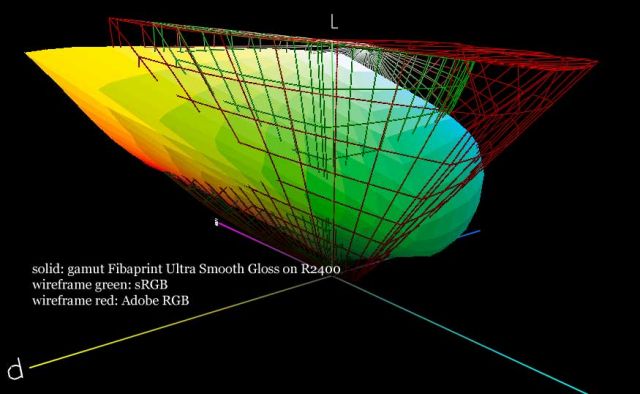
Remember that many printers can print outside Adobe RGB color space as well.
below a 3D plot of a baryte paper I use, together with sRGB and Adobe RGB. You will notice the gamut of the paper is partly outside sRGB and Adobe RGB.
p.1 #15 · sRGB vs Adobe RGB...I thought I had it right!
Hendrik wrote:
Remember that many printers can print outside Adobe RGB color space as well.
below a 3D plot of a baryte paper I use, together with sRGB and Adobe RGB. You will notice the gamut of the paper is partly outside sRGB and Adobe RGB.
How am I meant to notice that on a web browser, a purely sRGB display?
I must be really confused here
About reliable colour, I dont get perfect matches on my prints, but they are close enough to be realistic and not suspicious. Skin tones look perfectly natural to me.
In fact my only real problem is with b&w and getting neutral gray prints on my inkjet (Epson R300). I can only get them totally neutral as a last step in processing I turn the image into a grayscale. They used to be spot on, same printer same PC, same monitor, but they started coming up bluish/greenish after I reinstalled windows xp and all the same software (Photoshop CS2)
Other than that I avoid the issue by producing slightly warm monochromes, which I quite like anyway.
p.1 #16 · sRGB vs Adobe RGB...I thought I had it right!
Somewhere on Ken Rockwell's site he says that his site is a spoof, like the Onion. He's deliberately making misstatements and laughing when they provoke discussions.
p.1 #17 · sRGB vs Adobe RGB...I thought I had it right!
If you print B&W images, then the gamut is not relevant, … there is no color. You can only get good neutrals if you make (or let it make) profiles for your unique paper, printer, settings combination. Sometimes you can be lucky and the canned profiles are good enough. On my R2400 the Epson profiles are very good, but the Innova paper needed a custom-made profile. I print B&W as RGB images.
p.1 #18 · sRGB vs Adobe RGB...I thought I had it right!
Alex53 wrote:
I agree but what I get from that article is that the difference is not like 64 and 128 but actually so little it doesnt show on print and many printers cant even reproduce all that range, and the bigger 'box of crayons' requires extra trouble (i.e. colour profiles throughout the workflow) to actually fit in the extra crayons, and if you dont use it that way the results are actually worse.
Suffice it to say that I don't agree with Ken's article or theories of color management. Not using color profiles and good color managment is an exercise in futility....a hit and miss proposition.
RGB and CYMK gamuts are different rhomboid shapes, something which is only apparent when overlapped and viewed in a 3D rotatable application. On a Mac just open the ColorSync application, select the first profile, click the tiny triangle in the upper left corner and select "hold for comparison" and select a second. That's how I did the screen shots for the first link above.
The limiting gamut is the printer. Colors will only be as vivid and saturated as the physical limits of the ink purity, paper reflectance and other physical characteristics can make it.
As pointed out in the Cambridge tutorials there are several different ways to map color space. CIE*L*a*b is typically used for 3D plots such as this one where I compared the ink gamut of the new HP9100 / 8550 printers with the 8/C 7980 I currently have (note there is a typo in model # the graphic :
The B9180 (shown in white) on Advanced Glossy Paper has a much larger gamut in most colors than the HP7960 on Premium Plus Photo Paper, except for saturated blues, cyans, yellows and oranges ( colors hanging out).
Here is a comparison of the B9180 Advanced Glossy gamut (in color) in sRGB and AdobeRGB using the CIE_XYZ coordinate system. The printer gamut exceeds both of the working spaces which means that converting a file to either space to edit it will clip some colors which could theoretically be printed with more saturation.
AdobeRGB was a good fit to SWOP CYMK (Standards for Web Offset Printing) in 1998 when it was created, but web printing typically uses lower brightness papers and has physical limitations such as wet trapping of colors which todays ink jets don't. The fact the printer gamut for the newer 8-9 color ink jet printers falls outside of the working space reveals a need to edit in a larger space like ProPhoto RGB while soft proofing in the printer profile.
I say "theoretically" above is because there might not be any of those clipped colors in the original image. That's the missing piece of the puzzle in the color management conundrum: what range of colors, relative to the Lab space modeling the range the eye can see are actually in the photo and the gamut the printer can reproduce?
If all of colors in the photos you take fall inside sRGB and the CYMK printer gamut there is no real benefit to working in AdobeRGB.
The advantage of shooting in RAW is not having to decide which working space to select when shooting. So if undecided you could save a copy in both spaces, open them in Photoshop, then print and compare them side-by-side before doing any modification. You need to print to see the difference because that is where the difference will manifest and reveal itself.
The typical CRT or better consumer grade LCD monitor can only display a gamut roughly similar to sRGB. An LCD laptop typically has a gamut smaller than sRGB. In the first link above I show a comparison of the various spaces to my new 24" iMac. So even if soft proofing in Photoshop you are only seeing that part of the printer gamut the monitor can display.
The good news in all of this is that the human eye is so adaptive that if the colors are close to what is expected -- blue sky, green grass, red apples - the viewer will accept the color as being OK. Its only when two reference samples are compared that the slight differences will become apparent. A standing joke in printing is to never show a customer two proof variations at the same time because they will usually ask for one in the middle.
p.1 #20 · sRGB vs Adobe RGB...I thought I had it right!
This argument has been going around in circles for years. It's ridiculous. Anyone saying some color space is superior for photography, except within very narrowly defined constraints is being ridiculous. The simple fact is that what is appropriate and what makes a difference depends entirely on the images, the type of photography, and the type of output(s) being targeted. In any generally applicable theory about which color space in which to process images, neither sRGB or AdobeRGB are in the running -- they are both too limited.
In the mean time, if the colors look good to you and your target audience in the color space you are using IT'S JUST FINE. If you're not sure, shoot RAW and run proof prints before committing to an expensive print run.
In my experience processing in AdobeRGB vs sRGB just doesn't make a darn bit of difference in the real world. The only things that can be said for sure are that shooting RAW allows you to take advantage of the best color space for the application, that you need to use sRGB for general public screen presentation because most web browser software assumes images are in sRGB and doesn't bother to check any color profiles embedded, and that prints are a whole 'nother matter where the color space of the actual printers to be used vs the colors in the image, particularly the ones that are important mean a whole lot more than the source color space.
There is a lot of good advice above, but one thing I take exception to is all this trite advice about "RGB" and "CYMK" when discussing prints. Printer technology has advanced considerably over the years and the world has changed. I don't know about you folks, but I've not been printing stuff for which image quality is paramount on CYMK printers for quite a while. Forget about all the theoretical stuff, decide what printers you're printing on, get reliable profiles for those printers, and use the PS proof preview feature with gamut warning turned on to see of you're going to get in trouble. THEN PROOF PRINT before using a new service because in my experience most of the third party printer profiles are not updated frequently enough to be reliable, certainly not to the level where being able to judge whether processing in AdobeRGB vs sRGB would make a darn bit of difference. Inks change, papers change, and the darn print processing software changes. The acronym RIP for print processing software has always given me a chuckle. Having a photospectrometer and running calibration charts through printers you need to depend on is liberating!


 . Do some comparisons and make up your own mind. I looked at both sRGB and aRGB, and for just about all my shooting sRGB does just fine, so I generally don't bother with aRGB. Of course, I also mainly shoot RAW, so if I run into an out-of-gamut issue, I can always go back & convert to a wider space & try again.