p.3 #1 · Which album design software would you chose???
Without reading the other posts in the last day I can say that anything for albums can be done in PS versus InDesign. Where I would import to ID would be when I want to add text. PS text translates into pixelated crap. Other than that PS, and yes even PS6 can do album design............if you're not an Uncle Bob graphic designer.
p.3 #3 · Which album design software would you chose???
sboerup wrote:
Yes Indesign is a good program, but I don't think it's great for albums. Yes, page design, brochures, BC cards, etc. I use it all the time. But CS3 is much more flexible and customizable for albums. It's much easier to control gradients, drop shadows, blending modes, etc.
Indesign is great for vector artwork. I don't consider albums to fall in that category. YMMV
that might be, but in terms of editing layouts, having templates and having an efficient workflow, you can't beat InDesign.
p.3 #4 · Which album design software would you chose???
+1 Indesign.
Using CS3 to make an album is like trying to play the piano with mittens on. Its limiting and slow.
Photoshop was purposefully given minimal layout software. The same reason it was given the ability to create vector images and web layout abilities. Indesign for layouts, dreamweaver for web, its main function to manipulate photographs, Illustrator for vectors and so on and so forth.
p.3 #6 · Which album design software would you chose???
tomKphoto wrote:
dumb question - how do you manage templates in InDesign?
I prefer ID mainly from using Quark Xpress for page design while working as a PJ. When Adobe released ID, it was a no brainer to make the move. I love it for album design. Just upgraded to CS3 and a few of the new features make populating a page a breeze.
As far as templates, If I like a layout spread and think I will use it again in the future, I save it as a "snippet". I keep my snippets in folders based on style. Once the snippets are saved to a folder you can use Bridge and just drag the snippets onto a page in ID and away you go.
Using the style sheets for Object Styles, Paragraph Styles etc. really make quick work of fine tuning the design. If you want to change the look of your drop shadows, make the change to the object style and ID automatically updates every object using that style in the entire document. I don't think you can do that in PS with any of the add-on software options because each spread is a single file.
You can save any document as a template and have a base design and style sheet ready to go then adjust to taste and situation. When you File>Save as ... just select template format.
sboerup wrote:
Yes Indesign is a good program, but I don't think it's great for albums. Yes, page design, brochures, BC cards, etc. I use it all the time. But CS3 is much more flexible and customizable for albums. It's much easier to control gradients, drop shadows, blending modes, etc.
Indesign is great for vector artwork. I don't consider albums to fall in that category. YMMV
IDCS3 has virtually identical controls and adjustments for gradients, drop shadows and blending modes as PSCS3.
p.3 #7 · Which album design software would you chose???
IDCS3 has virtually identical controls and adjustments for gradients, drop shadows and blending modes as PSCS3.
Yes, they are the same, but are applied much much differently. I find IL and ID very annoying in this regard (its applying them to vector art here).
One of the big things for me is that ID cannot fade an object into "nothing". I'd like to get boxes, lines, objects and photos to fade from one color, to transparent. Nope, only color to color. Can't fade an object into the background either. Atleast I haven't figured it out.
p.3 #8 · Which album design software would you chose???
I hope this helps.
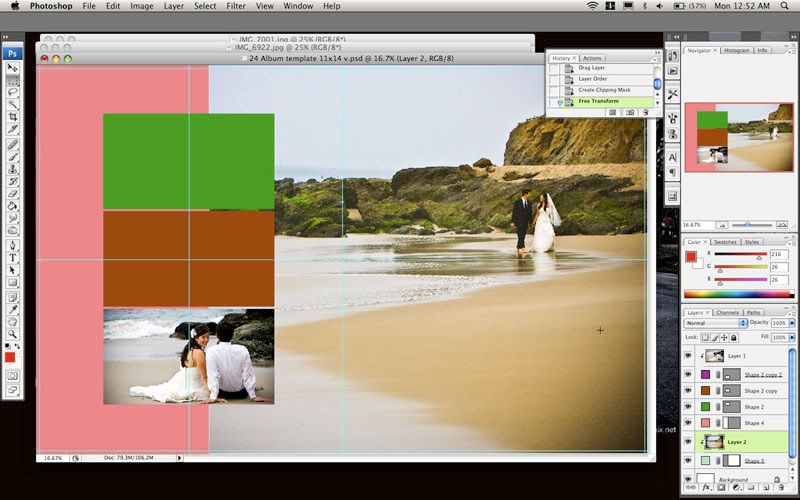
Make your own templates in PS
lets say an 11x14 or 22x14
put all your bleed lines in.
- take your Rectangle tool and draw out your boxes where you want your photos to be and make sure you select the color you want that box to be. This will allow you to know what layer is what box.
So after you had put in all your boxes in open up a picture put the picture right above the box you want it to go in ( same thing in the layers palette too. ) then right click or ctrl click ( mac ) on the picture and what you want to do is click Creat clipping mask. If the picture is to big for the box then just transform the image and drag it to where you want it.
So what I did is made about 35 spreads so now all I have to do is drag and drop pictures into the boxes and still then out of those 35 spread I can flip change the shape size of each box.
I hope this helps I'm not to good at explaining things but you are more then welcome to call me and I can walk you through it over the phone!
Here is a screen shot what I did notice in the layers palette you can see the picture has an arrow pointing down to the color boxed
p.3 #9 · Which album design software would you chose???
plove53 wrote:
I have a questions about FotoFusion...
ENHANCED -vs- EXTREME ... is it worth the extra $$
Do you use all what the EXTREME offers?
Thanks,
-p
The Extreme version gives a couple key features for album design:
1.) layout size is NOT limited to 13x19 so a 10x10 book is easier to build (2 page spread)
2.) You can see all of your layouts as a single project instead of one by one pages
3.) Save as PSD files
p.3 #10 · Which album design software would you chose???
I downloaded InDesign and Fotofusion trial version… and NOW I’m thinking staying with PhotoShop.
I found BOTH ID and FF difficult and did not offer much (at least with the trial version) with templates (which I was looking for).
Here is another question DOES PS have templates for albums? I guess I can start and make my own (then just add images) BUT is there a place I can get some templates?
p.3 #11 · Which album design software would you chose???
Hands down, Page Gallery. I absolutely love this software. I then open PSD's in CS3 and change the coloring and move the images so there's no chance of a repeated layout. With 4000 templates it not that likely anyway, but I like to personalize it.
I used to do my own, then had our designer create them and I'd make changes accordingly, but now I do most of it in Page Gallery. Best $600 ever!
p.3 #12 · Which album design software would you chose???
casey benson wrote:
FotoFusion by Lumipix...
I spent 26 hrs on an album last week.. I did an album in 3hrs last night... Do I need to say more?
I used to hate all the hours we put in early on. Like you, it now is only about 1 to 4 hours and I love the layouts. I use Page Gallery, but same idea.
p.3 #16 · Which album design software would you chose???
plove53 wrote:
I downloaded InDesign and Fotofusion trial version… and NOW I’m thinking staying with PhotoShop.
I found BOTH ID and FF difficult and did not offer much (at least with the trial version) with templates (which I was looking for).
Here is another question DOES PS have templates for albums? I guess I can start and make my own (then just add images) BUT is there a place I can get some templates?
Thanks for all the replys!
-p
They don't come with templates, but you can make your own or buy them from others. This applies to PS, InDesign and some others.
If you watch a how to for indesign (kevin swan has a great one) you'll be up and running in no time.
p.3 #17 · Which album design software would you chose???
sboerup wrote:
One of the big things for me is that ID cannot fade an object into "nothing". I'd like to get boxes, lines, objects and photos to fade from one color, to transparent. Nope, only color to color. Can't fade an object into the background either. Atleast I haven't figured it out.
To each his own.
Not trying to debate or convert you Spence ... but
Yes you can ... in IDCS3.
Object>Effects>Gradient feather. You can set the direction, amount, etc., etc. of the feather. Just as you can set a gradient in PS. Works on lines and strokes as well. You can add extra stops in the gradient for additional effects as well. This can be done to reveal the background color of the image box (if one is used) or reveal what lies beneath the object in either linear or radial feathers. Of course it can be set in an Object Style so it can be applied to multiple objects in a single click.
I was considering some other options for album design, howver, about an hour or so test driving the upgrade to IDCS3 sold me. The Gradient Feather effects was at the top of the list for making my decision.
This link has some nice video tutorials for ID offering more info on the new features. (as well as all the other Adobe apps.)
p.3 #20 · Which album design software would you chose???
butchM wrote:
Not trying to debate or convert you Spence ... but
Yes you can ... in IDCS3.
Object>Effects>Gradient feather. You can set the direction, amount, etc., etc. of the feather. Just as you can set a gradient in PS. Works on lines and strokes as well. You can add extra stops in the gradient for additional effects as well. This can be done to reveal the background color of the image box (if one is used) or reveal what lies beneath the object in either linear or radial feathers. Of course it can be set in an Object Style so it can be applied to multiple objects in a single click.
I was considering some other options for album design, howver, about an hour or so test driving the upgrade to IDCS3 sold me. The Gradient Feather effects was at the top of the list for making my decision.
This link has some nice video tutorials for ID offering more info on the new features. (as well as all the other Adobe apps.)