I'm wondering if someone can advise on a problem I'm having. I think I know the answer but want to check with those with more experience.
I'm printing on an Epson 3800. I printed a roughly 12" square image on 13x19 Ilford Gold Fibre Silk paper.
I followed the instructions for printer settings that came with the paper: in particular, I selected "Premium Semigloss" as the paper type in the Epson print driver.
The paper instructions didn't say anything about the platen gap, which I left at "3", which must be the setting for the paper type selected.
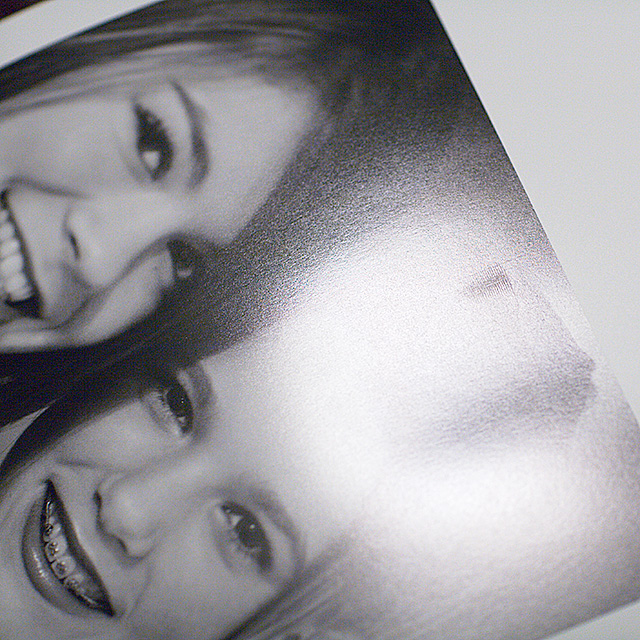
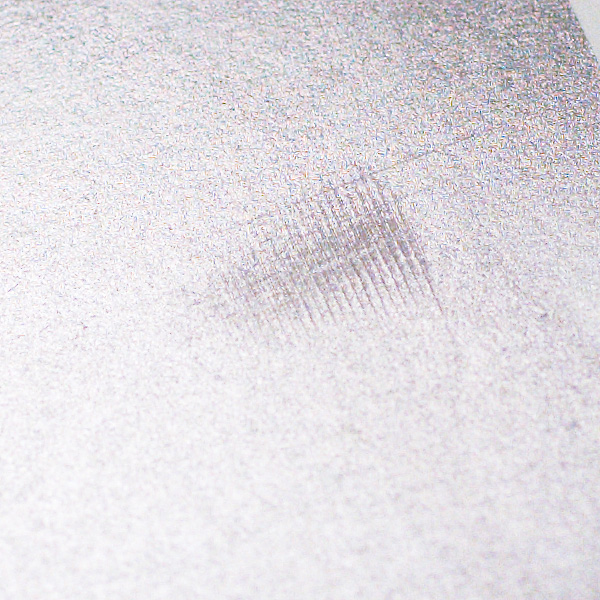
I'm attaching two photos of the resulting print, one a close up of the other, with the light reflecting off the print to highlight the problem. You clearly see a sequence scratches on the print. The same pattern occurs again at the same horizontal position on the paper but on the left side of the print (not visible in the pictures I've uploaded here).
The questions I have are two: (1) Are these scratches the result of the print heads striking the paper? (2) Is the solution to increase the platen gap?
Any other thoughts?
Thanks for any assistance you can provide.
Kind regards,
Kevin S
Edited by kevinsullivan on Jan 04, 2008 at 09:59 PM GMT
Kevin, my baryta papers are on their way, but I understand from reading in several forums that you must use a wider platen gap. Beyond that I can't say much, but knowing the weight of the papers, I would guess this to be true.
but I understand from reading in several forums that you must use a wider platen gap
Diane and all: Thanks. It looks like it was a head strike on the paper, and that a wider platen gap solves the problem. It's a 310 gsm paper -- basically "fine art" weight. I found that a paper thickness setting of 4 did ok (on "auto" mode). A wide or wider platen gap would probably also work fine. BTW, I did use the rear single-sheet feed. Well, now I (and you) know what it looks like when the head hits the paper during printing. Thanks, again,