skid00skid00 wrote:
Even when SSD's 'fail', you can -still- read all the data off of the drive.
You may want to check this thread over at XtremeSystems where they are pushing SSDs to fail for endurance testing. So far, none have failed in read-only mode. No data was recoverable.
skid00skid00 wrote:
...And while a previous poster said that SSD's don't speed up PS, they DO speed up the image cache (creating and retrieving).
And since swap files are ALWAYS in use, and SSD's *are* the perfect use, you get speedups with everything that goes to swap.
If I'm the poster you're referring to, if you re-read what I wrote you'll note that my caches and swap and numerous other files are on SSD, but Photoshop itself is installed on a spinner. My Photoshop (if we have roughly equal hardware configs, i.e., ~ same processor, no RAID) will be as fast as your Photoshop.
skid00skid00 wrote:
...And while a previous poster said that SSD's don't speed up PS, they DO speed up the image cache (creating and retrieving).
And since swap files are ALWAYS in use, and SSD's *are* the perfect use, you get speedups with everything that goes to swap.
Re: the old wive's tale that SSD's are destroyed by swap files, Microsoft themselves state in a white paper that the swap works the fastest on an SSD. My 2 drives are indicating they'll last another 20 years of use!
If you use your system much there's just no way you'll get 20 years out of them - even if you wanted to. About 5 years with "normal" use is what they do.
But I was just replying to say that PS scratch files can be assigned to any drive you like so if you point it to a rotational RAID0 it'll be just as fast as the fastest SSD drive - which sells currently for around $500 (except that with the rotational RAID0 you'll have 6TB and only have to spend $200).
SSDs are great for laptops although now being antiquated by SSHD. I don't see much call for them in a desktop or workstation though. Well, unless you're richer that sheet and wanna set up a 6 or 8 drive RAID0 with them for $3k to $4k. Otherwise a rotational RAID0 seems to put them to shame in just about every way.
You might also wanna check this vid:
Here's what the 2-drive 6TB RAID0 stripes profile like. This is with lots of data already on too.
With a 3-drive RAID0 stripe I get about 750MB/s and with four drives I get close to 1GB/s.
And of course with 4 of these drives we are talking about 12TB of storage space for $400.
Bifurcator, I suspect the speeds you're seeing there are writing data into your RAID cache. That's not throughput to the drive since the maximum performance you can see out of a 2-drive RAID0 is each drive's max performance combined (each of your 3tb drives is not writing through at 250 MB/s).
Most benchmarking applications do not account for RAID caches so they write a chunk of data that ends up fitting entirely into the cache, and are thus benchmarking the write speed of the cache, not of the drive. Have you tried writing a very large block, like 4gb?
Additionally, I am VERY leery of RAID0, especially for such large drives. A single drive failure wipes your entire array, and consumer hard drives are fairly unfriendly towards robust RAID controllers. Most consumer drives don't have firmware features like TLER to help reduce RAID errors, meaning that the drive doesn't even have to go bad to fail your array - there just has to be a hiccup in writing and the controller can decide to rebuild the whole thing... which has a not-infrequent failure rate.
If everything is backed up, it's less of an issue - and certainly we should be backing everything up - but my experience with RAID0 is that it's generally not worth the benefits except for very specific uses (things like scratch drives where data is transient, or non-critical systems). A solid state drive provides the speed benefit without the large risk.
Of course, you can do something like RAID0+1 to offset the risks, but then your investment in drives is getting pretty high... as is power consumption, space in the case, etc.
RAID 0 is an excellent choice so long as the data is backed-up, which i'm sure is true in Bifurcator's case. If you have need of, and know enough to set, up a 6Tb RAID 0, you usually know you need a backup.
We've been conducting a parallel discussion of this on another thread, and i am also a little sceptical of the numbers Bifurcator shows here, but he reports sequential transfers of a big chunk of data in the 400MB/sec region and i believe that - the peak throughput of these drives *is* around 200MB/sec for the outer sectors.
The question of which drives to choose for home RAID setups is important. Though we are drifting a little off topic, i will expand a little on this as i think it is important. So, for those less geeky than myself and binary visions, TLER (also called CCTL by some manufacturers and ERC in the proper SATA specifications) is a timeout feature on hard disks. In essence, when a drive can't read the data on a sector it will keep re-trying for a number of seconds. This will cause the drive (and probably also the computer) to stop responding whilst it repeatedly tries to read the data. On a normal desktop drive the timeout will be around 30 secs or so in order to really make sure that the data is lost before giving up. This 30 secs is the TLER/CCTL value. Having quite a long wait time is generally a good thing, as you don't want to lose the data and *do* want the drive to be sure the data is lost before giving up.
On a RAID array though, it is a bad thing. RAID is as much an uptime solution as a performance solution, so RAID controllers are much more interested in completely failed disks than in lost sectors, and if a disk stops responding for several seconds the controller will just assume it has failed and drop it from the array. The timeout for this is usually around 8 secs i think. Even if the drive is not failed, and the data readable, once the drive is dropped from the array the whole array needs to be rebuilt when it is re-included. This can take many hours for a multi-Tb array, and if a drive keeps falling out then the whole thing becomes a royal pain in the behind.
"But what about that unreadable sector?" you ask. Well it doesn't matter - on most RAID levels (all except RAID 0) the data is implicitly duplicated (thats the point of RAID), so the drive doesn't need to find it - the RAID controller just maps away the bad sector and regenerates the "lost" data from the other copy of the data in the array (RAID 1) or the checksum data (RAID 5/6).
It is worth noting that some of the energy efficient drives actually spin down when not in use, and the few seconds they take to spin up can similarly get them kicked out of an array.
If you want to avoid these RAID problems you really need to buy drives which are programmed (or can be reprogrammed) with low TLER/CCTL numbers. Most manufacturers offer "Enterprise" level drives that are RAID-friendly in this way, but charge a hefty premium for them. Western Digital used to offer a tool that would re-program the TLER value on consumer drives, but then changed their mind and locked out that functionality. They actually completely locked it out, which contravenes SATA specs as it should be programmable via software. There is some suspicion that Western Digital did this to bolster the sales of their more expensive drives, which is substantiated by their release of the "RED" drives which are "specially tuned" for NAS and home RAID applications (i.e. have the TLER value set to 5 secs rather than 30). Other manufacturers generally have a 30 sec timeout set in hardware, but allow you change it via software on boot (i have this on my Samsung drives). The change generally doesn't survive a reboot though, so needs to be applied every time you boot the computer/NAS.
I'd also comment that the numbers that Bifurcator shows are for sequential i/o, and do rival the numbers you would see from an SSD. For applications like loading photos and streaming video, where data is stored and accessed sequentially, the performance of such an array is probably indistiguishable from that of an SSD and thus represents very good value for money given the large amount of space it offers.
SSD's really take off with random i/o though, so for applications like running large databases they are massively faster than a spinning disk. Running an operating system also involves quite a bit of random i/o, which is why many folk tend like to boot from SSD. I'm not sure how random the i/o related to Photoshop swap files is.
Another factor not mentioned yet is that if you have a laptop with space for only one or two drives then an SSD offers performance that is not otherwise possible - you cannot fit many speedy 3.5" into a laptop as a RAID, and carting an external one around with you compromises portability.
My internal SSD has my whole system on it plus anything to do with ACR and Lr caches and the Lr catalog database. Photos take up too much space and are on a HDD. Performance is very good but unfortunately I have had six SSDs dies on me - all totally dead and unrecoverable but one took months to die and caused a lot of grief before I could pinpoint the fault.
The bandwidth junkies are using SSD in RAID 0 configs, so 1GB/s for streamed read/write on a pair of modern SSD (like Samsung 840). I'm a longtime fan of quality rotating media (SCSI), but the party is over. Only the price advantage remains. Robust NAND is available with a price and performance penalty vs the cheap stuff, and will serve faithfully over time. Neither hard drives nor SSD are so perfect that you can ignore backups - preferably offsite. For myself, I'm switching to SSD for primary storage to keep things quiet and cool.
binary visions wrote:
Bifurcator, I suspect the speeds you're seeing there are writing data into your RAID cache.
Nope. No cache involved. And for several tests the data was MUCH larger than any of the caches combined. If I were hitting the cache I would be getting more like 7 to 800MB/s.
binary visions wrote:
Have you tried writing a very large block, like 4gb?.
Yes, 5 gigs, 20gigs and 115gigs.
binary visions wrote:
A single drive failure wipes your entire array, and consumer hard drives are fairly unfriendly towards robust RAID controllers. Most consumer drives don't have firmware features like TLER to help reduce RAID errors, meaning that the drive doesn't even have to go bad to fail your array - there just has to be a hiccup in writing and the controller can decide to rebuild the whole thing... which has a not-infrequent failure rate.
Keep in mind the difference between RE (recoverable errors) and NRE non-recoverable errors. In (I guess about) 15 years of using RAID0 on my home computers most of which are on 24/7, I haven't had a problem yet. I do however change out the drives every 24 to 36 months - as any normal person would.
If everything is backed up, it's less of an issue - and certainly we should be backing everything up - but my experience with RAID0 is that it's generally not worth the benefits except for very specific uses (things like scratch drives where data is transient, or non-critical systems). A solid state drive provides the speed benefit without the large risk.
Actually the risk factor for consumer SSD (desktop grade) is incredibly similar. But rotational media is so cheap it's pretty easy and very affordable to back everything up - automatically:
TimeMachine is Apple's automatic hourly backup system. A really nice system too!
And of course you still need to backup when using SSD drives too!
Of course, you can do something like RAID0+1 to offset the risks, but then your investment in drives is getting pretty high... as is power consumption, space in the case, etc.
RAID 0+1 or RAID10 (essentially the same thing) really only doubles the cost. It will save you if a drive just blows up or something but in the case or NREs you just end up with a copy of the broken file(s). For sane (cost effective) integral FS security you want RAID5.
As to the other parts of this discussion I agree. If you're running a web-server, loading, editing, and saving massive databases (DB), or on any kind of system you need to reboot frequently (like notebooks) then SSD or the supplanting SSHD devices are the way to go! If however you use your desktop or workstation like a typical person here would by booting once or maybe twice per day, editing 15 to 30MB files, copying 8 to 24GB of files at a time, generating icons and previews from 20MB files, editing the occasional 1 to 100GB video, and so forth then SSDs will not provide any advantage over a RAID0 with fast-ish DT grade HDDs. Solid State Drives will only limit you in the amount of storage space you have available. They will boot the system quicker but once booted and used for about 20min. again there is no advantage - unless you run the system without much system memory. I boot or reboot my machine about once a week on average.
I guess that could be an important distinction to make. If you're running a DT or WS system with less than 8GB or RAM then the SSD will indeed speed almost every OS operation along. at 8,12, 14GB or higher however you just won't see it. Operating systems cache everything they do and with that much RAM you (typically) don't blow out the cached data unless you run 6 or 8 huge applications simultaneously. If you're blowing out OS caches you either need to give your apps less RAM in their respective configs and settings, or buy more RAM. This is system balancing and tuning for mission critical operation. Oooh that sounds so cool huh?
So in the end it does depend on what you use your system for and how the system is otherwise configured when choosing between SSD and rotational RAID0. And, who says you need to choose between the two? Get both! The drives I'm talking about here are only $100 a pop. So add $200 or $300 to the bill and have yourself a 2 or 3 drive RAID0 along side that tiny SSD you're paying $500 for.
In my experience making large panoramic montages, files in the 10s of gigabytes. I have found that building large arrays of SSD's on good RAID controllers has proved to be very beneficial
see the results here http://hdview.at/speedtest/results.html
and if you want to give it a try yourself go here http://hdview.at/speedtest/index.html
Obviously this is not your everyday off the shelf system and its build to do this and other tasks quickly and effortlessly, yet is still a Work In Progress.
There are many things to look out for when making a system, the number of cores per CPU and the amount of RAM each core needs to have data at all time, then comes the storage, which needs to be fast enough to fill ram with data for this process to succussed.
If you are not providing these conditions then you have a system that isn't optimised to the task.
If you have the room and the controllers, you can use HDD's instead of SSD's, I am personally not so keen on hybrid drives but thats just me
In my case I have 3 sets of RAID-0 with 1x8 disk and 2x 6 disks SSD's over 3 controllers where two of these controllers are also stripped as in RAID-00
The later does come with pros and cons it by passes the limit of the PCIe bus, but its slower in latency, but it does pull through at 4GB/sec
I totally disbelieve the figures Bif publish here. The fastest know 3TB drive available to general public today has a real at-the-cable throughput of a non-compressible perfectly sequential [very large, non-fragmentized] file that tops out at ~192MB/s, which kind of makes the 440+ MB/s read speeds for a 2-stripe RAID-0 impossible. Especially since those 192MB/s is only available for the first 5% of the drive, performance then drops to about 120MB/s towards the end of the drive.
According to Seagate, who make the barracuda 14-series 3TB drives, the outmost track on the platter has a theoretical maximum throughput of 205MB/s. That reality can get within 5% of that (192MB) is actually rather impressive.
The 10.000k rpm Velociraptor has been tested to sustain real-life transfers at about 205MB/s in an absolutely perfect scenario [very large, non-fragmentized file] at the start of the drive, the outer tracks of an empty, newly formatted drive.
Some video people I know are close to mental regarding media throughput, and they stream all their intermediate media over either dedicated PCIe cards or Thunderbolt interfaces, where the bus ceases to be a bottleneck and the only main speed bump is the drive itself. According to them, no integrated solution gets to 95% effectiveness, internal SATA ports never achieve the speeds they do on their server-grade PCIe solutions.
So, unless Bif has connections with some hitherto unknown hard-drive manufacturer that's more than 30% faster than anything known to the general public, those figures contain some sort of error.
My 2-stripe Samsung 840 on the other hand gladly swallowed a real-world throughput of close to 900MB/s of sequential material (a 9GB BR master ISO). And some 30,000+ I/O's per second of 4k non-sequential material (at high que-depths). Which is about 200 (two hundred) times faster than the velociraptor, which is twice as fast than the seagate barracuda at 4k-transfers.
Since I don't really need that throughput, I split the stripe after some initial testing, and do now run one as cache, dump and image/thumbnail database, and the other as scratch- and intermediate. OS was already on SSD. Final storage is all mechanical drives - have been thinking about those barracudas - they're seriously good value.
Thats a interesting benchmark you have there, as it chews up all 16GB of RAM i have to offer, and is very strongly i/o bound with respect to the PTGUI temp files. So i do get very different results running the PTGUI swap files on an SSD and on a spinning disk (5 mins vs 11 mins).
Looking at it slightly more in-depth, the test writes ~15.5GB of data to the temp directory and reads ~9.2GB (oddly it seemed to read and write less data when run on the SSD, don't know why). I can't tell if this is random i/o or sequential, so i can only guess how a spinning disk array would compare with an SSD. I was testing off a single (and relatively old) spinning disk, for reference.
I would comment that this is one of those cases where i would actually worry about the lifetime of my SSD's, if i were doing this sort of work every day. On a 128GB SSD with typical MLC NAND, 10GB/day corresponds to around 35 years lifetime. On one of the new TLC NAND drives (Samsung 840) that number is around 11 years. These numbers are of course fine for most of us doing normal desktop duties. But lets theorise that you run up 5 of these sorts of panos per day (perhaps a little unrealistic, but whenever i have made panos i've needed to generate them a few times with different settings to get what i want). This could then be say 60GB of writes to the drive, and you have now reduced those lifetime numbers by a factor of 6 (to 5 years and 1.8 years respectively). You could increase lifetime by getting bigger drive of course (double the drive = double the lifetime), but you are still entering the sort of load where SSD lifetime becomes an issue to consider.
There are fewer writes with the SSD since the que depth at all times will be shorter, which means that more of the operations will not have time to overflow the RAM buffer used and force a write-to-disk cache.
In servers (and this PTGUI example) this is like an avalanche threshold, exceed the comfort-level of I/O's and the system bogs down completely, desperately trying to shuffle data around so that it isn't lost and stalling threads/operations while waiting for buffers to clear and new data to be substituted.
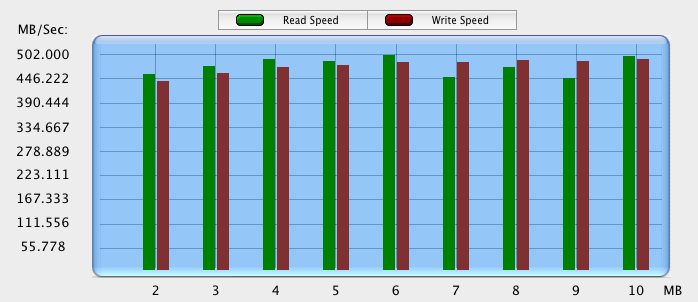
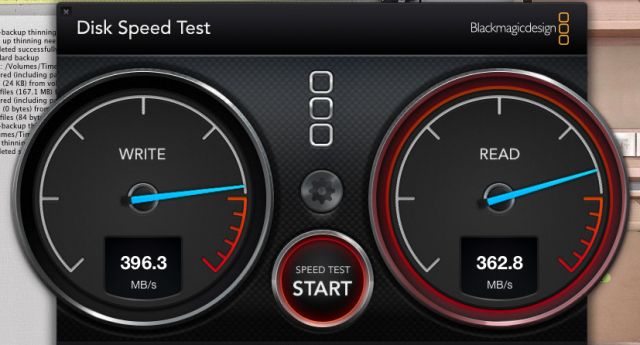
This IS a "server grade" PCIe solution - well, Workstation Grade... same thing. But if this is some kind of error then keep them coming! My own stopwatch verifies these speeds to an accuracy of ±0.5s over a > 30s test. Here's some other apps that measure disk speed in throughput. Notice in the white one how many hits there are above 400MB/s - even though the average given is affected by the slower writes. Reads for that test would be higher too except for some reason the first part of it had a bunch of slow ones - knocking down the average. Reads and writes on these RAIDs are nearly identical usually. Maybe 15MB/s different or something like that. On the black one it was hitting 410 and 420 quite often but after missing about 10 times while trying to time the screen grabs in order to catch it I just gave up and posted the best grab of the 10. It's a live mark and is constantly active.
I have magic hard drives!
Yay for magic! LOL - "Stress Level" is set to 5GB for this test.
Also the first box in the screen grab on this page ( https://www.fredmiranda.com/forum/topic/1179430/2#11289615 ) shows yet another test app getting over 400MB/s (average!) for both reads and writes transferring 200MB of data (ten 20MB files) 20 times. And hat's what photographers mostly do - read or write 15 to 30MB files - hundreds at a time.
Also, and BTW, most of your numbers are wrong. Just saying...
----
tived,
Looks like a killer system! 4GB/s... 12 cores at over 4GHz... 48GB/ RAM... Man! ROCK'N!!!
15Bit wrote:
I would comment that this is one of those cases where i would actually worry about the lifetime of my SSD's, if i were doing this sort of work every day. ...
Under heavy write loads, one can wear out an SSD. With a suitable enterprise drive, however, it won't be easy. Take an MLC 400GB (100,000 reprograms before EOL) and 400MB/s write rates. You can write full-tilt nonstop for three years! And since the drive slows down over time, you even get bonus time. My division of SanDisk makes these drives.
rico wrote:
Under heavy write loads, one can wear out an SSD. With a suitable enterprise drive, however, it won't be easy. Take an MLC 400GB (100,000 reprograms before EOL) and 400MB/s write rates. You can write full-tilt nonstop for three years! And since the drive slows down over time, you even get bonus time. My division of SanDisk makes these drives.
Absolutely, but they do cost a fair bit extra. But money well spent for heavy write applications.
Ho1972 wrote:
As I said, I have two SSDs in my system so I see the value, but not for the OS and apps. FYI, on a reboot (rare) it takes me 36 seconds to get to the login screen. Thereafter, the computer is in sleep mode when I'm not using it so wait time is negligible when I resume work. After all my apps have seen an initial launch, it takes a total of 12 seconds to fire up Photoshop, Lightroom, InDesign and Bridge, for an average of 3 seconds per app.
Seems quick enough to me given that I don't get paid for how fast my apps load. ...Show more →
I totally agree with you. Even if it takes 2 minutes to boot up...thst is done once a day. If I use PS and Lightroom for 6 hours, I want the constant increase in speed loading and using files throughout those 6 hours rather than the one time hit at boot up. I'm usually doing something else while the computer bots anyway so the time is really not wasted.
Well, notice also that there's a spike up in the 800MB/s region. Hardly realistic - or do you maintain that if you managed to capture that instant in the screencap the ~800MB/s would be a stated average? Temporary spikes or "noise" on a transfer diagram depends on buffer interaction, as two communicating solid state memories tries to keep in- and out communication saturated.
The BMD test is more realistic in this case, as is the file average in the io tool and AJA - since they could actually happen. 195MB/s sustained speeds per disk with 1TB platters is not unheard of, but 250MB/s as some of the numbers in an earlier graph on this page is.
AJA is well known to produce some really strange results. You get totally different results from intercepting at io port levels and not including stream control data. I'd suggest checking the manufacturer theoretical spec of your drives - if your any measurements are higher than 95% of that spec, take a sanity check via some other testing method.
The average sustained data rate for these drives which is measured as an average across the entire platter, is 210MB/s. And in the real world you can get exactly that - not 90% or 95% of that. The maximum transfer rate is 600MB/s. The average for the 1st 60% (not 5% ) of every spinning platter is 140% to 150% faster than the platter average. The ring from 60% to 70% is the same as the total average (100% of...) and by the time you get to the 99th percentile you're at about 1/4 of the average speed.
Even 140% of 210MB/s is 294MB/s and if I were on a newer machine and these drives didn't already have over 1TB on them, I would be expecting these RAID0 arrays to be clocking right around 550 to 580MB/s for drag & drop copying and on the upper side of that for bench-marking apps.
There can be little doubt that the benchmarking apps are recording the expected results when my own drag and drop timed tests with 115GB files show the same results.
And to be completely honest I couldn't give a flying frag how or why I'm getting 400 to 420MB/s in real world use and 440 to 505MB/s in most benchmark apps - the fact is that I am! And that's all that counts! When I backup, when I copy folders with hundreds or thousands of images, or when I edit video I'm happy that is indeed what I'm getting and that's all I care about. At $100 a pop that 30GB/$1 (or 18GB/$1 given only 60% platter usage) is pretty nice! It means we can have large storage AND be as fast as our systems are capable of at the same time. Kinda like having the cake and eating it too. Ya can't beat that!
Of course if you're rich then who cares, go for the SSD raid sets of 6 or 8 units. A fast SSD is faster by about two times! And that's all I ever intended to point out... was that two fast late 2012~2013 HDDs (ST3000DM001 in particular) are about the same as a single FAST SSD only with a heck of a lot more storage space.
For speed with large files like that from modern digital cameras and film scans:
two ST3000DM001 drives in RAID0 ($200 6TB) = one super-fast SSD (512GB $500).
four ST3000DM001 drives in RAID0 ($400 12TB) = two super-fast SSD in RAID0 (1TB $1,000).
and so on.
EDIT:
I'm not a very good communicator so I hope none of that sounded harsh or anything. My gruffness is meant jovially as always...
Bif - I am also still sceptical about these numbers. I've yet to see a review of any spinning disk that shows the numbers you are quoting. From the reviews i've found for the drives you have, ~200MB/s seems to be the peak transfer rate. See here for an example:
I have a feeling that there is a bug somewhere in the software you are using for the measurements.
That said, whilst we can bicker over the exact numbers, a RAID 0 array with two of these drives is going to show damn fast sequential transfer rates. I would expect real numbers in the region of 350-380MB/sec, and that *is* in the same ballpark as SSD's so long as you don't need random i/o performance. And you are getting a lot more storage space for your money.



 In (I guess about) 15 years of using RAID0 on my home computers most of which are on 24/7, I haven't had a problem yet. I do however change out the drives every 24 to 36 months - as any normal person would.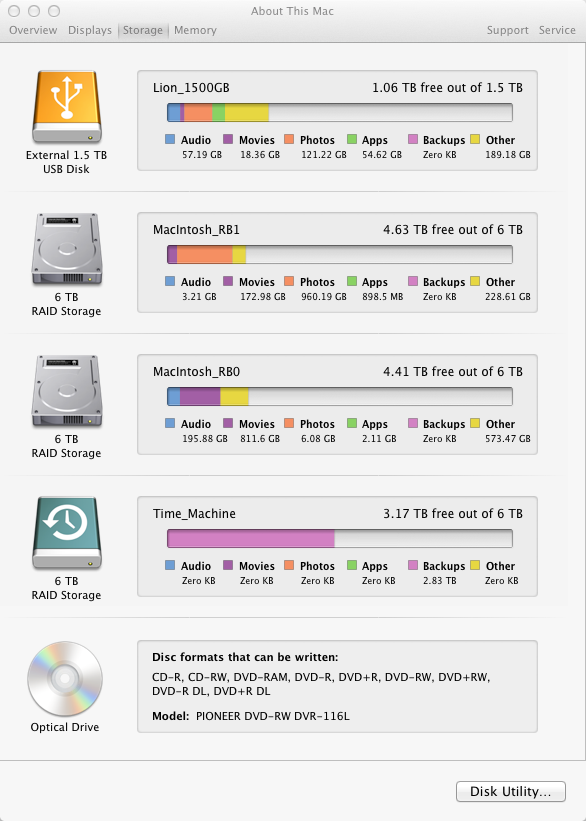


 ) of every spinning platter is 140% to 150% faster than the platter average. The ring from 60% to 70% is the same as the total average (100% of...) and by the time you get to the 99th percentile you're at about 1/4 of the average speed.